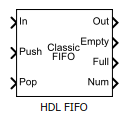
HDL FIFO
Store sequence of input samples in first in, first out register
Libraries:
HDL Coder /
HDL RAMs
Description
The HDL FIFO block stores a sequence of input samples in a first in, first out (FIFO) register. The block outputs data in the same order it was written. You can control the FIFO operations by using the Push and Pop input ports. When both control signals are asserted in the same time step, the block performs the pop operation before the push operation.
The HDL FIFO block is functionally and behaviorally similar to FIFO units on hardware platforms. Internally, the block uses the Simple Dual Port RAM System block. You can use this block to generate HDL code that maps to RAM resources on most FPGA devices.
Examples
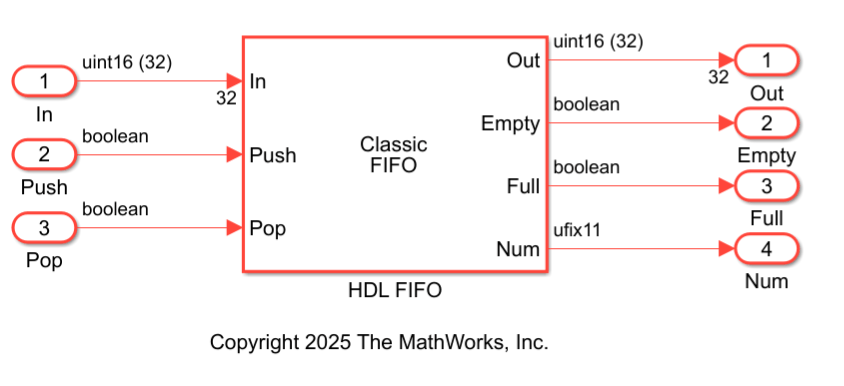
Map HDL FIFO Blocks to UltraRAM Resources on FPGA
Generate HDL code with synthesis attributes that enable UltraRAM inference for an HDL FIFO block on an FPGA.
- Since R2026a
- Open Live Script
Limitations
When you build the FPGA bitstream for the HDL FIFO block, the global reset logic does not reset the FIFO register in the block. To reset the FIFO register, you must implement a reset logic.
The HDL FIFO block does not support continuous sample time. You must specify a discrete sample time for the input to the HDL FIFO block.
Ports
Input
Data input signal, specified as scalar or vector. When you write data to the FIFO, the block pushes the newest data to the end of the FIFO register. The block places subsequent data entries after this entry.
Note
If the signal you connect to the In port is a vector, the data type must match the value specified by the Data input dimensions parameter.
Data Types: single | double | half | int8 | int16 | int32 | int64 | uint8 | uint16 | uint32 | uint64 | Boolean | fixed point
Complex Number Support: Yes
Write control signal, specified as a scalar of type
Boolean. When this port receives a value of
1, the block pushes the current input at the
In port to the end of the FIFO register.
Data Types: Boolean
Read control signal, specified as a scalar of type
Boolean. When this port receives a value of
1, the block pops the first element from the FIFO
register and outputs that value at the Out
port.
Data Types: Boolean
Reset control signal, specified as a scalar of type
Boolean. When this port receives a value of
1, the block resets the
Empty, Full, and
Num output ports to their initial
states.
Dependencies
To enable this port, select the Local reset port block parameter.
Data Types: Boolean
Output
Data output signal, returned as a scalar or vector. This port outputs the earliest written data from the FIFO register and holds that value until the next valid read operation.
Data Types: single | double | int8 | int16 | int32 | int64 | uint8 | uint16 | uint32 | uint64 | Boolean | fixed point
Complex Number Support: Yes
Empty status signal, returned as a scalar. The block sets this signal
to 1 when the FIFO register is empty and contains no
data entries.
Dependencies
To enable this port, select the Show empty register indicator port (Empty) block parameter.
Data Types: Boolean
Full status signal, returned as a scalar. The block sets this signal
to 1 when the FIFO register is full and cannot accept
additional data entries.
Dependencies
To enable this port, select the Show full register indicator port (Full) block parameter.
Data Types: Boolean
Number of data entries, returned as a scalar. This signal indicates
the number of data entries currently stored in the FIFO register. The
block increments this value by 1 each time you write
data to the FIFO, and decrements it by 1 each time
you read from the FIFO.
Dependencies
To enable this port, select the Show number of entries register port (Num) block parameter.
Data Types: uint8 | uint16 | uint32 | uint64 | fixed point
Parameters
Specify the number of entries that the FIFO register can hold. The minimum
value is 4.
Programmatic Use
Block parameter:
fifo_size |
| Type: character vector |
| Value: Integer greater than or equal to four |
Default:
10 |
Specify the operation mode of the block. By default, the
Mode parameter is set to
Classic, and the block icon displays
Classic FIFO. If you set this parameter to
FWFT, the block icon display FWFT
FIFO. In FWFT mode, you can look
ahead and view the first word written to the FIFO register without placing a
read request. The FWFT mode is useful when
applying back-pressure using AXI4-Stream interfaces.
Programmatic Use
Block parameter:
mode |
| Type: character vector |
Value:
'Classic' | 'FWFT' |
Default:
'Classic' |
Specify the ratio of output sample time to input sample time. The default
ratio value is 1, which means that the
In and Push input ports and
Out and Pop output ports run
at the same sample rate. You can configure the inputs and outputs to run at
different sample times by entering a positive integer or a value in the form
of 1/N, where N is a positive integer.
For example, if you enter 1/2, the output sample time is
half the input sample time, so the outputs run faster. The
Full, Empty, and
Num output ports run at the faster rate.
Programmatic Use
Block parameter:
ratio |
| Type: character vector |
| Value: Integer greater than or equal to one |
Default:
1 |
Since R2026a
Specify the dimension of the input data.
Note
The Data input dimensions parameter must match the vector length of the input signal at the In port.
Programmatic Use
Block parameter:
dataDim |
| Type: character vector |
| Value: Integer greater than or equal to one |
Default:
1 |
Specify how the block responds when you try to write to a FIFO that is full.
Programmatic Use
Block parameter:
push_msg |
| Type: character vector |
Value:
'Warning' | 'Ignore' |
'Error' |
Default:
'Warning' |
Specify how the block responds when you try to read from a FIFO that is empty.
Programmatic Use
Block parameter:
pop_msg |
| Type: character vector |
Value:
'Warning' | 'Ignore' |
'Error' |
Default:
'Warning' |
Specify whether to enable the Empty output port. This
port outputs 1 when the FIFO register is empty and
0 when the FIFO contains one or more data
entries.
Programmatic Use
Block parameter:
show_empty |
| Type: character vector |
Value:
'on' | 'off' |
Default:
'on' |
Specify whether to enable the Full output port. This
port outputs 1 when the FIFO register is full.
Programmatic Use
Block parameter:
show_full |
| Type: character vector |
Value:
'on' | 'off' |
Default:
'on' |
Specify whether to enable the Num output port. This port outputs the number of data entries that are currently available in the FIFO queue.
Programmatic Use
Block parameter:
show_num |
| Type: character vector |
Value:
'on' | 'off' |
Default:
'on' |
Specify whether to enable the rst input port. When
this port receives a value of 1, the block resets the
Empty, Full, and
Num output ports to their initial states.
Programmatic Use
Block parameter:
rst_port |
| Type: character vector |
Value:
'on' | 'off' |
Default:
'off' |
Algorithms
This figure shows the write operation. The Push input port acts as the enable signal for the write operation. In the figure, the write_en denotes this signal.
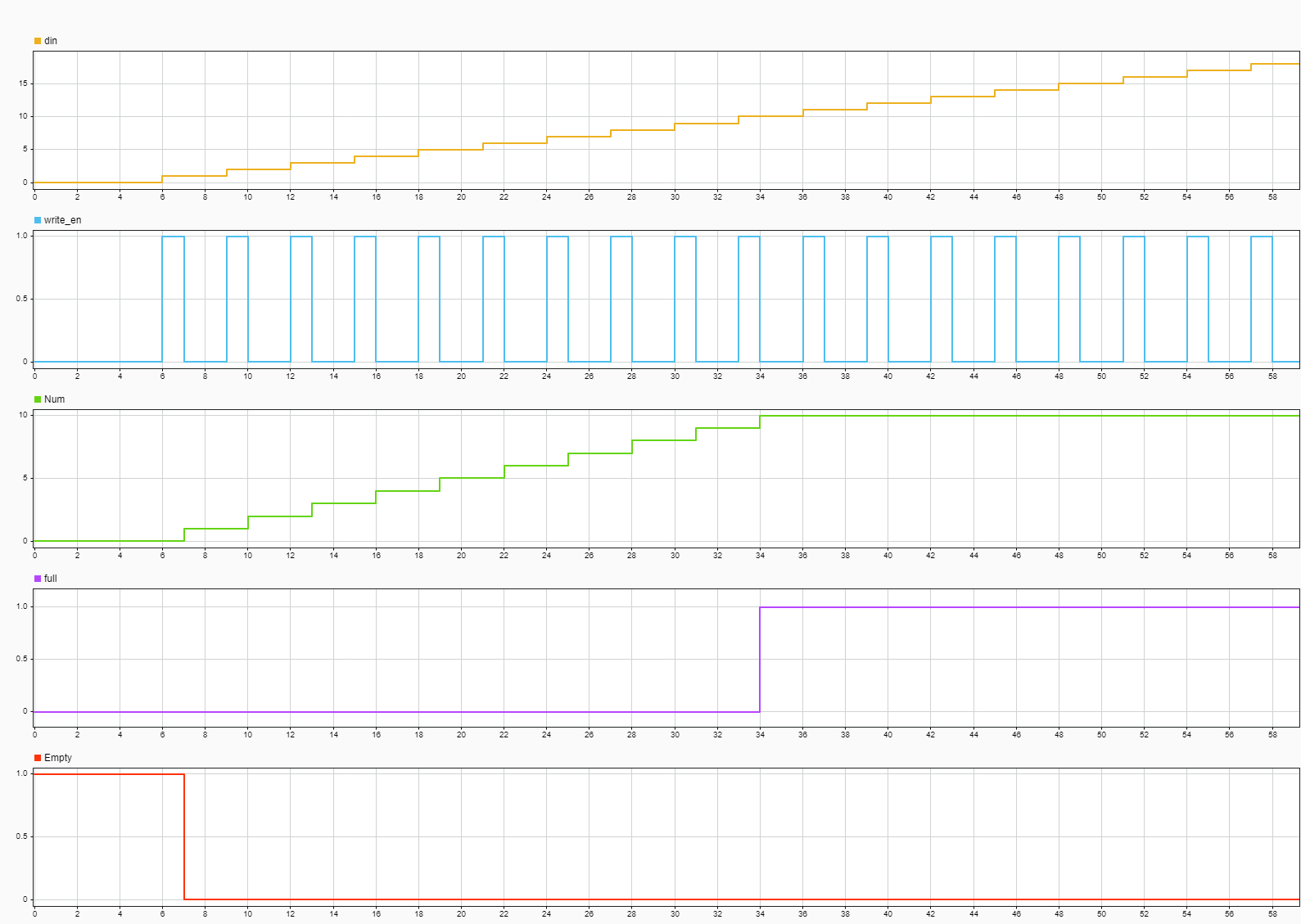
When the write_en signal is 0, the block
does not write data to the FIFO and the block asserts an Empty
flag.
When the write_en becomes 1, the block
pushes the din signal at input port In to
the end of the FIFO register in the next time step. The Num
signal indicates the number of data entries in the FIFO register. Every time you
write data into the FIFO, the Num signal increments by
1. At time step 6,
write_en is 1. At the next time step
7, data is written to the FIFO. Num
signal increments by 1 and the Empty flag is
de-asserted.
This FIFO uses the register size specified by the Register
size parameter. By default, register size is 10.
In the figure, when the Num signal becomes
10 at time step 34, the
Full signal is asserted. After the
Full signal becomes 1, if you write more
entries into the FIFO, the block generates a warning.
This figure shows the read operation. The Pop input port acts as the enable signal for the read operation. In the figure, the read_en denotes this signal.
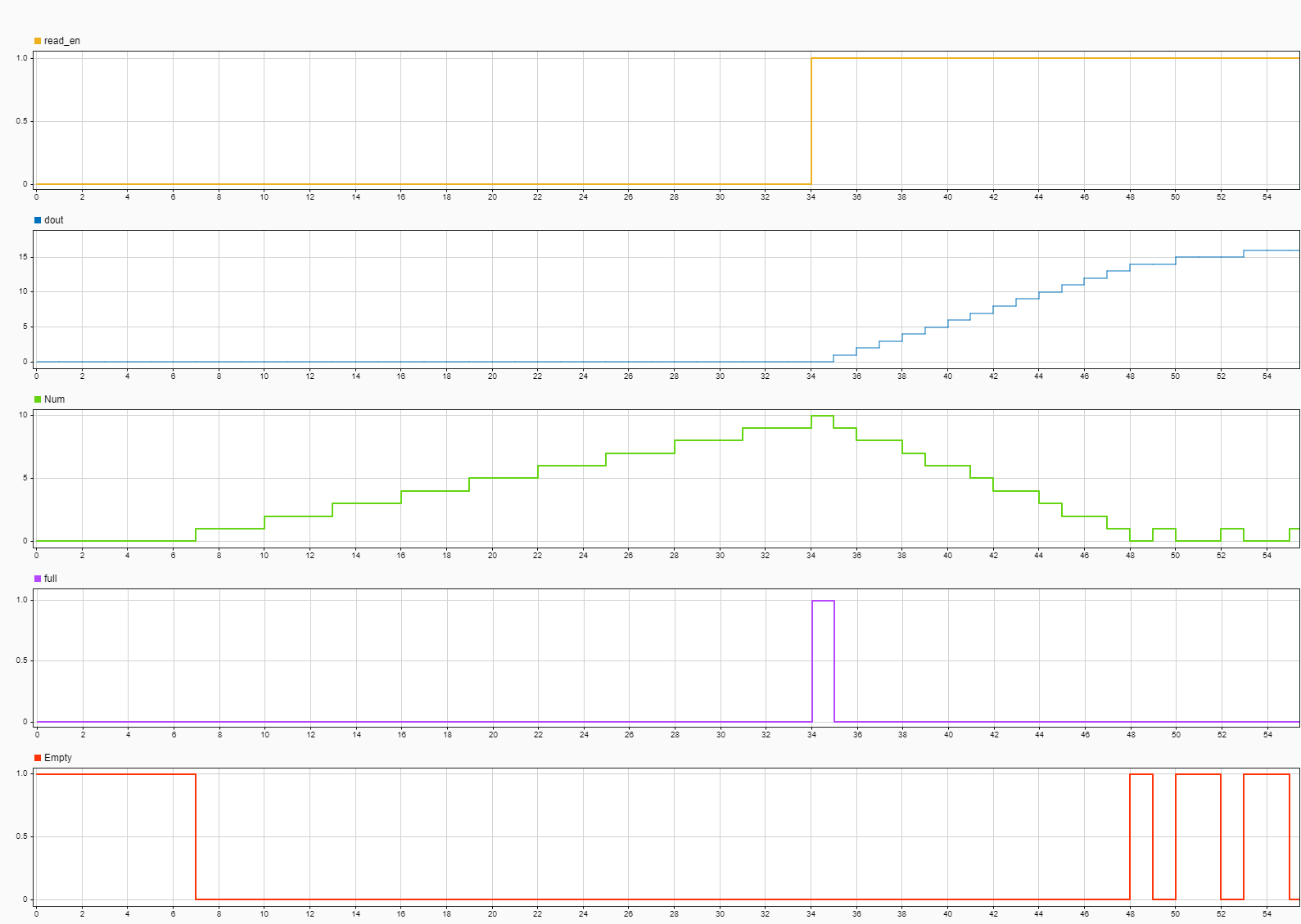
In the figure, when the read_en signal is
1 at time step 34, the
dout signal outputs the oldest entry in the FIFO in the
next time step 35. The Full flag is
de-asserted, the Num signal is decrements by
1 starting from time step 35 as you read
data from the FIFO.
When the Num signal is 0, the
Empty signal is asserted. After the
Empty signal becomes 0, if you read more
entries from the FIFO, the block generates a warning.
This figure shows the write operation when you set the Mode
parameter to FWFT. The Push input port acts
as the enable signal for the write operation. In the figure, the
write_en denotes this signal
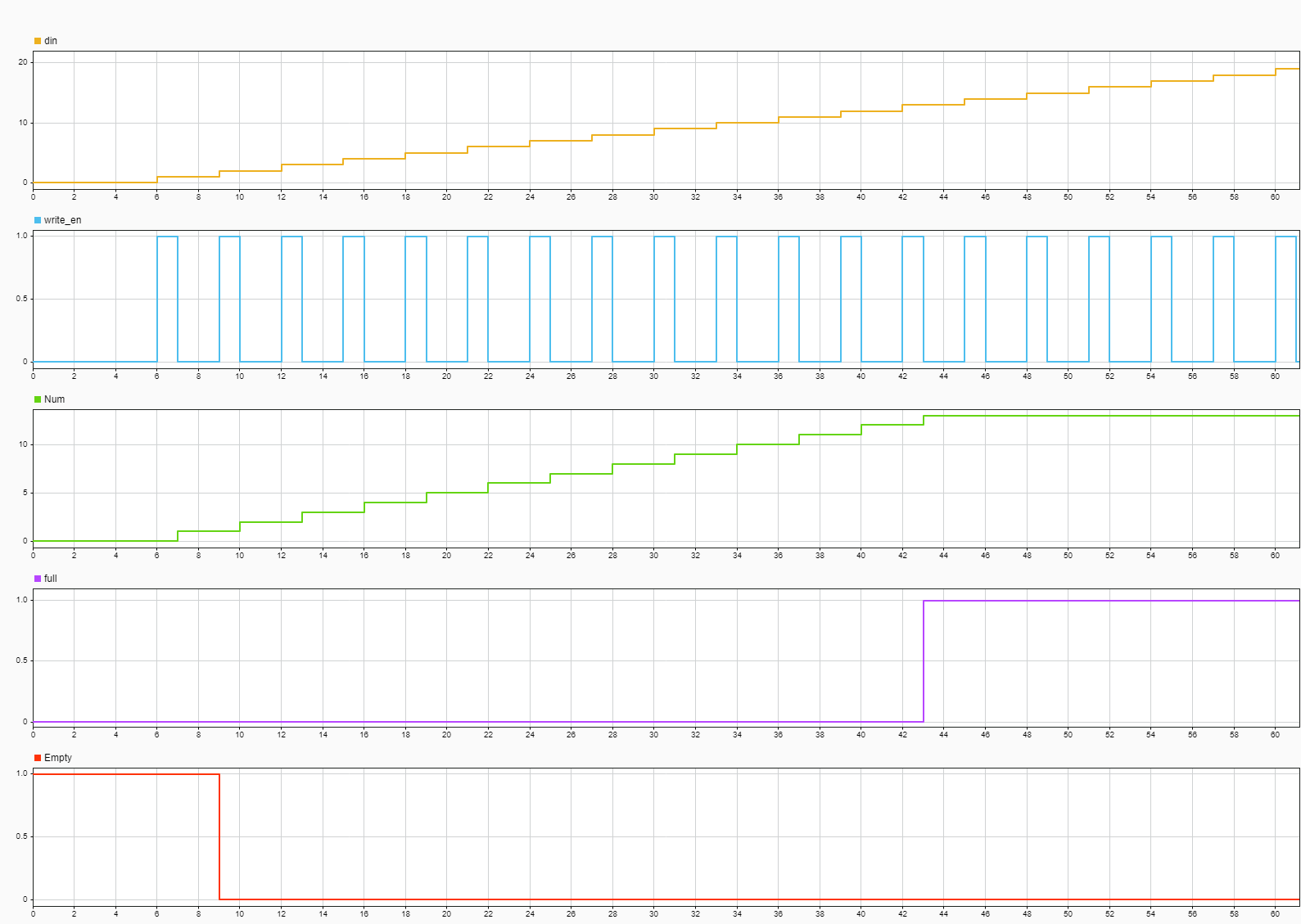
When the write_en signal is 0, the block
does not write data to the FIFO and the block asserts an Empty
flag.
When the write_en becomes 1, the block
pushes the din signal at input port In to
the end of the FIFO register in the next time step. The Num
signal indicates the number of data entries in the FIFO register. Every time you
write data into the FIFO, the Num signal increments by
1. At time step 6,
write_en is 1. At the next time step
7, data is written to the FIFO. Num
signal increments by 1 and the Empty flag is
de-asserted.
The FIFO uses the register size specified by the Register
sizeparameter. By default register size of 10. In
the figure, when Num signal becomes 13 at
time step 43, the Full signal is asserted.
In FWFT mode, the FIFO can store an additional 3 values beyond
its specified size. After the Full signal becomes
1, if you write more entries into the FIFO, the block
generates a warning.
This figure shows the read operation when you set the Mode
parameter to FWFT. The Pop input port acts
as the enable signal for the read operation. In the figure, the
read_en denotes this signal.
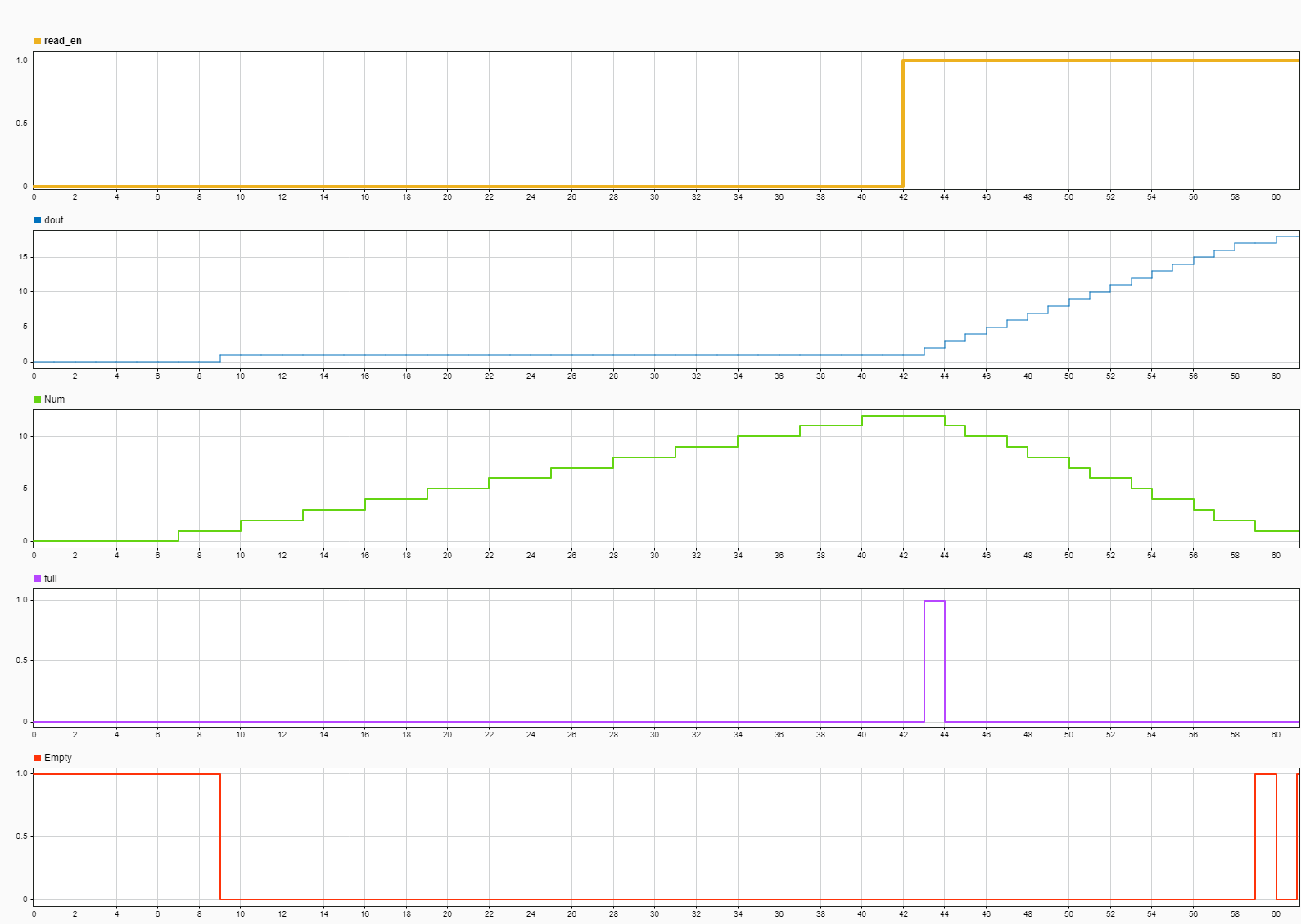
In the FWFT mode, the first word you write to the FIFO falls through to the output signal Out.
In the figure, the read_en becomes 1 at
time step 42, the FIFO read the first word
dout at time step 9. You can use this
capability to look ahead and see the first word that has been written to the
FIFO.
When the Num signal is 0, the
Empty signal is asserted. After the
Empty signal becomes 0, if you read more
entries from the FIFO, the block generates a warning.
Extended Capabilities
C/C++ Code Generation
Generate C and C++ code using Simulink® Coder™.
HDL Coder™ provides additional configuration options that affect HDL implementation and synthesized logic.
This block has one default HDL architecture.
| General | |
| ConstrainedOutputPipeline | Number of registers to place at the outputs by moving
existing delays within your design. Distributed pipelining
does not redistribute these registers. The default is
|
| InputPipeline | Number of input pipeline stages to insert in the
generated code. Distributed pipelining and constrained
output pipelining can move these registers. The default is
|
| OutputPipeline | Number of output pipeline stages to insert in the
generated code. Distributed pipelining and constrained
output pipelining can move these registers. The default is
|
| SynthesisAttributes |
Specifies the synthesis attributes for the blocks and block output signals in the model. The generated HDL code contains these attributes. For more information, see SynthesisAttributes. |
Version History
Introduced in R2014aThe RAMDirective HDL block property has been removed. To map RAM blocks in your design to the RAM blocks on the target FPGA, use the SynthesisAttributes HDL block property instead.
Use the SynthesisAttributes HDL block property to specify the synthesis attributes for the block and its output signals. HDL Coder includes these attributes in the generated HDL code.
The HDL FIFO block now supports vector data type at the In port. Use the Data input dimensions parameter to specify the dimension of the vector input.
The block now supports HDL code generation with input data of type
Half or
Boolean.
MATLAB Command
You clicked a link that corresponds to this MATLAB command:
Run the command by entering it in the MATLAB Command Window. Web browsers do not support MATLAB commands.
Select a Web Site
Choose a web site to get translated content where available and see local events and offers. Based on your location, we recommend that you select: .
You can also select a web site from the following list
How to Get Best Site Performance
Select the China site (in Chinese or English) for best site performance. Other MathWorks country sites are not optimized for visits from your location.
Americas
- América Latina (Español)
- Canada (English)
- United States (English)
Europe
- Belgium (English)
- Denmark (English)
- Deutschland (Deutsch)
- España (Español)
- Finland (English)
- France (Français)
- Ireland (English)
- Italia (Italiano)
- Luxembourg (English)
- Netherlands (English)
- Norway (English)
- Österreich (Deutsch)
- Portugal (English)
- Sweden (English)
- Switzerland
- United Kingdom (English)