Sharpen Region of Interest in an Image
Filtering a region of interest (ROI) is the process of applying a filter to a region in an image, where a binary mask defines the region. For example, you can apply an intensity adjustment filter to specific regions of an image. To filter an ROI in an image, use the roifilt2 function and specify the input grayscale image to be filtered, a binary mask image that defines the ROI, and a filter (either a 2-D filter or function). The roifilt2 function filters the input image and returns an image that consists of filtered values for pixels where the binary mask contains 1s and unfiltered values for pixels where the binary mask contains 0s. This type of operation is called masked filtering.
This example shows how you can sharpen specific regions in an image.
Read a grayscale image into the workspace.
I = imread("pout.tif");
imshow(I)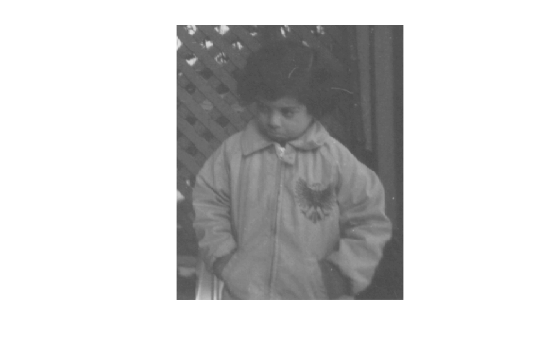
Draw a region of interest over the image to specify the area you want to filter. Use the drawcircle function to create the region of interest, specifying the center of the circle and the radius of the circle. Alternatively, if you want to draw the circle interactively, then do not specify the center or radius of the circle.
hax = drawcircle(gca,Center=[115 69],Radius=60);
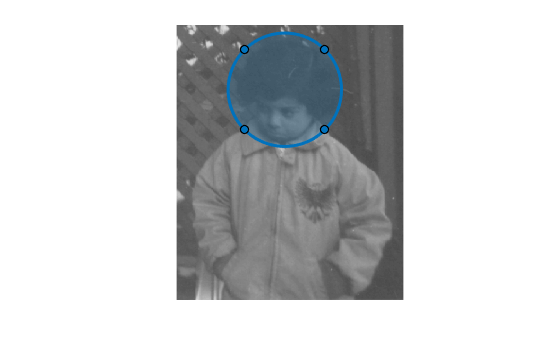
Create the mask using the createMask function and specifying the ROI.
mask = createMask(hax);
Define the function you want to use as a filter. This function, named f, passes the input image x to the imsharpen function and specifies the strength of the sharpening effect by using the Amount name-value argument.
f = @(x)imsharpen(x,Amount=3)
f = function_handle with value:
    @(x)imsharpen(x,Amount=3)
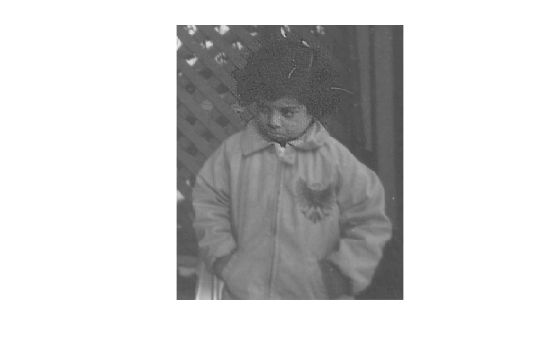
Filter the ROI by using the roifilt2 function and specifying the image, mask, and filtering function.
J = roifilt2(I,mask,f);
Display the result.
imshow(J)
See Also
drawcircle | Circle | createMask | roifilt2 | imsharpen

