Simulate PMSM Parameter Estimations
R2026bThis example shows how to use Motor Control Blockset library blocks to simulate estimations of resistance, inductance, and back EMF parameters for a permanent magnet synchronous motor (PMSM). The example compares the methods available to estimate each parameter and explains when to select each method.
For examples involving the same estimations on target hardware, see Estimate PMSM Parameters Using Parameter Estimation Blocks and Estimate PMSM Parameters Using Parameter Estimation Blocks on Real-Time Systems.
Estimate Motor Resistance
Open the example model ResistanceEstimator.
modelName = "ResistanceEstimator";
open_system(modelName);
To estimate the PMSM stator resistance, the PMSM Rs Estimator block requires measurements of all three phase currents. If you cannot obtain the third phase measurement from hardware, compute it using the other two phase currents using the relation .
The model assumes the board resistance is zero in both the PMSM Parameter Estimation Configurator and Interior PMSM blocks.
If the inverter resistance is not negligible, provide a value in the PMSM Parameter Estimation Configurator block for the Board resistance (ohm) parameter.
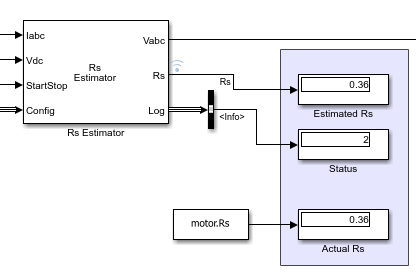
Simulate the model and display the estimated resistance, which matches the actual resistance from physical measurements.
sim(modelName);
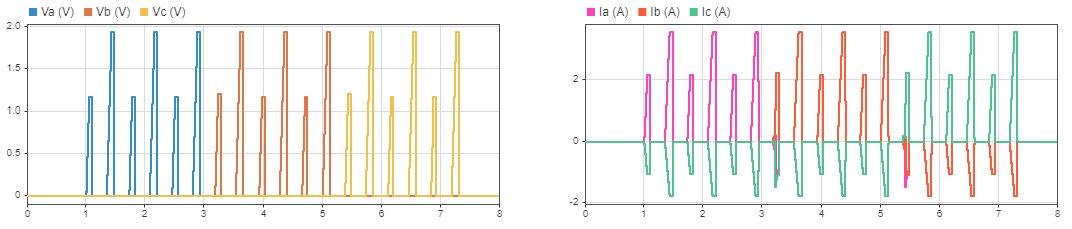
The plot shows that the estimator applies voltages to the three phases in sequence and measures the resulting currents to estimate each phase resistance. The block then returns the estimated stator resistance.
Estimate Inductance
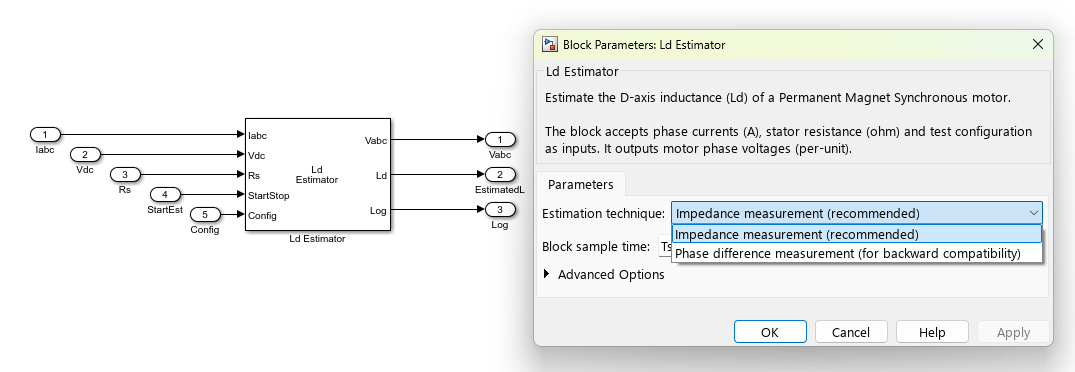
For the inductance estimation blocks Ld Estimator and Lq Estimator, choose between two techniques to estimate the d and q axis motor inductances:
Impedance measurement (recommended)
Phase difference measurement (for backward compatibility)
The impedance measurement does not need to compensate for delays in the current measurement. This technique injects higher frequencies during measurement compared to the phase difference measurement technique. Hence, the rotor does not vibrate or oscillate during the estimation process, improving the estimation accuracy. For instance, rotor movements are negligible when you apply a voltage along the q-axis for Lq measurement using the impedance method. The same voltage injection during phase difference estimation can cause rotor movements and reduce accuracy if the rotor is not externally locked.
To use the impedance measurement technique, in both the Ld Estimator and PMSM Parameter Estimation Configurator blocks, set Estimation technique to Impedance measurement.
In the PMSM Parameter Estimation Configurator block, for Select frequency (Hz), choose as high a frequency as possible (the highest frequency is determined by the Parameter estimation sample time (s) parameter). Higher frequencies lessen the effect of rotor resistance on the estimated inductance, and help avoid rotor movement or vibrations during the frequency injections.
The inductance estimation model uses a Variant Subsystem block to demonstrate the two inductance estimation methods. Choose the method in the parameter estimation configurator according to the active variant. For more information about variant subsystems, see Variant Subsystem.
Estimate Ld Using Impedance Method
Open the example model InductanceEstimation.
modelName = "InductanceEstimation";
open_system(modelName);
For both the Ld Estimator and PMSM Parameter Estimation Configurator blocks, set Estimation Technique to Impedance measurement (recommended).
set_param(modelName + "/Parameter Estimation Configurator","IndEstType","Impedance measurement (recommended)");
Select the Ld Impedance variant subsystem, which is preconfigured with an Ld Estimator block.
EstimatorVariant = "LdZ";Simulate the model and display the estimated inductance.
sim(modelName);
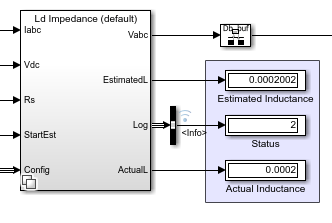
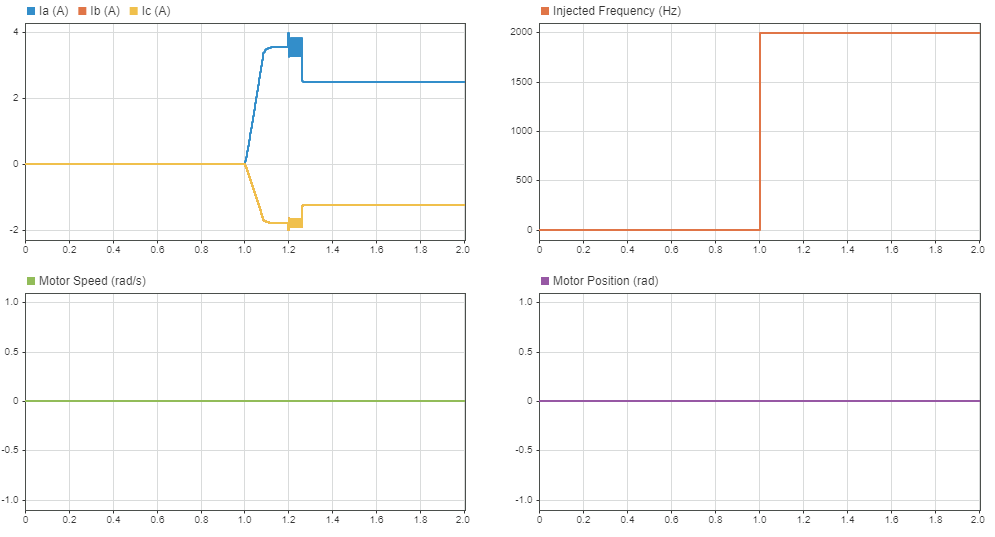
As the plot shows, the motor remains at zero position during the frequency injection phase.
Estimate Lq Using Impedance Method
Open the example model InductanceEstimation.
modelName = "InductanceEstimation";
open_system(modelName);
For both the Lq Estimator and PMSM Parameter Estimation Configurator blocks, set Estimation Technique to Impedance measurement (recommended).
set_param(modelName + "/Parameter Estimation Configurator","IndEstType","Impedance measurement (recommended)");
Select the Lq Impedance variant subsystem, which is preconfigured with an Lq Estimator block.
EstimatorVariant = "LqZ";Simulate the model and display the estimated inductance.
sim(modelName);
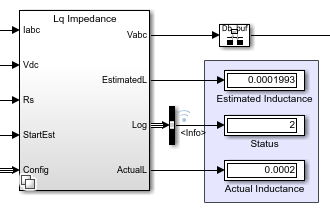
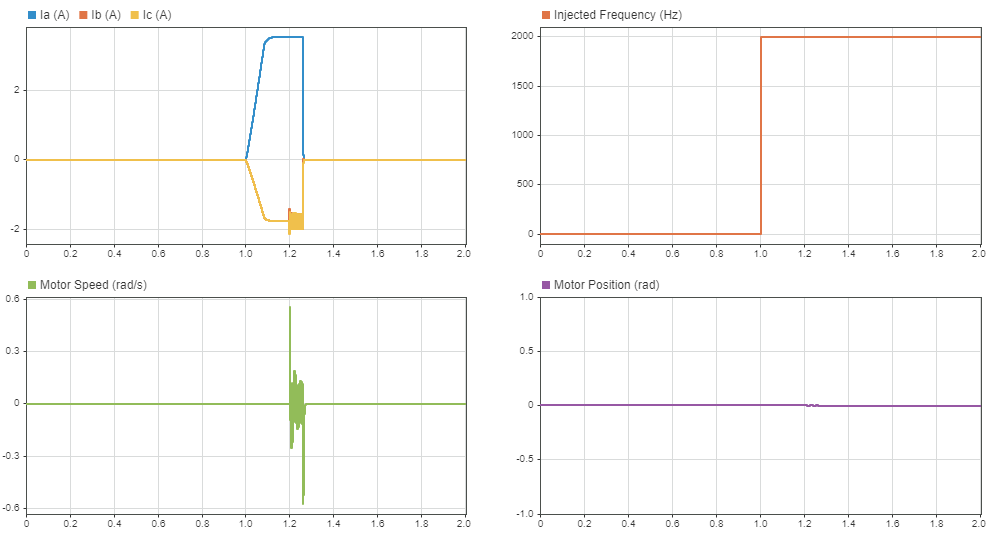
Notice that the rotor is free and not locked at zero speed. Compared to Ld estimation, the rotor position is nonzero but changes negligibly during the frequency injection phase.
Note: For surface mount PMSMs , so you need only run the estimation and assume to be equal to .
Estimate Ld Using Phase Difference Method
Open the example model InductanceEstimation.
modelName = "InductanceEstimation";
open_system(modelName);
For both the Ld Estimator and PMSM Parameter Estimation Configurator blocks, set Estimation Technique to Phase difference measurement (for backward compatibility).
set_param(modelName + "/Parameter Estimation Configurator","IndEstType","Phase difference measurement (for backward compatibility)");
In the Interior PMSM block, set Mechanical input configuration to Torque.
set_param(modelName + "/Motor/Interior PMSM","port_config","Torque");
Select the Ld Phase Difference variant subsystem, which is preconfigured with an Ld Estimator block.
EstimatorVariant = "LdP";Simulate the model and display the estimated inductance.
sim(modelName);
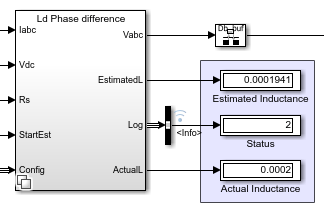
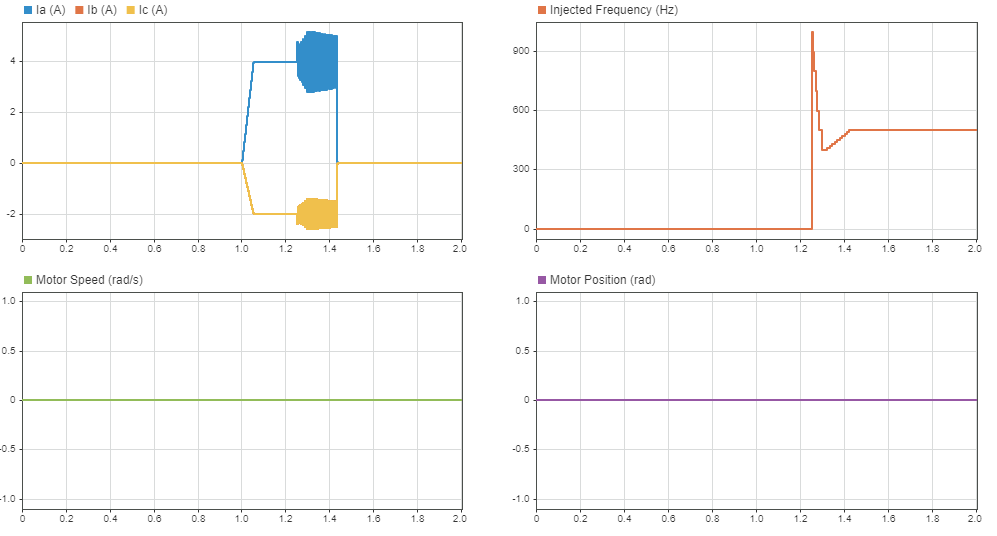
Configure the external rotor lock. In the Interior PMSM block, set Mechanical input configuration to Speed. Then simulate again. Since the rotor is locked, no plot of motor speed is available.
set_param(modelName + "/Motor/Interior PMSM","port_config","Speed");
sim(modelName);

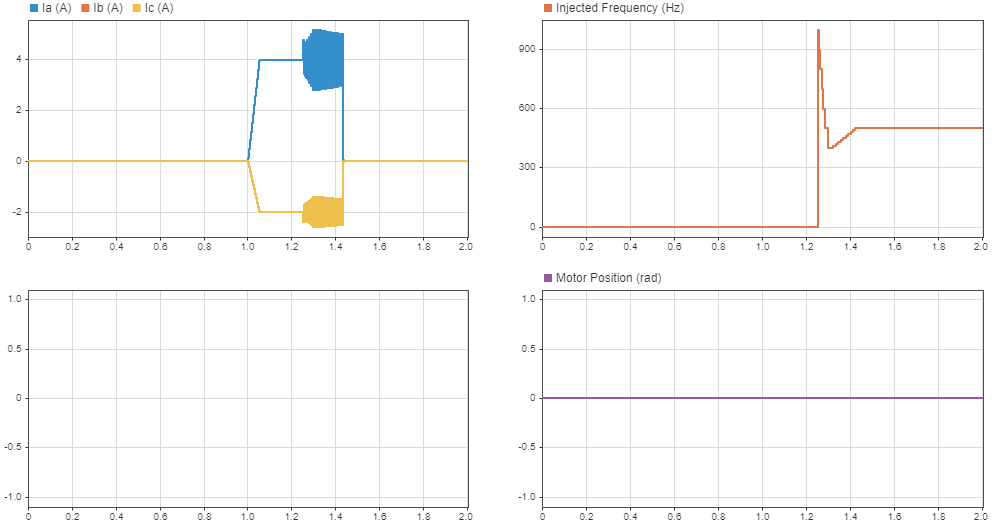
Observe that the estimated inductance does not change significantly between the free and locked motors. This is because any voltage or current applied along the d-axis does not generate torque and hence does not move the rotor.
Note: When the rotor shaft is not locked or loaded, the estimator aligns the rotor to zero electrical position. However, when locking the rotor, you must check that the rotor is locked to zero electrical position (for instance, using a quadrature encoder) to avoid inaccuracies in the measured inductance.
Estimate Lq Using Phase Difference Method
Open the example model InductanceEstimation.
modelName = "InductanceEstimation";
open_system(modelName);
For both the Lq Estimator and PMSM Parameter Estimation Configurator blocks, set Estimation Technique to Phase difference measurement (for backward compatibility).
set_param(modelName + "/Parameter Estimation Configurator","IndEstType","Phase difference measurement (for backward compatibility)");
In the Interior PMSM block, set Mechanical input configuration to Torque.
set_param(modelName + "/Motor/Interior PMSM","port_config","Torque");
Select the Lq Phase Difference variant subsystem, which is preconfigured with an Lq Estimator block.
EstimatorVariant = "LqP";Simulate the model and display the estimated inductance.
sim(modelName);
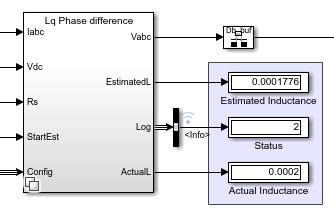
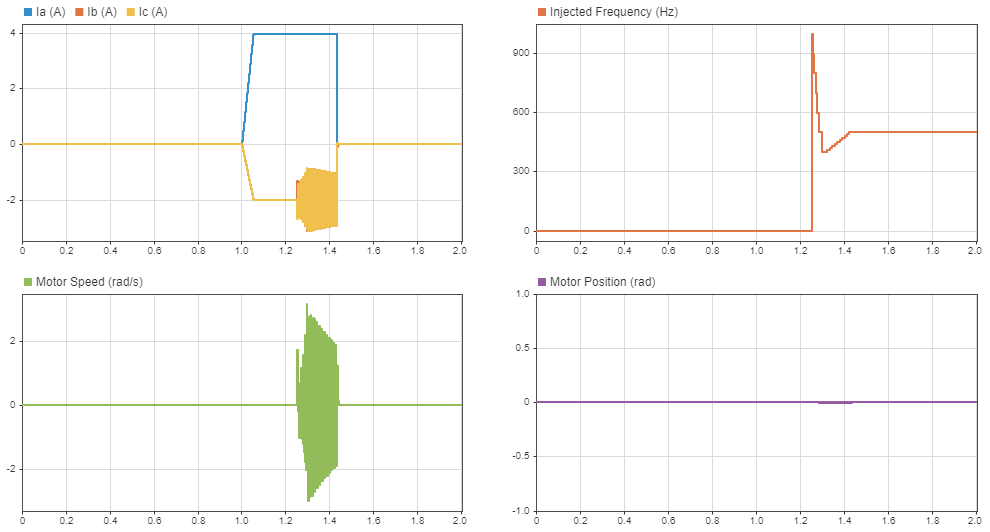
In this configuration, the estimated inductance deviates from the actual inductance. This is due to the rotor movement caused by the injected voltage along the q-axis.
To minimize rotor movement or vibrations due to the applied voltage, you can apply the external rotor lock. In the Interior PMSM block, set Mechanical input configuration to Speed. Then simulate again.
set_param(modelName + "/Motor/Interior PMSM","port_config","Speed");
sim(modelName);
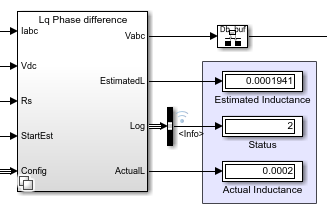
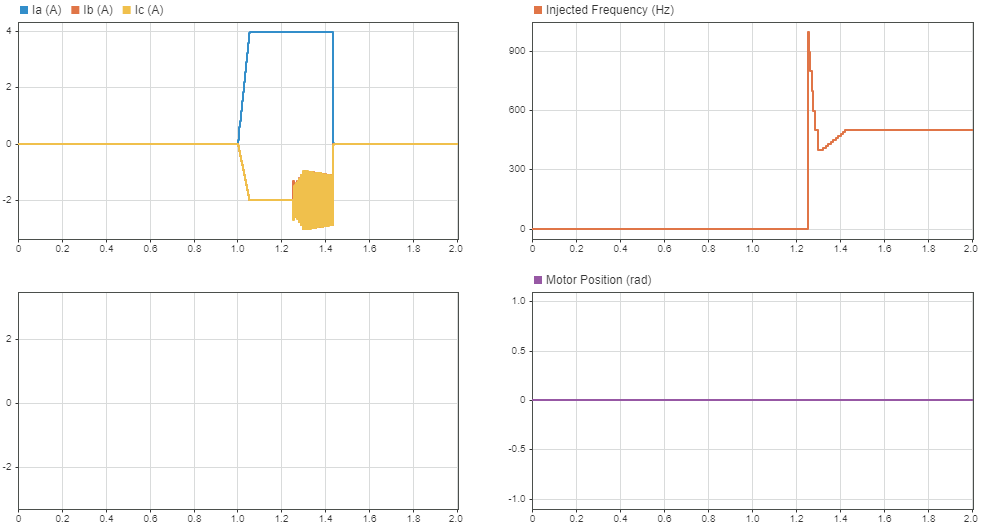
The Lq estimator locks the rotor electrically to zero position by applying a voltage along the d-axis. However, when smaller frequencies are injected along the q-axis, the rotor develops a torque and overcomes this electrical locking, resulting in rotor movement and vibrations. Locking the rotor externally using a mechanical lock avoids these vibrations and improves the estimation accuracy, as reflected in the simulation results.
As mentioned in the previous section, when locking the rotor, you must check that the rotor is locked to zero electrical position. Since this is not always feasible, prefer using impedance based estimation.
Estimate Back EMF
The PMSM Mechanical Parameter Estimator block runs the motor in closed-loop current control to estimate mechanical parameters such as the back EMF, rotor inertia, and viscous damping. However, for sensorless estimation, the algorithm must start the motor in open-loop control until it reaches a certain speed, for observers to estimate position from the generated back EMF. When you use certain sensors such as the quadrature encoder instead of observers, the algorithm also needs to start the motor in open-loop control until the sensor finds the index.
The block supports two techniques to start the motor in open-loop operation.
I-F Controller
V by F
The I-F Controller method can start the motor with high inertia and cogging torque or even when the rotor is loaded, and is more broadly applicable. The V by F method can quickly start and switch to closed-loop control, and is more suitable for motors with low inertia and low power. For details on these startup methods, see I-F Controller and VbyF Controller.
Sensorless with I-F Controller Startup
Open the example model MechanicalEstimator.
modelName = "MechanicalEstimator";
open_system(modelName);
Configure the model to use sensorless estimation with I-F controller startup.
set_param(modelName + "/Parameter Estimation Configurator","StartupType","I-F Controller");
set_param(modelName + "/Parameter Estimation Configurator","PosInType","Sensorless");
EstimatorVariant = "IFSL";
Simulate and display the estimated back EMF.
sim(modelName);
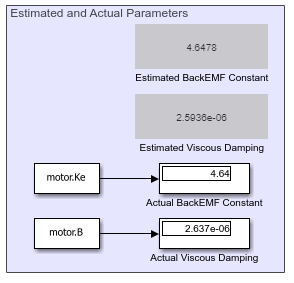
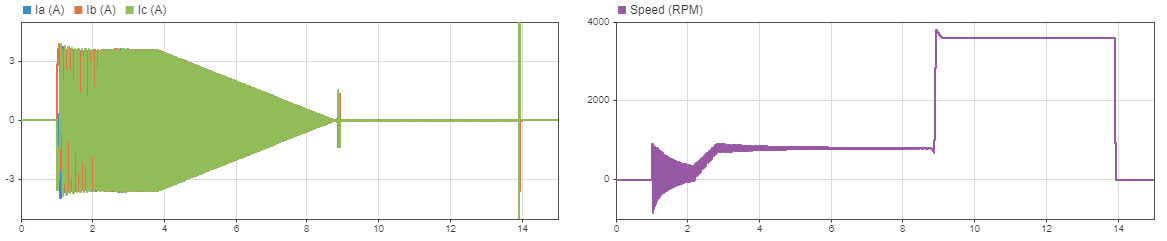
You can use this method when a position sensor is not available and the inertia of the rotor is greater than 1.0e-5 kg m^2, where using the V by F method is more challenging.
In contrast to sensored estimation, the I-F controller automatically switches from startup to closed-loop control. Hence the StartFOC input to the PMSM Mechanical Parameter Estimator is not required.
For an example involving field-oriented control using this startup method, see Sensorless Field-Oriented Control of PMSM Using I-F Control-Based Startup.
Sensored with I-F Controller Startup
Open the example model MechanicalEstimator.
modelName = "MechanicalEstimator";
open_system(modelName);
Configure the model to use sensored estimation with I-F controller startup.
set_param(modelName + "/Parameter Estimation Configurator","StartupType","I-F Controller");
set_param(modelName + "/Parameter Estimation Configurator","PosInType","Sensored");
EstimatorVariant = "IFS";
Simulate and display the estimated back EMF.
sim(modelName);
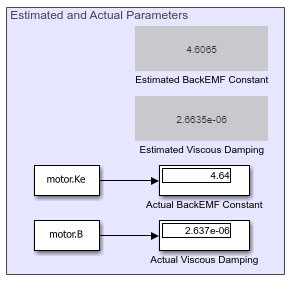

You can use this method for quadrature decoder based position estimation to spin the motor until the sensor finds the index. The I-F controller based startup ensures that the motor can start even when you are using a high inertia rotor.
The I-F controller starts the motor while the StartFOC input controls switching to the closed-loop FOC operation. You can set this input high when the system is ready for closed-loop operation, for example when you find the index using the quadrature decoder.
Sensorless with V by F Controller Startup
Open the example model MechanicalEstimator.
modelName = "MechanicalEstimator";
open_system(modelName);
Configure the model to use sensorless estimation with V by F controller startup.
set_param(modelName + "/Parameter Estimation Configurator","StartupType","V by F");
EstimatorVariant = "VbyFSL";
Simulate and display the estimated back EMF.
sim(modelName);
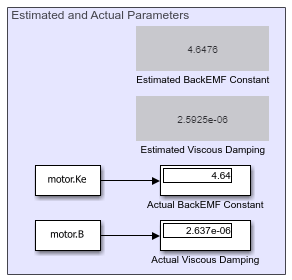
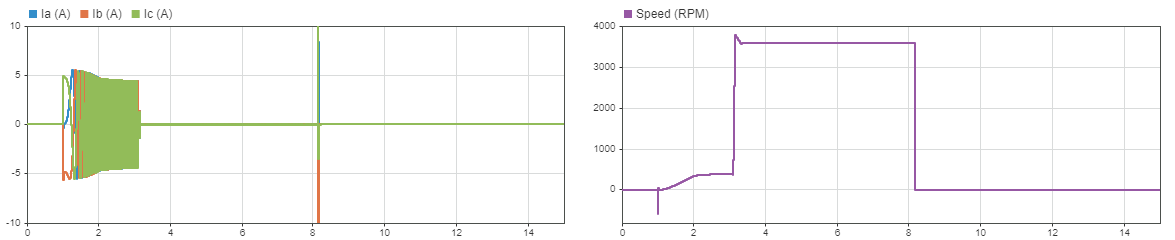
You can use this method for a low inertia motor where starting the motor in open-loop control is relatively simple. Compared to the sensorless with I-F controller setup, this method offers a shorter startup period, at the cost of less consistent startups for motors with high inertia or high cogging torque.
You must implement the open-loop to closed-loop switch outside the PMSM Mechanical Parameter Estimator block, which not handle switching when using the V by F controller startup. Use the StartFOC input to switch to closed-loop when the motor attains the necessary speed.
Sensored with V by F Controller Startup
Open the example model MechanicalEstimator.
modelName = "MechanicalEstimator";
open_system(modelName);
Configure the model to use sensored estimation with V by F controller startup.
set_param(modelName + "/Parameter Estimation Configurator","StartupType","V by F");
EstimatorVariant = "VbyFS";
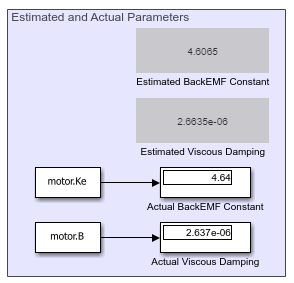
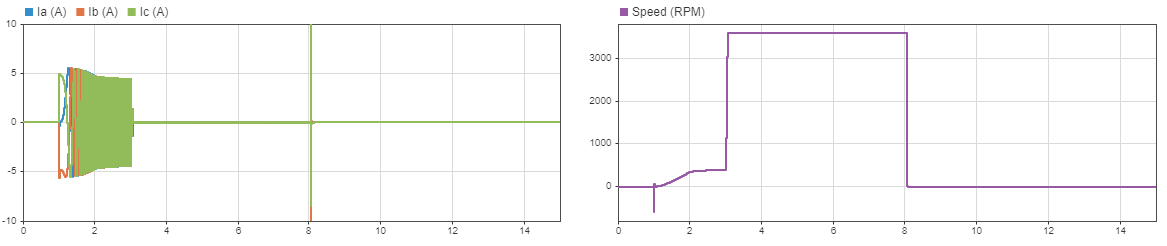
Simulate and display the estimated back EMF.
sim(modelName);
See Also
PMSM Rs Estimator | Ld Estimator | Lq Estimator | PMSM Mechanical Parameter Estimator | I-F Controller | VbyF Controller

