Clock
R2026bDisplay and provide simulation time
Clock block

To add a block to a model, double-click the canvas and start typing the block name. Then, select the block from the list.
Libraries:
Simulink /
Sources
Description
The Clock block outputs the current simulation time at each simulation step. This block is useful for other blocks that need the simulation time.
When you need the current time within a discrete system, use the Digital Clock block.
Examples
This example shows how to use the Memory and Clock blocks to calculate and display the step size in a simulation. The Sum block subtracts the time at the previous time step, which the Memory block generates, from the current time, which the Clock block generates.
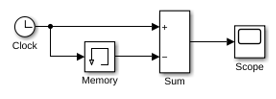
Because Inherit sample time is not selected for the Memory block, the block sample time depends on the type of solver for simulating the model. In this case, the model uses a fixed-step solver. Therefore, the sample time of the Memory block is the solver step size, or 1.
If you replace the Memory block with a Unit Delay block, you get the same results. The Unit Delay block inherits a discrete sample time of 1.
Extended Examples
Inverted Pendulum with Animation
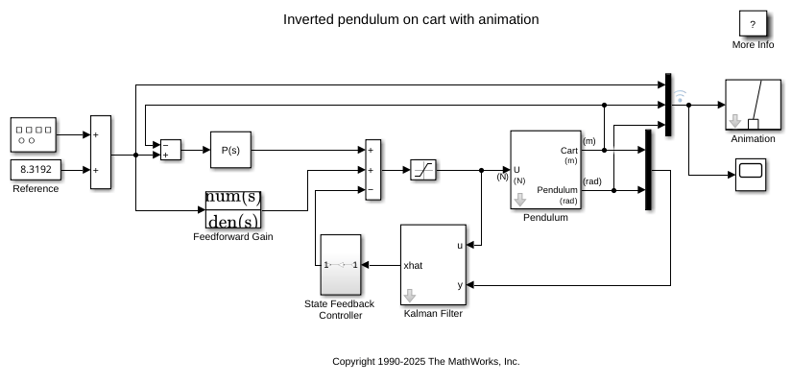
Use Simulink® to model and animate an inverted pendulum system. An inverted pendulum has its center of mass above its pivot point. To stably maintain this position, the system implements control logic to move the pivot point below the center-of mass as the pendulum starts to fall. The inverted pendulum is a classic dynamics problem used to test control strategies.
Accurate Zero-Crossing Detection
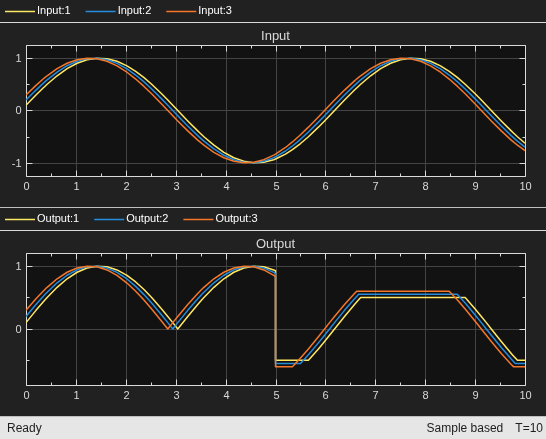
How zero-crossing detection works in Simulink®. Simulink uses zero-crossing detection to accurately simulate an abrupt model change or discontinuity without decreasing the solver time steps. For more information, see Zero-Crossing Detection.
Ports
Output
Parameters
Block Characteristics
Data Types |
|
Direct Feedthrough |
|
Multidimensional Signals |
|
Variable-Size Signals |
|
Zero-Crossing Detection |
|
Programmatic Use: Add Block
To add the block programmatically, use the add_block function with one of these library block paths as the source.
"simulink/Sources/Clock"
Example: add_block("simulink/Sources/Clock","myModel/myBlock",MakeNameUnique="on")
Extended Capabilities
Version History
Introduced before R2006a

