Get Started with AI-Assisted and Automated Labeling
The Image Labeler and Video Labeler apps offer a rich set of automation algorithms to accelerate image and video annotation workflows for object detection and image segmentation. These include both AI-assisted algorithms powered by foundation models and standard computer vision techniques based on heuristics and tracking.
This topic helps you:
Understand the available automation algorithms
Know where to access them in the apps
Choose the right algorithm based on your label definition
Extend functionality with custom automation
AI-Assisted Automation Algorithms in Labeler Apps
AI-assisted algorithms use deep learning models to provide intelligent, generalizable automation for labeling tasks. These are ideal to quickly label datasets with minimal manual intervention. This table lists AI-assisted labeling automation algorithms, their supported apps, compatible label definition types, and example links to help you get started:
| Automation Algorithm | Supported apps | Supported Label Definition Types | Getting Started Example |
|---|---|---|---|
| Segment Anything Model (SAM) | Image Labeler Video Labeler |
| Automatically Label Ground Truth Using Segment Anything Model |
| Grounding DINO | Image Labeler Video Labeler |
| Automatically Label Ground Truth Using Vision-Language Model |
How to Access AI-Assisted Automation Algorithms in Image Labeler and Video Labeler apps
To use AI-assisted automation algorithms in Image Labeler or Video Labeler apps, follow these steps:
Import data and create label definitions (e.g., Rectangle ROI, Pixel ROI, Polygon ROI).
In the app toolstrip, navigate to the Label tab.
Under the Label tab, in the Labeling Tools section, the app automatically displays the AI-assisted algorithms compatible with the selected label definition type. For instance, this figure shows the Label tab in the Image Labeler app for a Rectangle ROI label type:
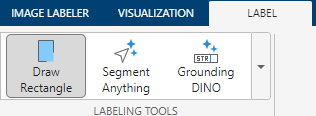
Select and run the desired algorithm to generate label suggestions directly within the labeling interface.
For a step-by-step tutorial of using AI-assisted automation algorithms, see Automatically Label Ground Truth Using Segment Anything Model or Automatically Label Ground Truth Using Vision-Language Model.
Standard Automation Algorithms in Labeler Apps
Standard automation algorithms for image and video labeling use classical computer vision techniques such as tracking, interpolation, and region-based segmentation. These are ideal for lightweight tasks, domain-specific applications, or when working in environments with limited computing power.
Standard Automation Algorithms for Object Detection Workflows
This table lists the standard labeling automation algorithms for object detection workflows, along with their supported apps and compatible label definition types:
| Automation Algorithm | Supported apps | Supported Label Definition Types |
|---|---|---|
| ACF People Detector | Image Labeler Video Labeler | Rectangle ROI Labels |
| ACF Vehicle Detector | Image Labeler Video Labeler | Rectangle ROI Labels |
Lane Boundary Detector (requires Automated Driving Toolbox™) | Video Labeler | Rectangle ROI Labels |
| Point Tracker | Video Labeler | Rectangle ROI Labels |
| Temporal Interpolator | Video Labeler | Rectangle ROI Labels |
Standard Automation Algorithms for Image Segmentation Workflows
This table lists the standard automation algorithms for object detection, along with their supported apps and compatible label definition types:
| Automation Algorithm | Supported apps | Supported Label Definition Types |
|---|---|---|
| Superpixel | Image Labeler Video Labeler | Pixel ROI Labels |
| Smart Polygon (Grab Cut) | Image Labeler Video Labeler | Pixel ROI Labels |
| Assisted Freehand | Image Labeler Video Labeler | Pixel ROI Labels |
| Flood Fill | Image Labeler Video Labeler | Pixel ROI Labels |
How to Access Standard Automation Algorithms in Image Labeler and Video Labeler apps
Accessing Standard Labeling Automation Algorithms for Object Detection Workflows
To use standard labeling automation algorithms for object detection workflows in Image Labeler or Video Labeler apps, follow these steps:
Import data and create label definitions (e.g., Rectangle ROI).
Under the main tab, from the Automate Labeling section of the app toolstrip, select the desired automation algorithm from the drop down. Click Automate. For instance, this figure shows the Automate Labeling section highlighted in the main tab of the Image Labeler app toolstrip:

A new Automate tab opens, where the app automatically enables only the label definition types supported by the chosen algorithm and greys out the rest.
Click the desired label definition and run the algorithm to generate label suggestions directly within the labeling interface. To see the code for the chosen automation algorithm, click Open Selected Algorithm.
Accessing Standard Labeling Automation Algorithms for Image Segmentation Workflows
To use standard labeling automation algorithms for image segmentation workflows in Image Labeler or Video Labeler apps, follow these steps:
Import data and create label definitions (e.g., Pixel ROI).
In the app toolstrip, navigate to the Label tab.
Under the Label tab, in the Labeling Tools section, the app automatically displays the Standard labeling automation algorithms for image segmentation workflows. For instance, this figure shows the Label tab in the Image Labeler app for a Pixel ROI label type:

Select and run the desired algorithm to generate label suggestions directly within the labeling interface.
For a step-by-step tutorial of using labeling automation algorithms for image segmentation workflows , see Label Pixels for Semantic Segmentation or Label Objects Using Polygons for Instance Segmentation.
Writing Custom Automation Algorithms in labeler Apps
For more control and customization over the automation process and parameters, you can create and import custom automation algorithms into the labeling apps. You can implement these automation algorithms using either a function-based or class-based interface, with support for specialized workflows such as temporal automation for tracking across frames, and blocked image automation for handling large-scale images. After implementing custom automation algorithms, you can access them using the Automate Labeling tab. For more details, see Create Custom Automation Algorithm for Labeling.

