access
R2026bAdd access analysis objects to satellite scenario
Syntax
Description
access( adds asset1,asset2,...)Access analysis objects
defined by nodes asset1, asset2, and so on.
Note
Access method visibility analysis does not take terrain or building obstructions into account.
ac = access(___,'ObstructingBodies',ObstructingBodies)
ac = access(___)ac.
Examples
Create a satellite scenario and add ground stations from latitudes and longitudes.
startTime = datetime(2020,5,1,11,36,0);
stopTime = startTime + days(1);
sampleTime = 60;
sc = satelliteScenario(startTime,stopTime,sampleTime);
lat = 10;
lon = -30;
gs = groundStation(sc,lat,lon);
Add satellites using Keplerian elements.
semiMajorAxis = 10000000;
eccentricity = 0;
inclination = 10;
rightAscensionOfAscendingNode = 0;
argumentOfPeriapsis = 0;
trueAnomaly = 0;
sat = satellite(sc,semiMajorAxis,eccentricity,inclination, ...
        rightAscensionOfAscendingNode,argumentOfPeriapsis,trueAnomaly);
Add access analysis to the scenario and obtain the table of intervals of access between the satellite and the ground station.
ac = access(sat,gs);
intvls = accessIntervals(ac)
intvls = 8×8 table
    "Satellite 2"    "Ground station 1"    1    01-May-2020 11:36:00    01-May-2020 12:04:00    1680    1    1
    "Satellite 2"    "Ground station 1"    2    01-May-2020 14:20:00    01-May-2020 15:11:00    3060    1    2
    "Satellite 2"    "Ground station 1"    3    01-May-2020 17:27:00    01-May-2020 18:18:00    3060    3    3
    "Satellite 2"    "Ground station 1"    4    01-May-2020 20:34:00    01-May-2020 21:25:00    3060    4    4
    "Satellite 2"    "Ground station 1"    5    01-May-2020 23:41:00    02-May-2020 00:31:00    3000    5    5
    "Satellite 2"    "Ground station 1"    6    02-May-2020 02:50:00    02-May-2020 03:39:00    2940    6    6
    "Satellite 2"    "Ground station 1"    7    02-May-2020 05:58:00    02-May-2020 06:47:00    2940    7    7
    "Satellite 2"    "Ground station 1"    8    02-May-2020 09:06:00    02-May-2020 09:56:00    3000    8    9
Play the scenario to visualize the ground stations.
play(sc)
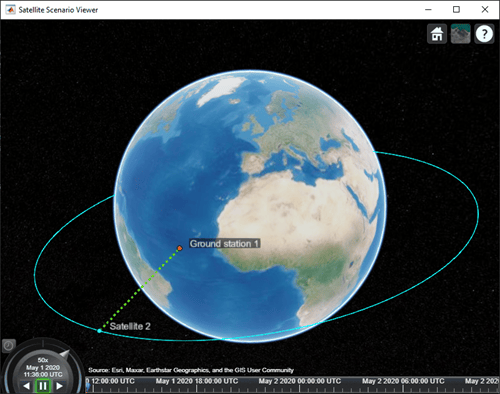
Create a satellite scenario.
startTime = datetime(2020,5,1,11,36,0);
stopTime = startTime + days(1);
sampleTime = 60;
sc = satelliteScenario(startTime,stopTime,sampleTime);
lat = 10;
lon = -30;
Add a platform using the given trajectory in the satellite scenario.
trajectory = geoTrajectory([40.6413,-73.7781,10600;32.3634,-64.7053,10600],[0,2*3600],AutoPitch=true,AutoBank=true);
pltf = platform(sc,trajectory);
Add a satellite using Keplerian elements.
semiMajorAxis = 10000000;
eccentricity = 0;
inclination = 10;
rightAscensionOfAscendingNode = 0;
argumentOfPeriapsis = 0;
trueAnomaly = 0;
sat = satellite(sc,semiMajorAxis,eccentricity,inclination, ...
        rightAscensionOfAscendingNode,argumentOfPeriapsis,trueAnomaly);
Add access analysis to the scenario and obtain the table of intervals of access between the satellite and the platform.
ac = access(sat,pltf);
intvls = accessIntervals(ac)
intvls = 7×8 table
    "Satellite 2"    "Platform 1"    1    01-May-2020 14:07:00    01-May-2020 14:54:00    2820    1    2
    "Satellite 2"    "Platform 1"    2    01-May-2020 17:11:00    01-May-2020 18:01:00    3000    3    3
    "Satellite 2"    "Platform 1"    3    01-May-2020 20:16:00    01-May-2020 21:06:00    3000    4    4
    "Satellite 2"    "Platform 1"    4    01-May-2020 23:22:00    02-May-2020 00:11:00    2940    5    5
    "Satellite 2"    "Platform 1"    5    02-May-2020 02:31:00    02-May-2020 03:15:00    2640    6    6
    "Satellite 2"    "Platform 1"    6    02-May-2020 05:43:00    02-May-2020 06:22:00    2340    7    7
    "Satellite 2"    "Platform 1"    7    02-May-2020 08:54:00    02-May-2020 09:33:00    2340    8    8
Play the scenario to visualize the platform and the satellite.
play(sc)
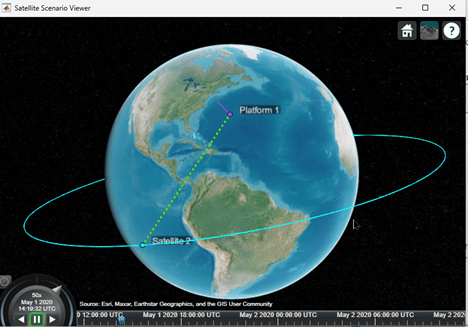
Set up access analysis between a ground station and conical sensors onboard satellites.
A ground station and a conical sensor on a satellite have access to one another if both:
The ground station is inside the field of view of the conical sensor, and
The conical sensor over or equal to the mask elevation angle of the ground station.
Create Satellite Scenario
Create a satellite scenario with a start time of 02-June-2020 8:23:00 AM UTC and a stop time of five hours later. Set the simulation sample time to 60 seconds.
startTime = datetime(2020,6,02,8,23,0);
stopTime = startTime + hours(5);
sampleTime = 60;
sc = satelliteScenario(startTime,stopTime,sampleTime);
Add Satellite and Ground Station to Scenario
Create a satellite by defining its orbit with Keplerian orbital elements.
semiMajorAxis = 10000000;                                          % meters
eccentricity = 0;
inclination = 10;                                                  % degrees
rightAscensionOfAscendingNode = 0;                                 % degrees
argumentOfPeriapsis = 0;                                           % degrees
trueAnomaly = 10;                                                  % degrees
sat1 = satellite(sc,semiMajorAxis,eccentricity,inclination, ...
         rightAscensionOfAscendingNode,argumentOfPeriapsis, ...
         trueAnomaly,Name="Satellite 1");
Create another satellite.
semiMajorAxis = 9078137;
eccentricity = 0;
inclination = 40;                                                                           % degrees
rightAscensionOfAscendingNode = 0;                                                          % degrees
argumentOfPeriapsis = 0;                                                                    % degrees
trueAnomaly = 50;                                                                           % degrees
sat2 = satellite(sc,semiMajorAxis,eccentricity,inclination, ...
    rightAscensionOfAscendingNode,argumentOfPeriapsis, ...
    trueAnomaly,Name = "Satellite 2");
allSats = [sat1 sat2];
Add a ground station, which represents the location to be photographed.
gs = groundStation(sc,Name="Location to Photograph", ...
    Latitude=42.3001,Longitude=-71.3504,MaskElevationAngle=0); % Latitude and longitude are in degrees
Add Conical Sensors to Satellites
Use conicalSensor to add a conical sensor to each satellite. These conical sensors represent a simple approximation of a directed antenna. Specify MaxViewAngle that defines the field of view of the sensors.
names = allSats.Name + " Custom Sensor";
maxViewAngles = [170 60];
% Add conical sensors to all satellites
camSensors = conicalSensor(allSats,Name=names,MaxViewAngle=maxViewAngles);
Point Satellites at Geographical Site
Use pointAt to make the yaw axis of each satellite track the geographical site.
pointAt(allSats,gs)
Visualize Scenario
Use satelliteScenarioViewer to launch a satellite scenario viewer and visualize the scenario.
vwr = satelliteScenarioViewer(sc);
Add Access Analysis Between Sensor and Ground Station
Use access to add access analysis between the sensor and location to be photographed. The access analyses determine when each sensor can photograph the site.
ac = access(camSensors,gs);
ac.LineColor = 'magenta';
Visualize Field of View of Sensor
Use fieldOfView to visualize the field of view of each sensor.
fov = fieldOfView(camSensors);
Determine Access Intervals
Use accessIntervals to determine the times when there is access between each sensor and the geographical site. These are the times when the corresponding sensor can photograph the site.
accessIntervals(ac)
ans = 3×8 table
              Source                        Target             IntervalNumber         StartTime                EndTime           Duration    StartOrbit    EndOrbit
    ___________________________    ________________________    ______________    ____________________    ____________________    ________    __________    ________

    "Satellite 1 Custom Sensor"    "Location to Photograph"          1           02-Jun-2020 10:48:00    02-Jun-2020 11:16:00      1680          1            2
    "Satellite 2 Custom Sensor"    "Location to Photograph"          1           02-Jun-2020 10:29:00    02-Jun-2020 10:41:00       720          1            1
    "Satellite 2 Custom Sensor"    "Location to Photograph"          2           02-Jun-2020 12:49:00    02-Jun-2020 13:23:00      2040          2            3
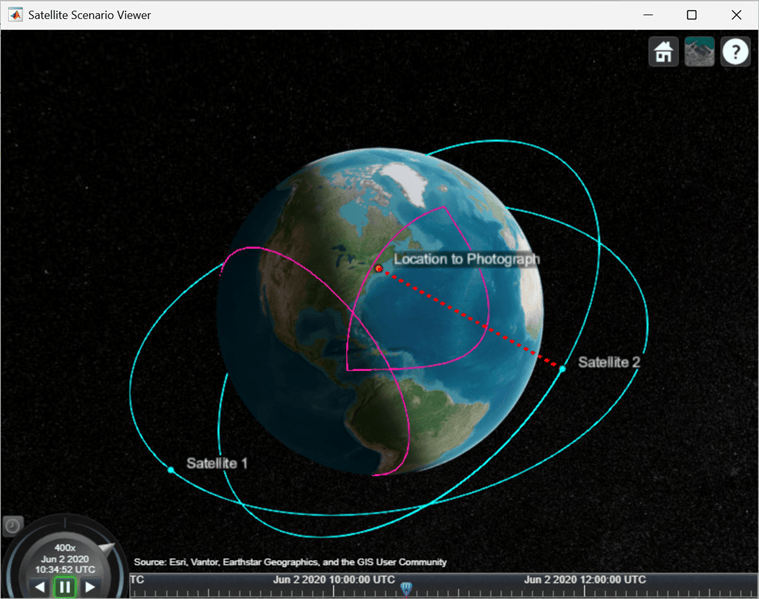
Play the satellite scenario with the satellite and ground station.
The scenario achieves visual access for only a portion of the time the ground station is in the field of view of a satellite. This is because of the visibility constraints imposed by the mask elevation angle of the ground station and maximum viewing angles of the conical sensors.
camLat = 30;                           % degrees
camLon = -71;                          % degrees
camHeight = 2e7;                       % meters
campos(vwr,camLat,camLon,camHeight)
play(sc,PlaybackSpeedMultiplier=400)
This example shows how to compute and analyze line-of-sight access intervals between a satellite orbiting the Moon and a low Earth orbit (LEO) satellite, accounting for obstructions caused by both the Earth and the Moon.
Create a satellite scenario object.
startTime = datetime(2025,1,1,12,0,0);
stopTime = startTime + days(1);
sampleTime = 60; % seconds
sc = satelliteScenario(startTime,stopTime,sampleTime);
Add a LEO satellite the scenario.
leoSat = satellite(sc, 6780e3, .02, 45, 0, 0, 0, Name = "LEO Sat");
Define lunar orbit.
semiMajorAxis = 1950e3; % meters
eccentricity = 0;
inclination = 50; % degrees
rightAscensionOfAscendingNode = 0; % degrees
argumentOfPeriapsis = 0; % degrees
trueAnomaly = 50; % degrees
Create central body object.
moonCB = Aero.spacecraft.CentralBodyOptions(CentralBody = "Moon");Propagate the lunar satellite orbit using propagateOrbit.
  timeVector = sc.StartTime:seconds(sc.SampleTime):sc.StopTime;
  pos_icrfMoon = propagateOrbit(timeVector, ...
      semiMajorAxis, ...
      eccentricity, ...
      inclination, ...
      rightAscensionOfAscendingNode, ...
      argumentOfPeriapsis, ...
      trueAnomaly, ...
      CentralBodyOptions=moonCB, ...
      OutputCoordinateFrame="inertial", ...
      PropModel="two-body-keplerian");
Add position of Moon relative to Earth to translate lunar positions to be defined with respect to Earth center.
  leapSeconds = 37;    % s
  ttMinusTAI = 32.184; % s
  tt = timeVector + seconds(leapSeconds + ttMinusTAI);
  tdbJD = tdbjuliandate([tt.Year', tt.Month', tt.Day', ...
      tt.Hour', tt.Minute', tt.Second']);
  pos_icrfEarth = pos_icrfMoon + ...
      1e3 * planetEphemeris(tdbJD, "Earth", "Moon", "405", "km")';
Create timetable from position array.
posTT = timetable(timeVector', pos_icrfEarth');
Create satellite in scenario using lunar trajectory.
  lunarSat = satellite(sc, posTT, ...
      CoordinateFrame = "inertial", Name = "Lunar Sat");
Add access analysis between the lunar satellite and the LEO satellite, accounting for both Earth and Moon.
ac = access(lunarSat, leoSat, ObstructingBodies = ["Earth", "Moon"]);
Determine the intervals during which the lunar satellite has LOS access with the LEO satellite. Display the table.
intervals = accessIntervals(ac)
intervals = 16×8 table
      Source        Target      IntervalNumber         StartTime                EndTime           Duration    StartOrbit    EndOrbit
    ___________    _________    ______________    ____________________    ____________________    ________    __________    ________

    "Lunar Sat"    "LEO Sat"           1          01-Jan-2025 12:00:00    01-Jan-2025 12:12:00       720         NaN          NaN
    "Lunar Sat"    "LEO Sat"           2          01-Jan-2025 12:49:00    01-Jan-2025 13:08:00      1140         NaN          NaN
    "Lunar Sat"    "LEO Sat"           3          01-Jan-2025 14:22:00    01-Jan-2025 15:17:00      3300         NaN          NaN
    "Lunar Sat"    "LEO Sat"           4          01-Jan-2025 16:03:00    01-Jan-2025 16:50:00      2820         NaN          NaN
    "Lunar Sat"    "LEO Sat"           5          01-Jan-2025 18:11:00    01-Jan-2025 18:23:00       720         NaN          NaN
    "Lunar Sat"    "LEO Sat"           6          01-Jan-2025 19:01:00    01-Jan-2025 19:35:00      2040         NaN          NaN
    "Lunar Sat"    "LEO Sat"           7          01-Jan-2025 20:33:00    01-Jan-2025 21:28:00      3300         NaN          NaN
    "Lunar Sat"    "LEO Sat"           8          01-Jan-2025 22:30:00    01-Jan-2025 23:01:00      1860         NaN          NaN
    "Lunar Sat"    "LEO Sat"           9          01-Jan-2025 23:39:00    01-Jan-2025 23:54:00       900         NaN          NaN
    "Lunar Sat"    "LEO Sat"          10          02-Jan-2025 01:12:00    02-Jan-2025 02:03:00      3060         NaN          NaN
    "Lunar Sat"    "LEO Sat"          11          02-Jan-2025 02:49:00    02-Jan-2025 03:40:00      3060         NaN          NaN
    "Lunar Sat"    "LEO Sat"          12          02-Jan-2025 04:58:00    02-Jan-2025 05:12:00       840         NaN          NaN
    "Lunar Sat"    "LEO Sat"          13          02-Jan-2025 05:50:00    02-Jan-2025 06:21:00      1860         NaN          NaN
    "Lunar Sat"    "LEO Sat"          14          02-Jan-2025 07:23:00    02-Jan-2025 08:18:00      3300         NaN          NaN
    "Lunar Sat"    "LEO Sat"          15          02-Jan-2025 09:17:00    02-Jan-2025 09:51:00      2040         NaN          NaN
    "Lunar Sat"    "LEO Sat"          16          02-Jan-2025 10:29:00    02-Jan-2025 10:40:00       660         NaN          NaN
Determine the percentage of the scenario time that Earth and Moon contribute to blocking LOS access.
  acEarth = access(lunarSat, leoSat, ObstructingBodies="Earth");
  acMoon = access(lunarSat, leoSat, ObstructingBodies="Moon");
  pcntTotal = 100 - accessPercentage(ac);
  pcntEarth = 100 - accessPercentage(acEarth);
  pcntMoon = 100 - accessPercentage(acMoon);
  disp("Earth or Moon blocks LOS: " + pcntTotal + "%");
Earth or Moon blocks LOS: 63.4028%
disp(" Earth blocks LOS: " + pcntEarth + "%");
Earth blocks LOS: 41.875%
disp(" Moon blocks LOS: " + pcntMoon + "%");
Moon blocks LOS: 34.6528%
Open the animation and position the camera to view the scenario. Hide individual access lines for Earth and Moon to declutter the viewer. Show only cumulative access.
  v = satelliteScenarioViewer(sc, ...
      CameraReferenceFrame = "Inertial", PlaybackSpeedMultiplier=750);
  campos(v, -20.3, 27.9, 469213902);
  camheading(v, 0); campitch(v, -90); camroll(v, 0);
  hide(acEarth); hide(acMoon);
  play(sc);

