msresample
R2026bResample signal with peaks
Syntax
Description
msresample(
plots the resampled raw noisy signal data. The output signal has X,Intensities,N)N
samples with a spacing that increases linearly within the range
[min(.
X) max(X)]X can be a linear or a quadratic function of its index. When you set
input arguments such that down-sampling takes place, msresample applies a
lowpass filter before resampling to minimize aliasing.
Use msresample with data from any separation technique that produces
signal data, such as spectroscopy, NMR, electrophoresis, chromatography, or mass
spectrometry.
[
resamples raw noisy signal data, Xout,Intensitiesout]
= msresample(X,Intensities,N)Intensities.
For the antialias filter, msresample uses a linear-phase FIR filter
with a least-squares error minimization. The cutoff frequency is set by the largest
down-sampling ratio when comparing the same regions in the X and
Xout vectors.
Tip
msresample is particularly useful when you have signals with
different separation-unit vectors and you want to match the scales.
[
specifies options using one or more name-value arguments in addition to the arguments in the
previous syntaxes.Xout,Intensitiesout] = msresample(X,Intensities,N,Name=Value)
Examples
This example shows how to resample mass spec data.
Load a MAT-file, included with Bioinformatics Toolbox™, that contains mass spectrometry data, and then extract m/z and intensity value vectors.
load sample_hi_res;
mz = MZ_hi_res;
y = Y_hi_res;
Plot the original data.
plot(mz,y,'.')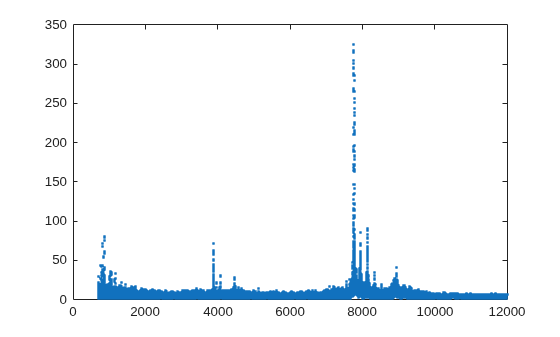
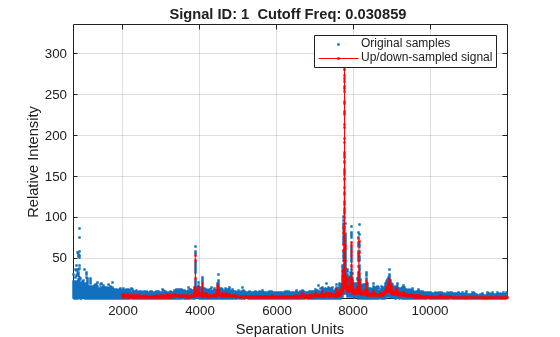
Resample the spectrogram to have 10000 samples between 2000 and maximum m/z value in the data set, and show both the resampled and original data.
[mz1,y1] = msresample(mz,y,10000, ...
                      Range=[2000 max(mz)], ...
                      ShowPlot=true);
Input Arguments
Name-Value Arguments
Output Arguments
Tips
LC/MS data analysis requires extended amounts of memory from the operating system.
If you receive errors related to memory, try the following:
Increase the virtual memory (swap space) for your operating system as described in Resolve "Out of Memory" Errors.
If you receive errors related to Java® heap space, increase your Java heap space:
If you have MATLAB® version 7.10 (R2010a) or later, see Java Runtime Environment Settings.
If you have MATLAB version 7.9 (R2009b) or earlier, see https://www.mathworks.com/matlabcentral/answers/92813-how-do-i-increase-the-heap-space-for-the-java-vm-in-matlab.
Version History
Introduced before R2006a
See Also
mspalign | msbackadj | msdotplot | msalign | msheatmap | mslowess | msnorm | mspeaks | msppresample | mssgolay | msviewer
Topics
- Mass Spectrometry and Bioanalytics
- Preprocessing Raw Mass Spectrometry Data
- Visualizing and Preprocessing Hyphenated Mass Spectrometry Data Sets for Metabolite and Protein/Peptide Profiling
- Differential Analysis of Complex Protein and Metabolite Mixtures Using Liquid Chromatography/Mass Spectrometry (LC/MS)

