Deploy and Run Sobel Edge Detection on NVIDIA Jetson
R2026bThis step of the example shows how to deploy a MATLAB® function onto an NVIDIA® Jetson™ board. You generate CUDA® code that takes snapshots using a webcam on the Jetson board, detects edges in the snapshots, and displays the output on the Jetson board. The Jetson board runs the code without using MATLAB.
Connect to NVIDIA Jetson
To deploy the application to the NVIDIA Jetson board, first create a connection to the board from MATLAB. Then, use the camera name and resolution as input arguments to the entry-point function.
Create Jetson Object
Before generating code and deploying the application to the Jetson board, connect to the hardware by using the jetson function.
hwobj = jetson("jetson-name","username","password");
When connecting to the target board for the first time, you must provide the host name or IP address, username, and password of the target board. On subsequent connections, you do not need to supply the address, username, and password. The hardware object reuses these settings from the most recent successful connection to an NVIDIA board.
This example reuses the settings from the most recent successful connection to a NVIDIA Jetson board.
hwobj = jetson;
### Checking for CUDA availability on the target...
### Checking for 'nvcc' in the target system path...
### Checking for cuDNN library availability on the target...
### Checking for TensorRT library availability on the target...
### Checking for prerequisite libraries is complete.
### Gathering hardware details...
### Checking for third-party library availability on the target...
### Gathering hardware details is complete.
Board name              : NVIDIA Jetson AGX Xavier Developer Kit
CUDA Version            : 11.4
cuDNN Version           : 8.6
TensorRT Version        : 8.5
GStreamer Version       : 1.16.3
V4L2 Version            : 1.18.0-2build1
SDL Version             : 1.2
OpenCV Version          : 4.5.4
Available Webcams       : Microsoft LifeCam Cinema(TM):
Available GPUs          : Xavier
Available Digital Pins  : 7  11  12  13  15  16  18  19  21  22  23  24  26  29  31  32  33  35  36  37  38  40
List Available Cameras
To detect available cameras on the Jetson board, use the getCameraList function of the jetson object.
camlist = getCameraList(hwobj);
              Camera Name              Video Device     Available Resolutions    Pixel Formats
    _______________________________    _____________    _____________________    _____________

    "Microsoft LifeCam Cinema(TM):"    "/dev/video0"    "(View resolutions)"      "YUYV,MJPG"
The getCameraList function lists the optimum resolutions supported by the camera sensor. Pick the resolution based on the requirements of your algorithm.
This example uses the first camera from the list and a 1280-by-720 resolution.
camName = table2array(camlist(1,"Camera Name"));
camResolution = [1280 720];
Verify GPU Environment on Target Board
Before generating GPU code, verify that the code generation environment has the compilers and libraries necessary for running this example by using the coder.checkGpuInstall (GPU Coder) function.
envCfg = coder.gpuEnvConfig("jetson");
envCfg.BasicCodegen = 1;
envCfg.Quiet = 1;
envCfg.HardwareObject = hwobj;
coder.checkGpuInstall(envCfg);
Prepare Sobel Edge Detection Algorithm for Deployment
The sobelEdgeDetection.m entry-point function captures live images from a camera connected to the hardware board, detect edges in the images, and displays the result on a monitor connected to the hardware board. To find the edges in the images, the algorithm calculates the convolution of a 3-by-3 Sobel operator with the image in the horizontal and vertical directions, calculates the magnitude of the convolutions, and applies a constant threshold.
type sobelEdgeDetection.mfunction sobelEdgeDetection(cameraName,resolution) %#codegen
%SOBELEDGEDETECTION() Entry-point function for Sobel edge detection
% This function is the entry-point function that supports examples in
% MATLAB Coder Support Package for NVIDIA Jetson and NVIDIA DRIVE
% Platforms that use Sobel algorithms for edge detection.
% Copyright 2020-2023 The MathWorks, Inc.
hwobj = jetson;
camObj = camera(hwobj,cameraName,resolution);
dispObj = imageDisplay(hwobj);
% Sobel kernel
kern = [1 2 1; 0 0 0; -1 -2 -1];
% Main loop
for k = 1:1000
% Capture the image from the camera on hardware.
img = snapshot(camObj);
% Finding horizontal and vertical gradients.
h = conv2(img(:,:,2),kern,'same');
v = conv2(img(:,:,2),kern','same');
% Finding magnitude of the gradients.
e = sqrt(h.*h + v.*v);
% Threshold the edges
edgeImg = uint8((e > 100) * 240);
% Display image.
image(dispObj,edgeImg');
end
end
Generate CUDA Code for Jetson Target Using GPU Coder
To generate a CUDA executable that you can deploy to an NVIDIA target, create a GPU code configuration object by using the coder.gpuConfig function with the exe build type.
cfg = coder.gpuConfig("exe");Create a configuration object for the Jetson platform by using the coder.hardware function, and assign it to the Hardware property of the code configuration object.
cfg.Hardware = coder.hardware("NVIDIA Jetson");To specify the folder in which to perform the remote build process on the target board, use the BuildDir property. If the specified build folder does not exist on the target board, then the software creates a folder. If you do not assign a value to cfg.Hardware.BuildDir, the remote build process occurs in the last specified build folder. If there is no stored build folder value, the build process takes place in the home folder.
cfg.Hardware.BuildDir = "~/remoteBuildDir";To generate an example C++ main file and compile it, set the GenerateExampleMain property. This example does not require modifications to the generated main files.
cfg.GenerateExampleMain = "GenerateCodeAndCompile";To generate CUDA code, use the codegen function with the GPU code configuration object and the input specifications for the sobelEdgeDetection.m entry-point function. The software generates code, copies it to the board, and builds the application.
inputArgs = {coder.Constant(camName),coder.Constant(camResolution)};
codegen("-config ",cfg,"-args",inputArgs,"sobelEdgeDetection","-report");
### Checking for CUDA availability on the target... ### Checking for 'nvcc' in the target system path... Code generation successful: View report
Run Sobel Edge Detection Application on Target Board
Run the application on the target device by using the runApplication function.
pid = runApplication(hwobj,"sobelEdgeDetection");### Launching the executable on the target... Executable launched successfully with process ID 28340. Displaying the simple runtime log for the executable... Note: For the complete log, run the following command in the MATLAB command window: system(hwobj,'cat /home/ubuntu/remoteBuildDir/MATLAB_ws/R2023b/home/user/Documents/MATLAB/ExampleManager/user.Bdoc23b.j2336540/nvidia-ex10094443/sobelEdgeDetection.log')
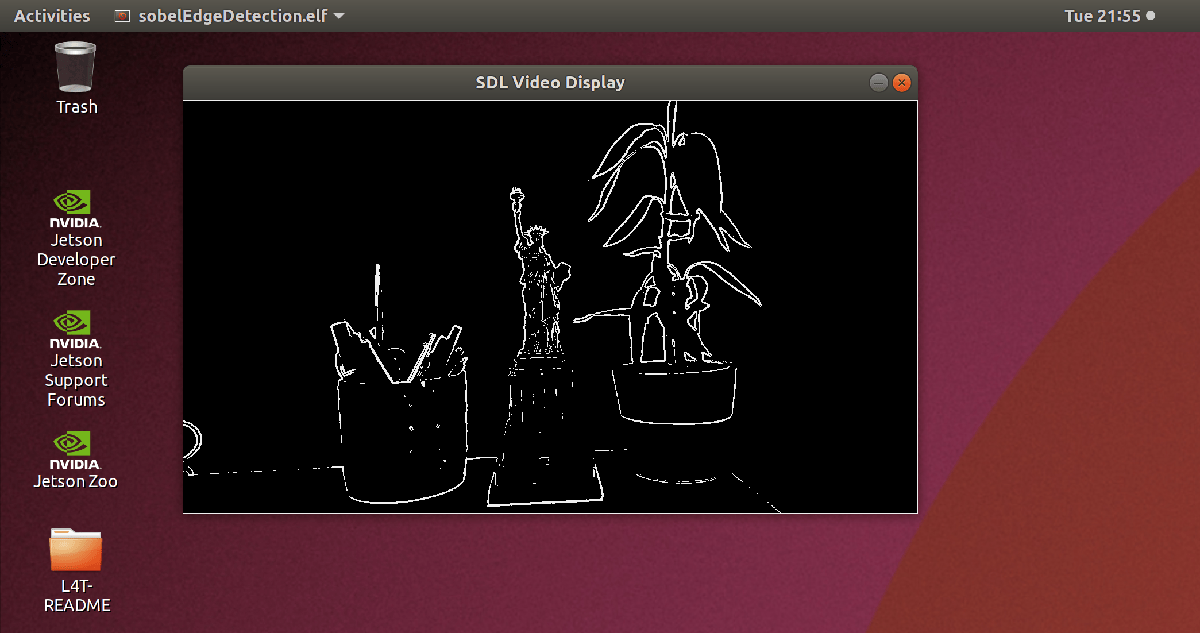
A window opens on the target hardware and shows the output of the Sobel edge detection algorithm for the live camera feed.
Stop the Application
To stop the sobelEdgeDetection application on the board, use the killApplication function.
killApplication(hwobj,"sobelEdgeDetection");
See Also
Functions
coder.checkGpuInstall(GPU Coder) |coder.gpuConfig(GPU Coder) |codegen|runApplication|killApplication

