Main Content

Single-Acting Actuator (MA)

R2026b

Single-acting linear actuator in a moist air network

Since R2024a

Libraries:
Simscape / Fluids / Moist Air / Actuators

Description

The Single-Acting Actuator (MA) block models a linear actuator with a piston controlled by a single moist air chamber. The actuator generates force in the extension and retraction strokes, but the actuation force depends on the gauge pressure in the chamber.

The figure shows the key components of an actuator. Port A represents the moist air chamber inlet, port R represents the translating actuator piston, and port C represents the actuator case. Port H represents the thermal interface between the moist air chamber and the environment.
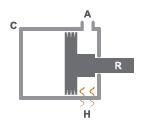
Single-Acting Actuator Schematic

Displacement

The block measures the piston displacement as the position at port R relative to port C. The Mechanical orientation parameter identifies the direction of piston displacement. The piston displacement is neutral, or 0, when the chamber volume is equal to the value of the Dead volume parameter. When the Piston displacement parameter is Provide input signal from Multibody joint, you input the piston displacement using port p. You can ensure that the derivative of the position signal is equal to the piston velocity by using a Translational Multibody Interface block to provide the piston displacement.

The direction of the piston motion depends on the Mechanical orientation parameter. If the mechanical orientation is positive, then the piston translation is positive in relation to the actuator case when the gauge pressure at port A is positive. The direction of motion reverses when the mechanical orientation is negative.

Hard Stop

A set of hard stops limit the piston range of motion. The block uses an implementation of the Translational Hard Stop block, which treats hard stops like spring-damper systems. The spring stiffness coefficient controls the restorative component of the hard-stop contact force and the damping coefficient the dissipative component.

The hard stops are located at the distal ends of the piston stroke. If the mechanical orientation is positive, then the lower hard stop is at x = 0, and the upper hard stop is at x = +stroke. If the mechanical orientation is negative, then the lower hard stop is at x = -stroke, and the upper hard stop is at x = 0.

Block Composite

This block is a composite component based on these Simscape™ Foundation blocks:
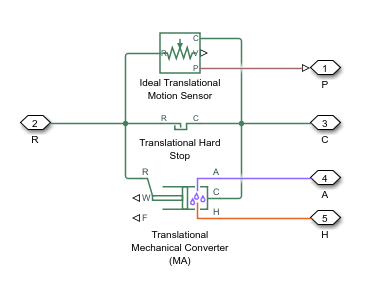
Diagram of elements that make up the block.

Ports

Input

expand all

Physical signal input associated with the piston position, in m. Connect this port to a Simscape Multibody™ network using a Translational Multibody Interface block.

Dependencies

To enable this port, set Piston displacement to Provide input signal from Multibody joint.

Programmatic Use

Port: p_in

Output

expand all

Physical signal output associated with the piston position, in m.

Dependencies

To enable this port, set Piston displacement to Calculate from velocity of port R relative to port C.

Programmatic Use

Port: p_out

Conserving

expand all

Moist air conserving port associated with chamber A.

Programmatic Use

Port: A

Translational mechanical conserving port associated with the actuator casing.

Programmatic Use

Port: C

Translational mechanical conserving port associated with the actuator piston.

Programmatic Use

Port: R

Thermal conserving port associated with the thermal mass of the moist air volume.

Programmatic Use

Port: H

Parameters

expand all

Actuator

Piston displacement direction. When you set this parameter to:

  • Pressure at A causes positive displacement of R relative to C, the piston displacement is positive when the volume of moist air at port A is expanding. This motion corresponds to rod extension.

  • Pressure at A causes negative displacement of R relative to C, the piston displacement is negative when the volume of moist air at port A is expanding. This motion corresponds to rod contraction.

Programmatic Use

Parameter: mech_orientation
Values: "foundation.enum.MechOrientationTranslational.Positive" | "foundation.enum.MechOrientationTranslational.Negative"

Cross-sectional area of the piston rod.

Programmatic Use

Parameter: piston_area

Maximum piston travel distance.

Programmatic Use

Parameter: stroke

Volume of moist air when the piston displacement is 0. This parameter is the moist air volume when the piston is against the actuator end cap.

Programmatic Use

Parameter: dead_volume

Cross-sectional area of port A.

Programmatic Use

Parameter: area_A

Environment reference pressure. When you select Atmospheric pressure, the block assumes a pressure of 0.101325 MPa.

Programmatic Use

Parameter: environment_spec
Values: "foundation.enum.pressure_spec.atmospheric" | "foundation.enum.pressure_spec.specified"

User-defined environmental pressure.

Dependencies

To enable this parameter, set Environment pressure specification to Specified pressure.

Programmatic Use

Parameter: environment_pressure

Hard Stop

Hard stop model to use when the piston is at full extension or full extraction. See the Translational Hard Stop block for more information.

Programmatic Use

Parameter: hardstop_model
Values: "simscape.enum.hardstop.smooth" | "simscape.enum.hardstop.fullundamped" | "simscape.enum.hardstop.fulldamped" | "simscape.enum.hardstop.modechart"

Piston stiffness coefficient.

Dependencies

To enable this parameter, set Hard stop model to one of these settings:

  • Stiffness and damping applied smoothly through transition region, damped rebound

  • Full stiffness and damping applied at bounds, undamped rebound

  • Full stiffness and damping applied at bounds, damped rebound

Programmatic Use

Parameter: stiff_coeff

Piston damping coefficient.

Dependencies

To enable this parameter, set Hard stop model to one of these settings:

  • Stiffness and damping applied smoothly through transition region, damped rebound

  • Full stiffness and damping applied at bounds, undamped rebound

  • Full stiffness and damping applied at bounds, damped rebound

Programmatic Use

Parameter: damping_coeff

Application range of the hard stop force model. The block does not apply the hard stop model when the maximum extension or retraction of the piston is outside of this range. In this situation, there is no additional force on the piston.

Dependencies

To enable this parameter, set Hard stop model to Stiffness and damping applied smoothly through transition region, damped rebound.

Programmatic Use

Parameter: transition

Ratio of the final to the initial relative speed between the slider and the stop after the slider bounces.

Dependencies

To enable this parameter, set Hard stop model to Based on coefficient of restitution.

Programmatic Use

Parameter: coeff_rest

Threshold relative speed between the slider and stop before collision. When the slider hits the case with a speed less than the value of the Static contact speed threshold parameter, they stay in contact. Otherwise, the slider bounces. To avoid modeling static contact between the slider and the case, set this parameter to 0.

Dependencies

To enable this parameter, set Hard stop model to Based on coefficient of restitution.

Programmatic Use

Parameter: v_tol

Minimum force needed to release the slider from a static contact mode.

Dependencies

To enable this parameter, set Hard stop model to Based on coefficient of restitution.

Programmatic Use

Parameter: f_tol

Initial Conditions

Method for determining the piston position. The block can receive the position from a Multibody block when set to Provide input signal from Multibody joint, or can calculate the position internally and report the position at port p. The position is between 0 and the value of the Piston stroke parameter when the mechanical orientation is positive and between 0 and the negative value of the Piston stroke parameter when the mechanical orientation is negative.

Programmatic Use

Parameter: displacement_spec
Values: "foundation.enum.DisplacementSpec.Calculate" | "foundation.enum.DisplacementSpec.InputSignal"

Piston position at the start of the simulation.

Dependencies

To enable this parameter, set Piston displacement to Calculate from velocity of port R relative to port C.

Programmatic Use

Parameter: x0

Moist air pressure at the start of the simulation.

Programmatic Use

Parameter: p_init

Moist air temperature at the start of simulation.

Programmatic Use

Parameter: T_init

Whether to describe the initial moist air humidity level using the relative humidity, specific humidity, water vapor mole fraction, or humidity ratio.

Programmatic Use

Parameter: humidity_spec
Values: "foundation.enum.HumiditySpec.RelativeHumidity" | "foundation.enum.HumiditySpec.SpecificHumidity" | "foundation.enum.HumiditySpec.MoleFraction" | "foundation.enum.HumiditySpec.HumidityRatio" | "foundation.enum.HumiditySpec.WetBulbTemperature"

Moist air relative humidity at the start of simulation.

Dependencies

To enable this parameter, set Initial humidity specification to Relative humidity.

Programmatic Use

Parameter: RH_init

Moist air specific humidity, defined as the mass fraction of water vapor in a moist air mixture, at the start of simulation.

Dependencies

To enable this parameter, set Initial humidity specification to Specific humidity.

Programmatic Use

Parameter: x_w_init

Mole fraction of the water vapor in a moist air mixture at the start of simulation.

Dependencies

To enable this parameter, set Initial humidity specification to Mole fraction.

Programmatic Use

Parameter: y_w_init

Moist air humidity ratio, defined as the mass ratio of water vapor to dry air and trace gas, at the start of simulation.

Dependencies

To enable this parameter, set Initial humidity specification to Humidity ratio.

Programmatic Use

Parameter: HR_init

Wet-bulb temperature of the moist air mixture at the start of simulation.

Dependencies

To enable this parameter, set Initial humidity specification to Wet-bulb temperature.

Programmatic Use

Parameter: Tw_init

Whether to use the mass fraction or mole fraction to describe the trace gas level at the start of simulation.

Programmatic Use

Parameter: trace_gas_spec
Values: "foundation.enum.trace_gas_spec.mass_fraction" | "foundation.enum.trace_gas_spec.mole_fraction"

Mass fraction of the trace gas in a moist air mixture at the start of simulation.

Dependencies

To enable this parameter, set Initial trace gas specification to Mass fraction.

Programmatic Use

Parameter: x_g_init

Mole fraction of the trace gas in a moist air mixture at the start of simulation.

Dependencies

To enable this parameter, set Initial trace gas specification to Mole fraction.

Programmatic Use

Parameter: y_g_init

Initial mass ratio of water droplets to moist air.

Programmatic Use

Parameter: r_d_init

Relative humidity above which condensation occurs in the chamber.

Programmatic Use

Parameter: RH_ws

Characteristic time scale at which an oversaturated moist air volume returns to saturation by condensing out excess humidity.

Programmatic Use

Parameter: time_constant_cond

Characteristic time scale at which water droplets evaporate to vapor.

Programmatic Use

Parameter: time_constant_evap

Fraction of the condensate in the moist air that is entrained as water droplets.

Programmatic Use

Parameter: fraction_entrained

Extended Capabilities

expand all

C/C++ Code Generation
Generate C and C++ code using Simulink® Coder™.

Version History

Introduced in R2024a

expand all