Create and Download an Arbitrary Waveform to a Function Generator
R2026bThis example shows how to use the Quick Control function generator interface to create an arbitrary waveform, load it into a function generate, and generate an output.
Requirements
To run this example you need:
Instrument Control Toolbox™.
An arbitrary waveform generator. This example uses Tektronix® AFG3022B.
VISA software installed on your machine. This example uses Agilent® IO Libraries Version 16.1.
IVI-C drivers for the instruments installed on your machine. This example uses Tektronix® tkafg3k IVI-C driver version 3.2 from the IVI Foundation Driver Registry.
Define Waveform Parameters
You will create an arbitrary waveform that consists of three different waveforms. Each waveform's properties include its amplitude and frequency. For each waveform, the amplitude is in volts, while the frequency is in Hz.
When generating signals for a function generator it is important to ensure continuity in the time domain so as to not introduce unintended spectral content in the signal, especially if the waveform is going to be played back repeatedly. To ensure continuity you can define the time vector such that it contains an integral number of cycles of each of the three tones that compose the synthesized waveform.
timeStep = 0.001;
time = 0:timeStep:(1-timeStep);
Set parameters for the first waveform.
amplitude1 = 0.2;
frequency1 = 10;
Set parameters for the second waveform.
amplitude2 = 0.8;
frequency2 = 14;
Set parameters for the third waveform.
amplitude3 = 0.6;
frequency3 = 18;
Create Arbitrary Waveform
Create three individual waveforms using the sin function.
waveform1 = amplitude1*sin(2*pi*frequency1*time);
waveform2 = amplitude2*sin(2*pi*frequency2*time);
waveform3 = amplitude3*sin(2*pi*frequency3*time);
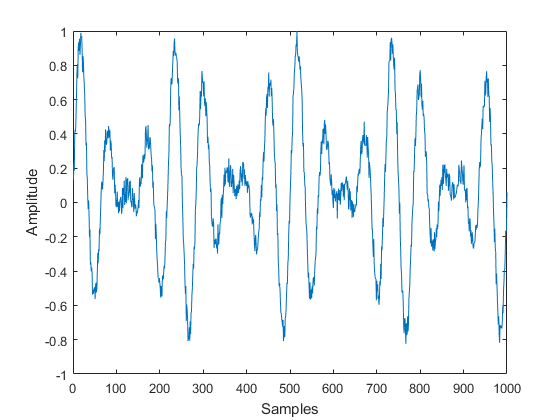
Combine the three waveforms to create the arbitrary waveform.
waveform = waveform1 + waveform2 + waveform3;
Add random noise to the waveform.
waveform = waveform + 0.3*rand(1,size(waveform,2));
Some function generators require a normalized waveform. In this case the waveform is normalized between -1 and +1.
waveformArray = (waveform./max(waveform))';
plot(waveformArray);
xlabel('Samples');
ylabel('Amplitude');
Connect to Function Generator
Discover all the available instrument resources (targets) you can connect to, using the resources function.
f = fgen;
resources(f)
ans =

  1×211 char array

 ASRL1::INSTR
 ASRL3::INSTR
 ASRL::COM1
 ASRL::COM3
 GPIB0::INTFC
 PXI0::MEMACC
 TCPIP0::172.28.22.217::inst0::INSTR
 TCPIP0::172.28.23.55::inst0::INSTR
 TCPIP0::a-d6054l-000006.dhcp.mathworks.com::inst0::INSTR
Because the IP address of the instrument is 172.28.22.217, the resource to specify is 'TCPIP0::172.28.22.217::inst0::INSTR'.
f = fgen('TCPIP0::172.28.22.217::inst0::INSTR','tkafg3k');
Download the Waveform and Generate Output
Specify the output channel of the function generator.
selectChannel(f,'1');
To generate a custom arbitrary waveform, set the Waveform property to 'Arb'.
f.Waveform = 'Arb';
Download the waveform onto the function generator.
downloadWaveform(f,waveformArray);
Enable the waveform generation.
enableOutput(f);
Clean Up
clear f;

