Reservoir (IL)
R2026bIsothermal liquid reservoir at constant or time-varying pressure
Reservoir (IL) block

To add a block to a model, double-click the canvas and start typing the block name. Then, select the block from the list.
Libraries:
Simscape /
Foundation Library /
Isothermal Liquid /
Elements
Description
The Reservoir (IL) block represents an infinite reservoir of isothermal liquid. Use this block to set the boundary condition in an isothermal liquid network. The liquid in the reservoir can be at a constant pressure, either atmospheric or specified by a block parameter. You can also control the pressure inside the reservoir by using the physical signal input port P. Port A, an isothermal liquid conserving port, represents the reservoir inlet.
The block icon changes depending on the values of the Provide input signal for pressure and Pressure specification parameters.
| Reservoir Type | Pressure Specification | Block Icon |
|---|---|---|
Constant — Provide input signal for pressure is off | Atmospheric pressure |
|
Specified pressure |
| |
Controlled — Provide input signal for pressure is on |
| |


Assumptions and Limitations
The volume of liquid inside the reservoir is assumed infinite. Therefore, the flow is assumed quasi-steady.
There is no flow resistance between port A and the reservoir interior.
Examples
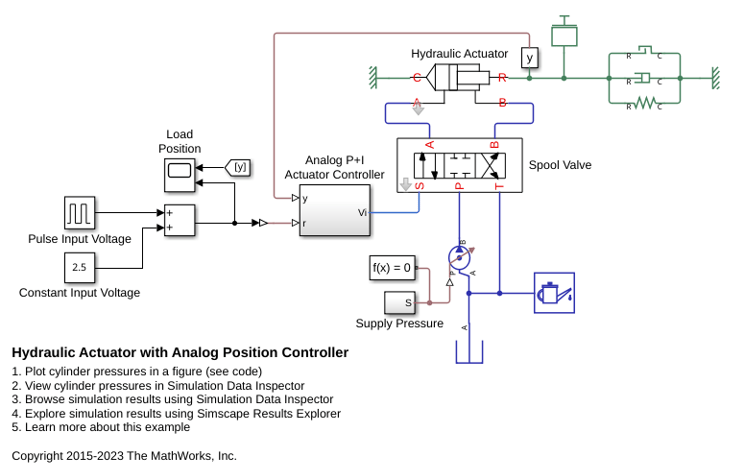
Hydraulic Actuator with Analog Position Controller
How the Foundation library can be used to model systems that span electrical, mechanical and isothermal liquid domains. In the model, a hydraulic system implemented in the isothermal liquid domain controls the mechanical load position in response to a voltage reference demand. If the reference demand is zero, then the hydraulic actuator (and load) displacement is zero, and if the reference is +5 volts, then the displacement is 100 mm.
Ports
Input
Conserving
Parameters
Programmatic Use: Add Block
To add the block programmatically, use the add_block function with one of these library block paths as the source.
"fl_lib/Isothermal Liquid/Elements/Reservoir (IL)"
Example: add_block("fl_lib/Isothermal Liquid/Elements/Reservoir (IL)","myModel/myBlock",MakeNameUnique="on")
For information about programmatic access to individual block parameters, see the Programmatic Use section of parameter descriptions on this page.

