Find Artifacts with Queries
R2026bWith the CI/CD Automation for Simulink Check, you can define a development and verification process for your team by adding tasks to your process model and using queries to find the relevant artifacts for your tasks and process. There are built-in queries for finding common artifacts like models, requirements, and test cases, but you can also create your own custom queries. Typically, you use queries to find artifacts for your tasks to iterate over, use as task inputs, or use to find additional artifacts that your task inputs depend on.
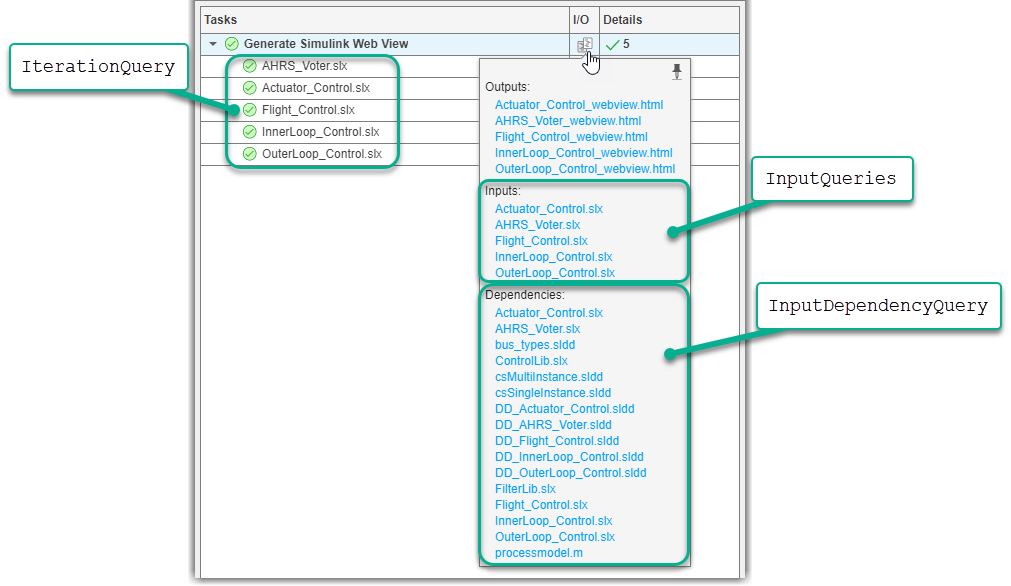
In Process Advisor, the Tasks column shows the artifacts that the task iterates over. When you point to task results in the I/O column, you can see the task inputs and input dependencies. You define the task iterations, inputs, and input dependencies by specifying the associated task properties using queries.
Built-In Queries
The support package has built-in queries that can find specific sets of artifacts in your project. You can use the queries when you define your process, but note that you can only use certain queries as an input query (InputQueries) or iteration query (IterationQuery) for a task.
| Query | Returns | Iteration Query | Input Query |
|---|---|---|---|
padv.builtin.query.FindArtifacts | Artifacts that meet specified criteria | ✔ | Only when the query properties |
padv.builtin.query.FindBuildfile | Build file for MATLAB® build tool | ✔ | |
padv.builtin.query.FindCodeForModel | Generated code files and buildInfo.mat for a model | ✔ | ✔ |
padv.builtin.query.FindDesignModels | Units and components in project | ✔ | |
padv.builtin.query.FindExternalCodeCache | External code cache files in project | ✔ | |
padv.builtin.query.FindFileWithAddress | File at the specified address | Only when the query property | ✔ |
padv.builtin.query.FindFilesWithLabel | Files with specific project label | ✔ | ✔ |
padv.builtin.query.FindMAJustificationFileForModel | Find Model Advisor justification files | ✔ | ✔ |
padv.builtin.query.FindModels | Models | ✔ | Only when the query properties |
padv.builtin.query.FindModelsWithLabel | Models with specific project label | ✔ | ✔ |
padv.builtin.query.FindModelsWithTestCases | Models associated with a test case | ✔ | |
padv.builtin.query.FindProjectFile | Project file | ✔ | ✔ |
padv.builtin.query.FindRefModels | Referenced models | ✔ | |
padv.builtin.query.FindRequirements | Requirement sets | ✔ | Only when the query properties |
padv.builtin.query.FindRequirementsForModel | Requirements associated with model | ✔ | ✔ |
padv.builtin.query.FindSubsystemsForModel | Subsystems | ✔ | ✔ |
padv.builtin.query.FindTestCasesForModel | Test cases associated with model | ✔ | ✔ |
padv.builtin.query.FindTopModels | Top models | ✔ | ✔ |
padv.builtin.query.FindUnits | Units in the project | ✔ | ✔ |
padv.builtin.query.GetDependentArtifacts | Dependent artifacts for artifact | ✔ | |
padv.builtin.query.GetInputsOfBuildToolTasks | Inputs of MATLAB build tool tasks | ✔ | |
padv.builtin.query.GetIterationArtifact | Artifact that the task is iterating over | ✔ | |
padv.builtin.query.GetOutputsOfDependentTask | Outputs from immediate predecessor task | ✔ |
Custom Queries
If you need to find artifacts that are not already covered by built-in queries, you can use custom queries in your process model. Depending on what you want your custom query to do, there are different approaches. For more information, see Create Custom Queries.
Valid Artifact Types
The support package creates a digital thread to monitor artifacts in your project and analyze their relationships. The digital thread is a set of metadata that allows Process Advisor and its build system to detect changes to the project and identify outdated task results. However, the digital thread only tracks changes to specific types of artifacts shown below. If you use custom queries that return unsupported artifact types, the digital thread cannot detect changes to those artifacts, which can limit the ability of Process Advisor to identify outdated tasks results. To see a list of the files the digital thread is tracking in your project, see Find Artifacts That Digital Thread Tracks.
The digital thread tracks the following types of artifacts. If an artifact in your project is represented by a padv.Artifact object with another artifact type, such as "other_file", changes to that artifact do not cause tasks to become outdated.
| Category | Artifact Type | Description |
|---|---|---|
MATLAB | "m_class" | MATLAB class |
"m_file" | MATLAB file | |
"m_func" | MATLAB function | |
"m_method" | MATLAB class method | |
"m_property" | MATLAB class property | |
Model Advisor | "ma_config_file" | Model Advisor configuration file |
"ma_justification_file" | Model Advisor justifications file | |
Model Finder | "mf_database" | Model Finder database file |
Process Advisor | "padv_dep_artifacts" | Related artifacts that current artifact depends on |
"padv_output_file" | Process Advisor output file | |
Project | "project" | Current project file |
Requirements | "mwreq_file" | Requirement file (since R2024b) |
"mwreq_item" | Requirement (since R2024b) | |
| Requirement (for R2024a and earlier) | |
"sl_req_file" | Requirement file (for R2024a and earlier) | |
"sl_req_table" | Requirements Table | |
Stateflow® | "sf_chart" | Stateflow chart |
"sf_graphical_fcn" | Stateflow graphical function | |
"sf_group" | Stateflow group | |
"sf_state" | Stateflow state | |
"sf_state_transition_chart" | Stateflow state transition chart | |
"sf_truth_table_chart" | Stateflow truth table (since R2024a) | |
Simulink® | "sl_block_diagram" | Block diagram |
"sl_data_dictionary_file" | Data dictionary file | |
"sl_embedded_matlab_fcn" | MATLAB function | |
"sl_block_diagram" | Block diagram | |
"sl_library_file" | Library file | |
"sl_model_file" | Simulink model file | |
"sl_protected_model_file" | Protected Simulink model file | |
"sl_subsystem" | Subsystem | |
"sl_subsystem_file" | Subsystem file | |
System Composer™ | "zc_activity_diagram" | System Composer activity diagram (since R2026a) |
"zc_allocation" | System Composer allocation (since R2025a) | |
"zc_allocation_scenario" | System Composer allocation scenario (since R2025a) | |
"zc_allocation_set" | System Composer allocation set (since R2025a) | |
"zc_allocation_set_file" | System Composer allocation set file (since R2025a) | |
"zc_architecture_diagram" | System Composer architecture (since R2026a) | |
"zc_block_diagram" | System Composer architecture (for R2025b and earlier) | |
"zc_component" | System Composer architecture component | |
"zc_file" | System Composer architecture file | |
| Tests | "harness_info_file" | Harness info file |
"sl_harness_block_diagram" | Harness block diagram | |
"sl_harness_file" | Test harness file | |
"sl_test_case" | Simulink Test™ case | |
"sl_test_case_result" | Simulink Test case result | |
"sl_test_file" | Simulink Test file | |
"sl_test_iteration" | Simulink Test iteration | |
"sl_test_iteration_result" | Simulink Test iteration result | |
"sl_test_report_file" | Simulink Test result report (before R2024b) | |
"sl_test_result_file" | Simulink Test result file | |
"sl_test_resultset" | Simulink Test result set | |
"sl_test_seq" | Test Sequence | |
"sl_test_suite" | Simulink Test suite | |
"sl_test_suite_result" | Simulink Test suite result |
Dynamically Resolve Paths with Tokens
To dynamically resolve paths for artifacts, directories, and other process information, you can use tokens as placeholders. The default process model and built-in task source code use the following tokens.
| Token | Description |
|---|---|
$INPUTARTIFACT$ | Input artifact for task |
$ITERATIONARTIFACT$ | Current artifact that the task is acting on |
$PWD$ | Current working directory |
$TIMESTAMP$ | Current date and time in the format 'yyyy_mm_dd_HH_MM_ss' |
$PROJECTROOT$ | Root folder of project |
$TASKNAME$ | Task name or title |
$DEFAULTOUTPUTDIR$ | Default output directory for the process model |
$ROOTITERATIONARTIFACT$ | Root-level artifact for the iteration artifact |
You can use these tokens in your process model, but note that:
The output directory of a task cannot be
$PROJECTROOT$.The pipeline generator,
padv.pipeline.generatePipeline, does not support the tokens$PWD$,$TIMESTAMP$, and$INPUTARTIFACT$.
Inside the run method and dryRun method for a task, you can resolve tokens to their absolute path by using the resolvePath method. For example:
reportPath = convertStringsToChars(obj.resolvePath(obj.ReportPath));

