Advisor.getExclusion
R2026bGet exclusion information from model or exclusion file
Syntax
Description
exclusionInfo = Advisor.getExclusion(modelName)
exclusionInfo = Advisor.getExclusion(modelName,filterType,entityIdentifier)filterType argument. The entity is specified by the
entityIdentifier argument.
Examples
Create a model, add an exclusion to a block, and then get the exclusion from the model.
Create and open a model named myAdvisorModel.
modelName = 'myAdvisorModel';
new_system(modelName);
open_system(modelName);
Add a Gain block to the model.
add_block('simulink/Math Operations/Gain',[modelName '/Gain']);
Exclude the Gain block from Model Advisor analysis.
Advisor.addExclusion(modelName,'Block',[modelName '/Gain']);
Get all exclusions from the model.
exclusions = Advisor.getExclusion(modelName);
The exclusion for the Gain block is the first and only element in
exclusions.
exclusions(1)
ans =

  AdvisorFilterSpecification with properties:
     filteredItem: [1×1 advisor.filter.IFilter]
         metadata: [1×1 advisor.filter.Metadata]
             mode: Exclude
    commentThread: [1×0 advisor.filter.Metadata Sequence]
             type: Block
               id: 'myAdvisorModel:1'
           checks: [1×1 String Sequence]
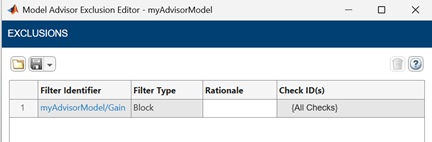
Alternatively, you can view the exclusion in the Model Advisor Exclusion Editor by right-clicking the Simulink® canvas and selecting Model Advisor > Open Model Advisor Exclusion Editor.
The Model Advisor Exclusion Editor shows a table with a row for the
Gain block exclusion. The Filter Identifier column
shows the pathname of the excluded block and the Filter Type column
shows Block. The Rationale and Check
ID(s) columns are empty because no rationale or checks
were specified.
Continue from the previous example to add a second exclusion with a
rationale and then get the exclusion for that specific block using the
filterType and entityIdentifier
arguments.
Using the myAdvisorModel model from the previous example, add a
Constant block and exclude it with a
rationale.
add_block('simulink/Sources/Constant',[modelName '/Constant']);
Advisor.addExclusion(modelName,'Block',[modelName '/Constant'],'rationale','Block verified manually.');
Get the exclusion for the Constant block.
exclusion = Advisor.getExclusion(modelName,'Block',[modelName '/Constant'])
exclusion =

  AdvisorFilterSpecification with properties:
     filteredItem: [1×1 advisor.filter.IFilter]
         metadata: [1×1 advisor.filter.Metadata]
             mode: Exclude
    commentThread: [1×0 advisor.filter.Metadata Sequence]
             type: Block
               id: 'myAdvisorModel:2'
           checks: [1×1 String Sequence]
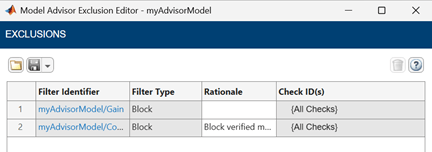
Alternatively, you can view the exclusion in the Model Advisor Exclusion Editor by right-clicking the Simulink canvas and selecting Model Advisor > Open Model Advisor Exclusion Editor.
The Rationale column in the Model Advisor Exclusion Editor
shows Block verified manually for the Constant block
exclusion.
Input Arguments
Output Arguments
Alternative Functionality
Model Advisor Exclusion Editor
You can also view exclusions by using the Model Advisor Exclusion Editor. To view exclusion information for a model, right-click in the Simulink canvas or right-click an entity and select Model Advisor > Open Model Advisor Exclusion Editor. For more information, see Exclude Blocks from Model Advisor Check Analysis.

