Interactive Calculus in Live Editor
R2026bThis example shows how you can add interactive controls to solve a calculus problem in a live script.
Adding Interactive Controls to Your Script
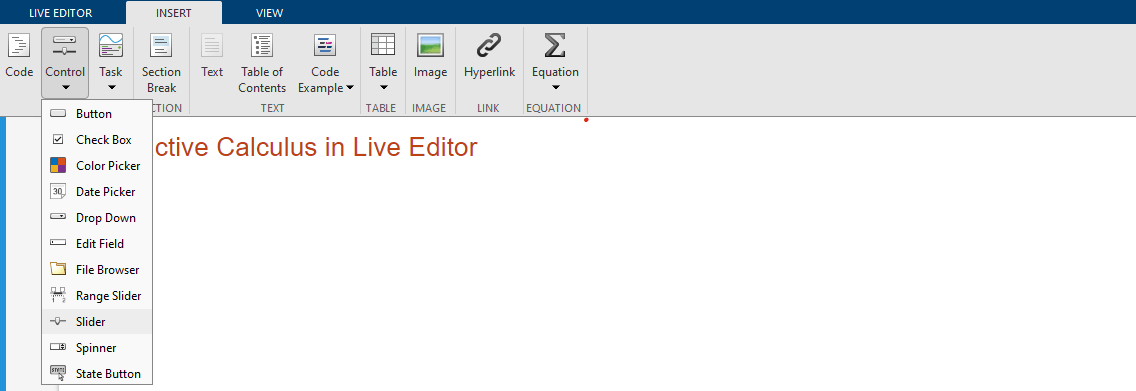
An interactive control can be used to change the values of variables in your live script. To add a numeric slider, go to the Insert tab, click the Control button, and select Slider. For more information, see Add Interactive Controls to Live Scripts.
Initialize Variables and Function
Evaluate the integral
using Riemann sum approximation.
A Riemann sum is a numerical approximation of the analytical integration by a finite sum of rectangular areas. Use the interactive slider bars to set the upper bound of the integral, the number of rectangles, and the constant factor of the function.
syms x; xMax =4; numRectangles =
30; c =
2.5; f(x) = c*x^2; yMax = double(f(xMax));
Visualize the Area Under the Curve Using Riemann Sums
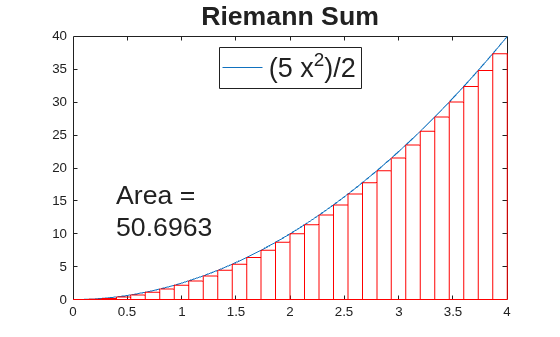
Plot the integrand f.
fplot(f);
xlim([0 xMax]); ylim([0 yMax]);
legend({},Location="north",FontSize=20);
title("Riemann Sum",FontSize=20);
Calculate the rectangular areas that approximate the area under the curve of the integral. Plot the rectangles.
width = xMax/numRectangles;
sum = 0;
for i = 0:numRectangles-1
    xval = i*width;
    height = double(f(xval));
    rectangle(Position=[xval 0 width height],EdgeColor="r");
    sum = sum + width*height;
end
text(xMax/10,yMax/3,["Area = " num2str(sum)],FontSize=20);
Calculate the Integral Analytically
Calculate the integral analytically. Use vpa to numerically approximate the exact symbolic result to 32 significant digits.
fInt = int(f,0,xMax)
fInt =
vpa(fInt)
ans =

