Install UAV Toolbox Support Package for ArduPilot Autopilots in Windows
R2026bAdd support for ArduPilot® Autopilots by installing the UAV Toolbox Support Package for ArduPilot Autopilots.
After you install the support package, you can use:
Supported hardware and its features.
Block library to create models.
Examples that show you how to use flight controller boards, including Pixhawk®, Cube, CUAV, and others, with the ArduPilot flight stack.
Operating System Requirements
The UAV Toolbox Support Package for ArduPilot Autopilots supports only Microsoft® Windows® operating systems.
Note
This support package does not support Linux® and macOS.
The support package can be installed on these versions of Windows operating systems:
Windows
Windows 11 (recommended)
Windows 10
Tip
To find the Windows version, enter
winverat the Windows Start Menu.
Install Support Package
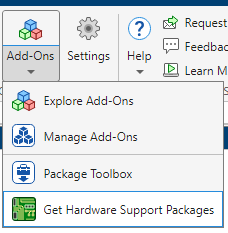
On the MATLAB® Home tab, in the Environment section, select Add-Ons > Get Hardware Support Packages.
In the Add-Ons Panel, click the UAV Toolbox Support Package for ArduPilot Autopilots and then click Install.

