Use ARXML Files in CAN Communication
R2026bThis example shows you how to create, receive, and process messages using information stored in ARXML files.
Open the ARXML File
Create a database in the workspace from the ARXML file. The database includes metadata and structure information about the ARXML file.
db = arxmlDatabase("demoFile.arxml")db =
Database with properties:
Name: "demoFile.arxml"
Path: "/tmp/Bdoc26b_3351752_1669259/tp27681ebe/vnt-ex83636057/demoFile.arxml"
CAN: [1×1 vnt.arxml.protocol.CAN]
Examine the Frame property to see the names of all messages defined in this file.
db.CAN.Frame
ans = 2×9 table
         Name                      Path                   ID     Extended    StartBit    Length           ByteOrder                         PDU                     FrameTriggering
    ______________    _______________________________    ____    ________    ________    ______    _______________________    ________________________________    ___________________

    "EngineMsg"       "/MathWorks/FRAME/EngineMsg"       1000     false         0          8       mostSignificantByteLast    /MathWorks/PDUS/Engine_PDU          "FrameTriggering_1"
    "VehicleState"    "/MathWorks/FRAME/VehicleState"    1001     true          0          4       mostSignificantByteLast    /MathWorks/PDUS/VehicleState_PDU    "FrameTriggering_2"
View PDU Information
In the table, view the Protocol Data Unit (PDU) information for EngineMsg, including the PDU start bit, data length, and a signal list. Only ISignalIPDU is supported.
ISignalIPDUTable = db.CAN.PDU.ISignalIPDU;
EnginPDU = ISignalIPDUTable(ISignalIPDUTable.Name == "Engine_PDU", :)
EnginPDU = 1×6 table
Name Frame ISignal StartBit Length ByteOrder
____________ __________________________ ___________ ________ ______ _______________________
"Engine_PDU" /MathWorks/FRAME/EngineMsg {4×5 table} 0 8 mostSignificantByteLast
View Signal Metadata
There are two ways to view the Signal information. View basic mapping information of the signals of a specific PDU in the ISignalIPDU table.
EnginPDU.ISignal{1}ans = 4×5 table
Name StartBit Length ByteOrder BaseType
____________________ ________ ______ _______________________ ____________
"VehicleSpeed" 0 8 mostSignificantByteLast {1×1 struct}
"TransmissionStatus" 8 8 mostSignificantByteLast {1×1 struct}
"GPSSpeed" 16 8 mostSignificantByteLast {1×1 struct}
"EngineSpeed" 24 32 mostSignificantByteLast {1×1 struct}
You can also view the signal information in the ISignal table, which provides more details including the unit, compuMethod, baseType, systemSignal reference, etc.
db.CAN.ISignal
ans = 5×9 table
            Name                   CompuMethod           StartBit    Length           ByteOrder             BaseType      Unit                  PDU                                       SystemSignal
    ____________________    _________________________    ________    ______    _______________________    ____________    ____    ________________________________    _____________________________________________________

    "EngineSpeed"           1×1 vnt.arxml.CompuMethod       24         32      mostSignificantByteLast    {1×1 struct}    rpm     /MathWorks/PDUS/Engine_PDU          "/MathWorks/SYSTEM_SIGNALS/EngineSpeed_System"
    "GPSSpeed"              1×1 vnt.arxml.CompuMethod       16          8      mostSignificantByteLast    {1×1 struct}    rpm     /MathWorks/PDUS/Engine_PDU          "/MathWorks/SYSTEM_SIGNALS/GPSSpeed_System"
    "Ignition"              1×1 vnt.arxml.CompuMethod        0          2      mostSignificantByteLast    {1×1 struct}    rpm     /MathWorks/PDUS/VehicleState_PDU    "/MathWorks/SYSTEM_SIGNALS/Ignition_System"
    "TransmissionStatus"    1×1 vnt.arxml.CompuMethod        8          8      mostSignificantByteLast    {1×1 struct}    mph     /MathWorks/PDUS/Engine_PDU          "/MathWorks/SYSTEM_SIGNALS/TransmissionStatus_System"
    "VehicleSpeed"          1×1 vnt.arxml.CompuMethod        0          8      mostSignificantByteLast    {1×1 struct}    rpm     /MathWorks/PDUS/Engine_PDU          "/MathWorks/SYSTEM_SIGNALS/VehicleSpeed_System"
Create a Message Using Database Definitions
Create a new message by specifying the database and the message name EngineMsg to have the database definition applied.
msgEngine = canMessage(db, "EngineMsg")msgEngine =
Message with properties:
Message Identification
ProtocolMode: 'CAN'
ID: 1000
Extended: 0
Name: 'EngineMsg'
Data Details
Timestamp: 0
Data: [0 0 0 0 0 0 0 0]
Signals: [1×1 struct]
Length: 8
Protocol Flags
Error: 0
Remote: 0
Other Information
Database: [1×1 vnt.arxml.Database]
UserData: []
View Signal Value
View the Signals property to see signal values for this message. You can directly write to and read from these signals to pack and unpack data from the message. EngineMsg includes VehicleSpeed, TransmissionStatus, GPSSpeed, and EngineSpeed. VehicleSpeed, TransmissionStatus, and EngineSpeed are numeric values. TransmissionStatus is an enumeration type, which can have the value 'P', 'N', 'R', or 'D'. Enumeration values are output as text, converted from the raw CAN messages using text category CompuMethods, such as TEXTTABLE, defined in the ARXML file.
msgEngine.Signals
ans = struct with fields:
          VehicleSpeed: 0
    TransmissionStatus: 'P'
              GPSSpeed: 0
           EngineSpeed: 0
Change Signal Information
Change the signal TransmissionStatus value from 'P' (parking) to 'N' (neutral).
msgEngine.Signals.TransmissionStatus = 'N'; Read the signal values back to verify that TransmissionStatus has been updated with the new value.
msgEngine.Signals
ans = struct with fields:
          VehicleSpeed: 0
    TransmissionStatus: 'N'
              GPSSpeed: 0
           EngineSpeed: 0
When a value is written directly to the signal, it is translated, scaled, and packed into the message data using the database definition. Note the value change in the Data property after a new value is written to the EngineSpeed signal.
msgEngine.Signals.EngineSpeed = 5500;
msgEngine.Signals
ans = struct with fields:
          VehicleSpeed: 0
    TransmissionStatus: 'N'
              GPSSpeed: 0
           EngineSpeed: 5500
Receive Messages with Database Information
To automatically apply database definitions to incoming messages, attach a database to a CAN channel that receives messages. The database decodes only those messages that are defined. All other messages are received in their raw form.
rxCh = canChannel("MathWorks", "Virtual 1", 2);
rxCh.Database = db
rxCh =
  Channel with properties:

   Device Information
            DeviceVendor: 'MathWorks'
                  Device: 'Virtual 1'
      DeviceChannelIndex: 2
      DeviceSerialNumber: 0
            ProtocolMode: 'CAN'

   Status Information
                 Running: 0
       MessagesAvailable: 0
        MessagesReceived: 0
     MessagesTransmitted: 0
    InitializationAccess: 1
        InitialTimestamp: [0×0 datetime]
           FilterHistory: 'Standard ID Filter: Allow All | Extended ID Filter: Allow All'

   Channel Information
               BusStatus: 'N/A'
              SilentMode: 0
         TransceiverName: 'N/A'
        TransceiverState: 'N/A'
       ReceiveErrorCount: 0
      TransmitErrorCount: 0
                BusSpeed: 500000
                     SJW: []
                   TSEG1: []
                   TSEG2: []
            NumOfSamples: []

   Other Information
                Database: [1×1 vnt.arxml.Database]
                UserData: []
Receive Messages
Start the channel, generate some message traffic, and receive messages with physical message decoding.
start(rxCh);
generateCANMsgsARXML();
rxMsg = receive(rxCh, Inf, "OutputFormat", "timetable");
rxMsg(1:15, :)
ans = 15×8 timetable
       Time         ID     Extended          Name                   Data             Length      Signals       Error    Remote
    ___________    ____    ________    ________________    ______________________    ______    ____________    _____    ______

    0.11761 sec    1000     false      {'EngineMsg'   }    {[   0 3 0 0 0 0 0 0]}      8       {1×1 struct}    false    false
    0.11761 sec    1001     true       {'VehicleState'}    {[           0 0 0 0]}      4       {1×1 struct}    false    false
    0.36761 sec    1000     false      {'EngineMsg'   }    {[68 3 102 0 0 0 0 0]}      8       {1×1 struct}    false    false
    0.61774 sec    1000     false      {'EngineMsg'   }    {[ 62 3 97 0 0 0 0 0]}      8       {1×1 struct}    false    false
    0.61774 sec    1001     true       {'VehicleState'}    {[           1 0 0 0]}      4       {1×1 struct}    false    false
    0.86762 sec    1000     false      {'EngineMsg'   }    {[61 3 103 0 0 0 0 0]}      8       {1×1 struct}    false    false
    1.1176 sec     1000     false      {'EngineMsg'   }    {[ 68 3 91 0 0 0 0 0]}      8       {1×1 struct}    false    false
    1.1176 sec     1001     true       {'VehicleState'}    {[           1 0 0 0]}      4       {1×1 struct}    false    false
    1.3676 sec     1000     false      {'EngineMsg'   }    {[67 3 103 0 0 0 0 0]}      8       {1×1 struct}    false    false
    1.6176 sec     1000     false      {'EngineMsg'   }    {[66 3 100 0 0 0 0 0]}      8       {1×1 struct}    false    false
    1.6176 sec     1001     true       {'VehicleState'}    {[           1 0 0 0]}      4       {1×1 struct}    false    false
    1.8677 sec     1000     false      {'EngineMsg'   }    {[ 66 3 91 0 0 0 0 0]}      8       {1×1 struct}    false    false
    2.1177 sec     1000     false      {'EngineMsg'   }    {[ 62 3 89 0 0 0 0 0]}      8       {1×1 struct}    false    false
    2.1177 sec     1001     true       {'VehicleState'}    {[           1 0 0 0]}      4       {1×1 struct}    false    false
    2.3677 sec     1000     false      {'EngineMsg'   }    {[ 66 3 93 0 0 0 0 0]}      8       {1×1 struct}    false    false
Stop the receiving channel and clear it from the workspace.
stop(rxCh);
clear rxCh
Examine a Received Message
Inspect a received message to see the applied database decoding.
rxMsg(10, :)
ans = 1×8 timetable
       Time        ID     Extended        Name                  Data             Length      Signals       Error    Remote
    __________    ____    ________    _____________    ______________________    ______    ____________    _____    ______

    1.6176 sec    1000     false      {'EngineMsg'}    {[66 3 100 0 0 0 0 0]}      8       {1×1 struct}    false    false
rxMsg.Signals{10}ans = struct with fields:
VehicleSpeed: 66
TransmissionStatus: 'D'
GPSSpeed: 67.3333
EngineSpeed: 0
Extract All Instances of a Specified Message
Extract all instances of message EngineMsg.
allmsgEngine = rxMsg("EngineMsg" == rxMsg.Name, :);
allmsgEngine(1:15, :)
ans = 15×8 timetable
Time ID Extended Name Data Length Signals Error Remote
___________ ____ ________ _____________ ______________________ ______ ____________ _____ ______
0.11761 sec 1000 false {'EngineMsg'} {[ 0 3 0 0 0 0 0 0]} 8 {1×1 struct} false false
0.36761 sec 1000 false {'EngineMsg'} {[68 3 102 0 0 0 0 0]} 8 {1×1 struct} false false
0.61774 sec 1000 false {'EngineMsg'} {[ 62 3 97 0 0 0 0 0]} 8 {1×1 struct} false false
0.86762 sec 1000 false {'EngineMsg'} {[61 3 103 0 0 0 0 0]} 8 {1×1 struct} false false
1.1176 sec 1000 false {'EngineMsg'} {[ 68 3 91 0 0 0 0 0]} 8 {1×1 struct} false false
1.3676 sec 1000 false {'EngineMsg'} {[67 3 103 0 0 0 0 0]} 8 {1×1 struct} false false
1.6176 sec 1000 false {'EngineMsg'} {[66 3 100 0 0 0 0 0]} 8 {1×1 struct} false false
1.8677 sec 1000 false {'EngineMsg'} {[ 66 3 91 0 0 0 0 0]} 8 {1×1 struct} false false
2.1177 sec 1000 false {'EngineMsg'} {[ 62 3 89 0 0 0 0 0]} 8 {1×1 struct} false false
2.3677 sec 1000 false {'EngineMsg'} {[ 66 3 93 0 0 0 0 0]} 8 {1×1 struct} false false
2.6177 sec 1000 false {'EngineMsg'} {[67 3 100 0 0 0 0 0]} 8 {1×1 struct} false false
2.8677 sec 1000 false {'EngineMsg'} {[ 64 3 98 0 0 0 0 0]} 8 {1×1 struct} false false
3.1177 sec 1000 false {'EngineMsg'} {[ 62 3 99 0 0 0 0 0]} 8 {1×1 struct} false false
3.3677 sec 1000 false {'EngineMsg'} {[ 61 3 96 0 0 0 0 0]} 8 {1×1 struct} false false
3.6177 sec 1000 false {'EngineMsg'} {[ 67 3 92 0 0 0 0 0]} 8 {1×1 struct} false false
Plot Physical Signal Values
Use canSignalTimetable to repackage signal data from message EngineMsg into a signal timetable.
signalTimetable = canSignalTimetable(rxMsg, "EngineMsg");
signalTimetable(1:15, 1:3)
ans = 15×3 timetable
Time VehicleSpeed TransmissionStatus GPSSpeed
___________ ____________ __________________ ________
0.11761 sec 0 "D" 0
0.36761 sec 68 "D" 68.667
0.61774 sec 62 "D" 65.333
0.86762 sec 61 "D" 69.333
1.1176 sec 68 "D" 61.333
1.3676 sec 67 "D" 69.333
1.6176 sec 66 "D" 67.333
1.8677 sec 66 "D" 61.333
2.1177 sec 62 "D" 60
2.3677 sec 66 "D" 62.667
2.6177 sec 67 "D" 67.333
2.8677 sec 64 "D" 66
3.1177 sec 62 "D" 66.667
3.3677 sec 61 "D" 64.667
3.6177 sec 67 "D" 62
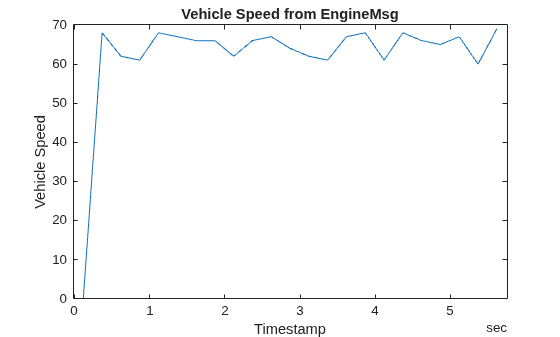
Plot the values of signal VehicleSpeed over time.
plot(signalTimetable.Time, signalTimetable.VehicleSpeed)
title("Vehicle Speed from EngineMsg", "FontWeight", "bold")
xlabel("Timestamp")
ylabel("Vehicle Speed")
Close the ARXML File
Close access to the ARXML file by clearing the database variable from the workspace.
clear db
