802.11 MAC Frame Generation
R2026bThis example shows how to generate IEEE® 802.11™ MAC frames.
Introduction
This example shows how to generate WLAN MAC frames, as specified in the section 9 of [1], [2], and [3]. Further, you can also export these frames to a packet capture (PCAP) file for analysis with third-party packet analysis tools such as Wireshark.
The general MAC frame format consists of a header, frame-body, and frame check sequence (FCS). The header holds information about the frame. The frame-body carries data that needs to be transmitted. The transmitter calculates the FCS over the header and frame-body. The receiver uses the FCS to confirm that the header and frame-body are properly formed. This diagram shows the structure of a general MAC frame.
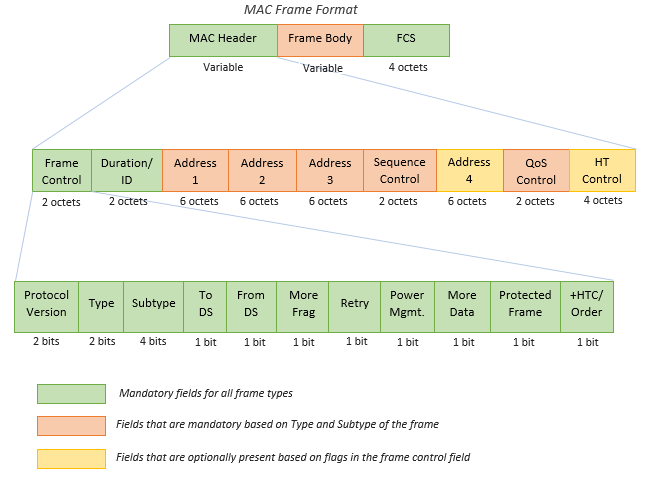
IEEE Std 802.11™-2020 Adapted and reprinted with permission from IEEE. Copyright IEEE 2020. All rights reserved
For more information, see the WLAN MAC Frame Structure topic.
You can use the wlanMACFrame function to generate MAC frames. This function accepts a MAC frame configuration object wlanMACFrameConfig as an input. This object configures the fields in the MAC header. Set the FrameType property to the desired Subtype description in Table 9-1 of [1] to set the appropriate Type and Subtype fields in the MAC header. The wlanMACFrame function supports the generation of these MPDUs.
Management Frames: Beacon
Data Frames: Data, Null, QoS Data, QoS Null
Control Frames: RTS, CTS, Ack, Block Ack, CF-End, Trigger
In addition to these MPDUs, wlanMACFrame also supports generation of A-MPDUs containing MPDUs of type QoS Data.
Control Frame Generation
To generate an RTS frame, create a MAC frame configuration object with the FrameType set to 'RTS'.
rtsCfg = wlanMACFrameConfig('FrameType', 'RTS');
disp(rtsCfg);
  wlanMACFrameConfig with properties:

          FrameType: 'RTS'
    PowerManagement: 0
           MoreData: 0
           Duration: 0
           Address1: 'FFFFFFFFFFFF'
           Address2: '00123456789B'

   Read-only properties:
            Decoded: 0
Configure the frame header fields.
% Duration
rtsCfg.Duration = 500;
% Receiver address
rtsCfg.Address1 = 'FCF8B0102001';
% Transmitter address
rtsCfg.Address2 = 'FCF8B0102002';
Generate an RTS frame using the configuration.
% Generate octets for an RTS frame
rtsFrame = wlanMACFrame(rtsCfg);
By default, the output of wlanMACFrame is a sequence of hexadecimal octets. If you want to generate the MAC frame as a sequence of bits, set the OutputFormat parameter to bits.
% Generate bits for an RTS frame
rtsFrameBits = wlanMACFrame(rtsCfg, OutputFormat='bits');
Data Frame Generation
To generate a QoS Data frame, create a MAC frame configuration object with the FrameType set to 'QoS Data'.
qosDataCfg = wlanMACFrameConfig(FrameType='QoS Data');
disp(qosDataCfg);
  wlanMACFrameConfig with properties:

          FrameType: 'QoS Data'
        FrameFormat: 'Non-HT'
               ToDS: 0
             FromDS: 1
     Retransmission: 0
    PowerManagement: 0
           MoreData: 0
           Duration: 0
           Address1: 'FFFFFFFFFFFF'
           Address2: '00123456789B'
           Address3: '00123456789B'
     SequenceNumber: 0
                TID: 0
          AckPolicy: 'No Ack'
    MSDUAggregation: 0
               EOSP: 0
        IsMeshFrame: 0

   Read-only properties:
            Decoded: 0
Configure the frame header fields.
% From DS flag
qosDataCfg.FromDS = 1;
% To DS flag
qosDataCfg.ToDS = 0;
% Acknowledgment Policy
qosDataCfg.AckPolicy = 'Normal Ack';
% Receiver address
qosDataCfg.Address1 = 'FCF8B0102001';
% Transmitter address
qosDataCfg.Address2 = 'FCF8B0102002';
The QoS Data frame is used to transmit a payload from higher-layer. A 20-byte payload containing a repeating sequence of hexadecimal value '11' is used in this example.
payload = repmat('11', 1, 20);
Generate a QoS Data frame using payload and configuration.
% Generate octets for a QoS Data frame
qosDataFrame = wlanMACFrame(payload, qosDataCfg);
By default, the output of wlanMACFrame is a sequence of hexadecimal octets. If you want to generate the MAC frame as a sequence of bits, set the OutputFormat parameter to bits.
% Generate bits for a QoS Data frame
qosDataFrameBits = wlanMACFrame(payload, qosDataCfg, OutputFormat='bits');
The output MAC frame is an MPDU with a single MSDU. For more information about A-MSDU and A-MPDU generation, see 802.11ac Waveform Generation with MAC Frames.
Management Frame Generation
To generate a Beacon frame, create a MAC frame configuration object with the FrameType set to 'Beacon'.
beaconCfg = wlanMACFrameConfig(FrameType='Beacon');
disp(beaconCfg);
  wlanMACFrameConfig with properties:

           FrameType: 'Beacon'
                ToDS: 0
              FromDS: 1
      Retransmission: 0
     PowerManagement: 0
            MoreData: 0
            Duration: 0
            Address1: 'FFFFFFFFFFFF'
            Address2: '00123456789B'
            Address3: '00123456789B'
      SequenceNumber: 0
    ManagementConfig: [1×1 wlanMACManagementConfig]

   Read-only properties:
             Decoded: 0
Beacon frame-body consists of information fields and information elements as explained in section 9.3.3.2 of [1]. You can configure these information fields and elements using wlanMACManagementConfig.
% Create a management frame-body configuration object
frameBodyCfg = wlanMACManagementConfig;
disp(frameBodyCfg);
  wlanMACManagementConfig with properties:

                   FrameType: 'Beacon'
                   Timestamp: 0
              BeaconInterval: 100
               ESSCapability: 1
              IBSSCapability: 0
                     Privacy: 0
               ShortPreamble: 0
          SpectrumManagement: 0
                  QoSSupport: 1
           ShortSlotTimeUsed: 0
                 APSDSupport: 0
            RadioMeasurement: 0
      DelayedBlockAckSupport: 0
    ImmediateBlockAckSupport: 0
                        SSID: 'default SSID'
                  BasicRates: {'6 Mbps'  '12 Mbps'  '24 Mbps'}
             AdditionalRates: {}

   Read-only properties:
         InformationElements: {511×2 cell}
Configure the information fields and elements in the frame-body configuration. You can add information elements using addIE(elementID, information) method as shown below. Section 9.4 in [1] lists the information fields and information elements.
% Beacon Interval
frameBodyCfg.BeaconInterval = 100;
% Timestamp
frameBodyCfg.Timestamp = 123456;
% SSID
frameBodyCfg.SSID = 'TEST_BEACON';
% Add DS Parameter IE (element ID - 3) with channel number 11 (0x0b)
frameBodyCfg = frameBodyCfg.addIE(3, '0b');
Assign the updated frame-body configuration object to the ManagementConfig property in the MAC frame configuration.
% Update management frame-body configuration
beaconCfg.ManagementConfig = frameBodyCfg;
Generate the Beacon frame with the updated frame configuration.
% Generate octets for a Beacon frame
beaconFrame = wlanMACFrame(beaconCfg);
By default, the output of wlanMACFrame is a sequence of hexadecimal octets. If you want to generate the MAC frame as a sequence of bits, set the OutputFormat parameter to bits.
% Generate bits for a Beacon frame
beaconFrameBits = wlanMACFrame(beaconCfg, OutputFormat='bits');
Conclusion and Further Exploration
This example shows how to generate MAC frames for the IEEE 802.11 standard.
You can use a packet analyzer to view the generated MAC frames. The packet capture (PCAP) or packet capture next generation (PCAPNG) file (.pcap or .pcapng, respectively) is a widely used packet capture file format to perform packet analysis. You can use wlanPCAPWriter object to export the generated MAC frames to a PCAP or PCAPNG file. You can visualize and analyze the PCAP or PCAPNG file by using a third-party packet analyzer tool such as Wireshark. For more information, see Examples.
To transmit the generated MAC frames over the air, see 802.11 OFDM Beacon Frame Generation and 802.11ac Waveform Generation with MAC Frames.
References
[1] IEEE Std 802.11™-2020 (Revision of IEEE Std 802.11-2016). “Part 11: Wireless LAN Medium Access Control (MAC) and Physical Layer (PHY) Specifications.” IEEE Standard for Information Technology — Telecommunications and Information Exchange between Systems — Local and Metropolitan Area Networks — Specific Requirements.
[2] IEEE® Std 802.11ax™-2021 (Amendment to IEEE Std 802.11-2020). “Part 11: Wireless LAN Medium Access Control (MAC) and Physical Layer (PHY) Specifications. Amendment 1: Enhancements for High Efficiency WLAN.” IEEE Standard for Information Technology — Telecommunications and Information Exchange between Systems. Local and Metropolitan Area Networks — Specific Requirements.
[3] IEEE Std 802.11be™-2024 “IEEE Standard for Information Technology — Telecommunications and Information Exchange between Systems — Local and Metropolitan Area Networks — Specific Requirements — Part 11: Wireless LAN Medium Access Control (MAC) and Physical Layer (PHY) Specifications. Amendment 2: Enhancements for Extremely High Throughput (EHT).” https://ieeexplore.ieee.org/document/11090080
[4] Wireshark · Go Deep. https://www.wireshark.org/. Accessed 30 June 2020
[5] Group, The Tcpdump. Tcpdump/Libpcap Public Repository. https://www.tcpdump.org. Accessed 30 June 2020

