Wi-Fi 8 Coordinated Beamforming Packet Error Rate Simulation
R2026bThis example shows how to measure the coordinated beamforming (Co-BF) packet error rate (PER) for a beamformed IEEE® 802.11bn™ ultra high-reliability (UHR) link.
Introduction
Co-BF is a multi-AP coordination mechanism introduced in IEEE 802.11bn, also known as the Wi-Fi 8 standard [1]. In a Co-BF transmission, two access points (APs), each with multiple transmit chains, simultaneously transmit beamformed signals to their associated stations (STAs). Using channel state information (CSI), each AP directs its transmission toward its intended STAs while reducing interference to the STAs served by the overlapping basic service set (OBSS) AP. To suppress inter-BSS interference, each AP computes a steering matrix that nulls its transmission toward the other AP's associated STAs. The UHR Co-BF sounding procedure provides the CSI required for Co-BF. During this procedure, each AP transmits an extremely high-throughput (EHT) sounding null data packet (NDP), and the beamformee STAs estimate the channel and return CSI feedback. The APs then use this feedback to compute steering matrices that steer transmissions toward their intended recipients and steer nulls toward unintended recipients.
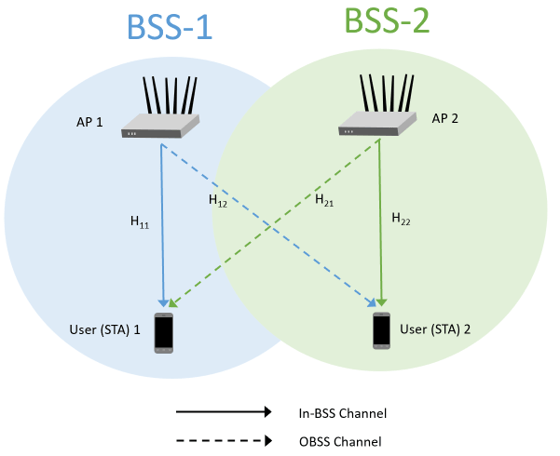
The 802.11bn standard describes two primary approaches to compute steering matrices: full-nulling and partial-nullling. In the full-nulling approach, all APs compute steering matrices that minimize the interference observed across all receive chains of all recipients associated with the OBSS AP. In the partial-nullling approach, when the OBSS AP's recipients have multiple receive chains, the APs compute steering matrices that minimize interference over a subspace formed by the dominant eigenmodes of the channels to those recipients. While full-nulling can achieve the most interference suppression across all BSSs, partial-nulling can improve overall system throughput by simultaneously achieving additional beamforming gain, as described by Insik Jung et al. [2].
This example evaluates the PER of a beamformed UHR link in a Co-BF single-user multiple-input multiple-output (SU-MIMO) scenario, where each BSS serves a single STA. The simulation sweeps a range of Signal to Interference power Ratios (SIR), treating the in-BSS transmission as the desired signal and the OBSS transmission as interference. The example supports three simulation modes: SU-MIMO without OBSS interference, Co-BF with full-nulling, and Co-BF with partial-nulling.
Configure UHR Downlink Co-BF Transmission
Configure the UHR downlink (DL) Co-BF transmission parameters. This example assumes identical AP and STA configurations in both BSSs participating in the Co-BF operation, with the number of receive antennas at each STA equal to the number of spatial streams. Each AP must have at least twice as many transmit antennas as spatial streams to support simultaneous beamforming and null steering to both BSSs. The example models an 802.11bn SU-MIMO transmission scenario in which each AP uses four transmit antennas and two spatial streams, while each STA uses two receive antennas.
simParams = struct;
simParams.ChannelBandwidth = "CBW80";
simParams.NumTxAntennas = 4;
simParams.NumSTS = 2;
simParams.MCS = 1;
simParams.APEPLength = 100;
simParams.GuardInterval = 3.2;
simParams.UHRLTFType = 4;
Configure Channel
Configure the channel model between the AP and STA by using the wlanTGaxChannel System object™.
simParams.Channel = wlanTGaxChannel;
simParams.Channel.DelayProfile = "Model-D";
simParams.Channel.NumTransmitAntennas = simParams.NumTxAntennas;
simParams.Channel.NumReceiveAntennas = simParams.NumSTS;
simParams.Channel.ChannelBandwidth = simParams.ChannelBandwidth;
simParams.Channel.LargeScaleFadingEffect = "None";
simParams.Channel.NormalizeChannelOutputs = false;
simParams.Channel.SampleRate = wlanSampleRate(simParams.ChannelBandwidth);
Configure Simulation
The example supports three modes that represent different approaches to inter-BSS interference mitigation:
SU-MIMO mode: Only a single AP transmits to its associated STA with no OBSS interference present; the steering matrix is computed by performing an singular value decomposition (SVD) of the in-BSS channel and selecting the dominant right singular vectors corresponding to the number of spatial streams.
Full-nulling mode: Both APs transmit simultaneously, and each AP projects its steering matrix onto the null space of the full cross-BSS channel to the recipient of its peer AP. This mode nulls all interference directions (rank equal to ), leaving degrees of freedom for beamforming the desired signal.
Partial-nulling mode: Each AP only nulls the dominant interference direction towards the recipient of the other AP, leaving degrees of freedom for beamforming. This mode trades off some residual interference for a larger effective beamforming subspace, which can improve the desired signal strength relative to full-nulling when the interference is not strong.
To configure the example to one of these modes, set the simParams.Mode field to "SU-MIMO", "Full-Nulling", or "Partial-Nulling". Alternatively, you can configure the example to simulate all three modes simultaneously.
% simParams.Mode = ["SU-MIMO" "Full-Nulling" "Partial-Nulling"];By default, this example simulates Full-Nulling.
simParams.Mode = "Full-Nulling";You can specify a range of SIR, where the signal is the in-BSS transmission and the interference is the OBSS transmission. SIR can be a scalar or a row vector. This is independent of the precoding scheme applied. SIR can be a scalar or a row vector. This example uses a SIR of 20 dB.
simParams.SIR = 20;
SNRRange is a nested cell array of SNR values in dB. The outer cell has one entry per mode, and each entry is a cell array containing one SNR vector per SIR. To configure SNRRange when Mode is a string array, see the Further Exploration section.
simParams.SNRRange = {{7.5:10.5}};For simplicity, this example simulates a small number of packets, resulting in a short execution time. For more meaningful results, increase the number of packets.
simParams.MaxNumPackets = 100;
simParams.MaxNumErrors = 20;
By default, the example processes the SNR points in parallel using the parfor loop. To switch between parallel and sequential execution, set enableParallelism to true or false, respectively.
simParams.enableParallelism =  true;
true;Process SNR Points
For each interference level and SNR point, test packets and calculate the PER.
For each packet, the uhrCoBFSimulateScenario helper function performs these steps:
I. Obtain the perfect CSI and compute the steering matrix:
Generate an independent fading realization for all links. This example bypasses the explicit sounding and feedback procedure by extracting perfect CSI directly from a system-level channel model. The helper
hSLSTGaxSystemChannelcreates a single channel object that encompasses all APs and STAs.For each AP–STA link, obtain path gains and path filters and compute the frequency-domain channel response across all active subcarriers using method
ofdmChannelResponse. This example does not model the CSI feedback grouping or compression.Compute the beamforming steering matrix based on
Mode[2]:SU-MIMO mode:is calculated by applying singular value decomposition (SVD) on the in-BSS channel
Full-nulling mode:is calculated by using this formula, where and represent the effective beamforming channel and beamforming matrix, respectively.
, where , and
Partial-nulling mode: is calculated by using this formula
, where , and
Generate the beamforming steering matrix for the second BSS, by using its in-BSS channel and OBSS channel
II. Transmit data packets from both APs simultaneously and decode the desired in-BSS transmission at to recover the PSDU:
Create and encode a PSDU for each AP to generate single-packet waveforms with the corresponding beamforming steering matrix
Pass each AP's DL waveform through the TGax channel to using the same fading realization as the perfect CSI estimation above.
Combine the desired in-BSS signal (→) with the OBSS interference (→) scaled by the
SIR.Add AWGN to the combined received waveform.
Detect the packet at the receiver.
Estimate and correct for coarse carrier frequency offset (CFO) using the L-STF.
Establish fine timing synchronization using the L-STF through L-SIG fields.
Estimate and correct for fine CFO using the L-LTF.
Demodulate the UHR-LTF and perform channel estimation.
Demodulate the UHR-Data field.
Perform pilot phase tracking to track any residual carrier frequency offset.
Estimate the noise power using the demodulated data field pilots.
Equalize the OFDM symbols with the channel estimate.
Demodulate and decode the equalized symbols to recover the PSDU.
packetErrorRate = uhrCoBFSimulateScenario(simParams);
Plot Packet Error Rate against SNR
figure;
markers = {'o', 's', '^', 'd', 'v'};
colors = colororder;

for iMode = 1:length(simParams.Mode)
    currentMode = simParams.Mode(iMode);
    color = colors(iMode, :);

    if currentMode == "SU-MIMO"
        per = packetErrorRate.perSUMIMO;
        snrVec = simParams.SNRRange{iMode}{1};
        semilogy(snrVec(per>0), per(per>0), '-o', Color=color, LineWidth=1.5, MarkerSize=5, DisplayName="SU-MIMO");
        hold on;
    else
        if currentMode == "Full-Nulling"
            prefix = "FN";
        else
            prefix = "PN";
        end

        for ix = 1:length(simParams.SIR)
            fieldName = "per" + prefix + strrep(string(simParams.SIR(ix)), ".", "_");
            displayName = currentMode + ", SIR = " + simParams.SIR(ix) + " dB";
            per = packetErrorRate.(fieldName);
            snrVec = simParams.SNRRange{iMode}{ix};
            semilogy(snrVec(per>0), per(per>0), ['-' markers{ix}], Color=color, LineWidth=1.5, MarkerSize=5, DisplayName=displayName);
            hold on;
        end
    end
end

hold off;
grid on;
xlabel("SNR (dB)");
ylabel("Packet Error Rate");
title("Co-BF PER (MCS 1, 4x2, 80 MHz, Model-D, LDPC)");
legend('Location', 'southwest');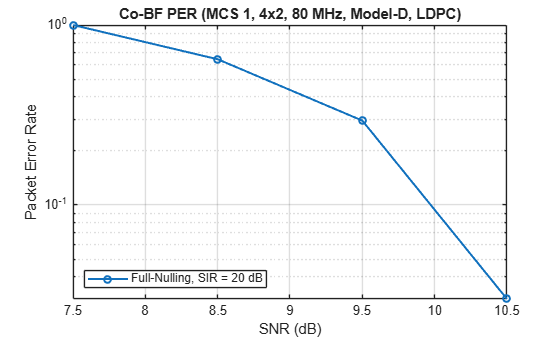
Further Exploration
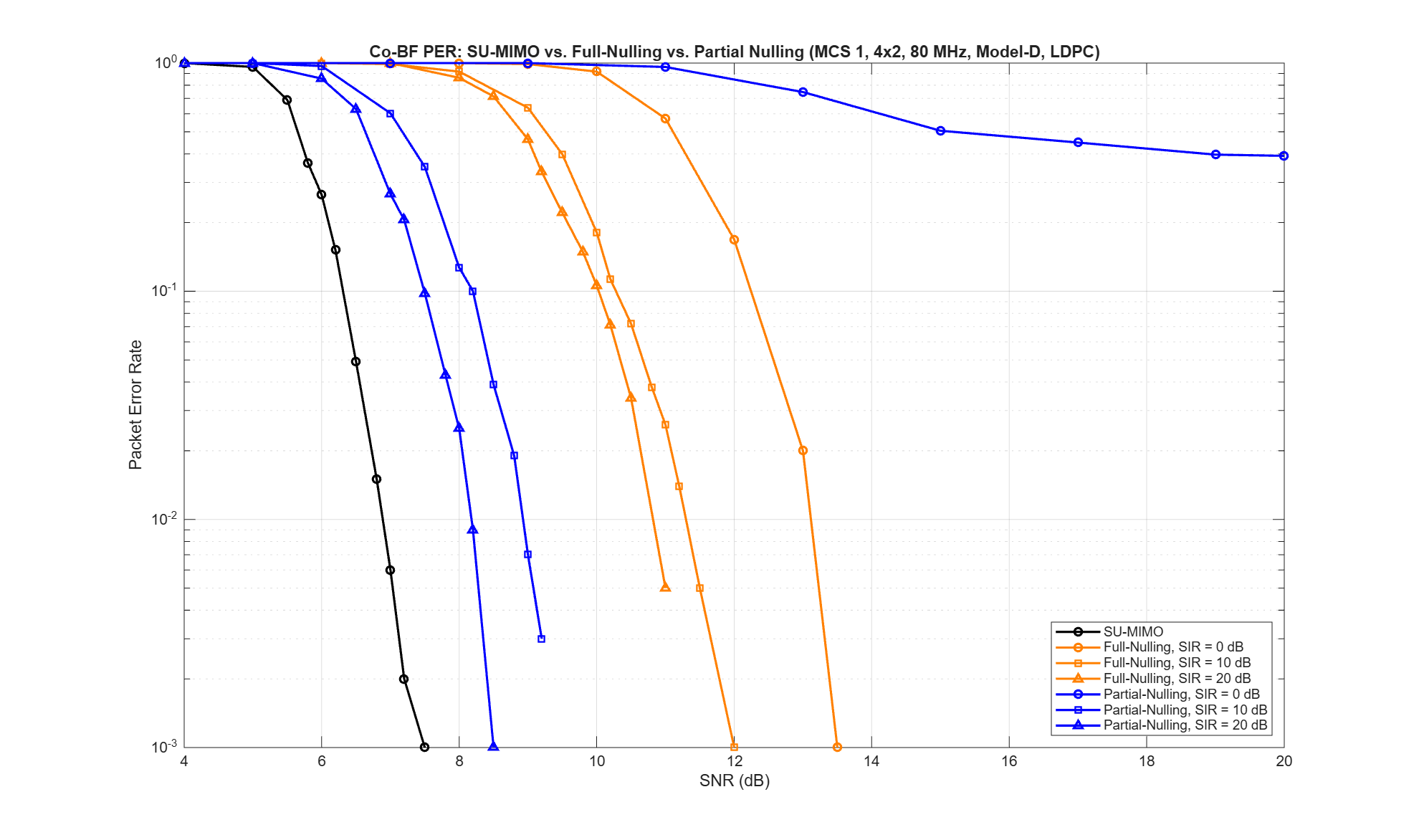
The maxNumErrors and maxNumPackets parameters control the number of packets tested for each SNR point. For meaningful results, increase these values. For example, this figure shows results for a maxNumErrors value of 100 and a maxNumPackets value of 1000. The long running simulation executes all three modes with the following SIR and SNR values:
% simParams.Mode = ["SU-MIMO" "Full-Nulling" "Partial-Nulling"];
% simParams.SIR = [0 10 20];
% simParams.SNRRange = { ...
%    {[4 5 5.5 5.8 6 6.2 6.5 6.8 7 7.2 7.5 8 9]}, ...               % SU-MIMO
%    {[7 8 9 10 11 12 13 13.5], ...                                 % full-nulling, SIR=0 dB
%    [6 7 8 9 9.5 10 10.2 10.5 10.8 11 11.2 11.5 12 12.5 13], ...   % full-nulling, SIR=10 dB
%    [5 6 7 8 8.5 9 9.2 9.5 9.8 10 10.2 10.5 11 11.5]}, ...         % full-nulling, SIR=20 dB
%    {[5 7 9 11 13 15 17 19 20], ...                                % partial-nulling, SIR=0 dB
%    [5 6 7 7.5 8 8.2 8.5 8.8 9 9.2 9.5 10 10.5], ...               % partial-nulling, SIR=10 dB
%    [4 5 6 6.5 7 7.2 7.5 7.8 8 8.2 8.5 9 9.5]} ...                 % partial-nulling, SIR=20 dB
%    };
This plot shows the simulation results of all three modes. When the OBSS interference level is low ( dB), partial-nulling outperforms full-nulling because the beamforming gain from the larger subspace outweighs the benefit of complete interference suppression. Conversely, when the OBSS interference is strong ( dB), full-nulling outperforms partial-nulling because eliminating all interference directions becomes the dominant factor.
References
[1] IEEE P802.11bn™/D1.4. IEEE Standard for Information Technology - Telecommunications and Information Exchange between Systems - Local and Metropolitan Area Networks - Specific Requirements - Part 11: Wireless LAN Medium Access Control (MAC) and Physical Layer (PHY) Specifications - Amendment 6: Enhancements for ultra high reliability (UHR).
[2] Insik Jung et al. "Coordinated Beamforming for 11bn", Accessed June 25th, 2026, https://mentor.ieee.org/802.11/dcn/24/11-24-1204-00-00bn-coordinated-beamforming-for-11bn.pptx
[3] IEEE Std 802.11™-2024. IEEE Standard for Information Technology - Telecommunications and Information Exchange between Systems - Local and Metropolitan Area Networks - Specific Requirements - Part 11: Wireless LAN Medium Access Control (MAC) and Physical Layer (PHY) Specifications.

