returnLoss
R2026bCalculate and plot return loss of antenna or scan return loss of array
Syntax
Description
returnLoss(
calculates the return loss of the individual elements of the specified array
over the specified frequency, at a reference impedance of 50 ohm, and opens an
interactive return loss plot. To switch between the individual element plots,
specify the element number in the Elements box at the
bottom of the plot.array,frequency)
returnLoss(
calculates and plots the scan return loss of the specified antenna element in
the array using the reference impedance array,frequency,z0,elementnumber)z0.
rl = returnLoss(array,frequency,z0,elementnumber)rl of the specified antenna
element in the array.
[___,
uses the specified frequency sweep interpolation method to calculate the antenna
or array element return loss, and additionally returns the interpolation method
type and rational fit parameters stored in a frequency sweep object
sweepobj] = returnLoss(___,SweepOption=Value)sweepobj.
[___] = returnLoss(___,
specifies additional options using one or more name-value
arguments. For example,
Name=Value)returnLoss(dipole,60e6:1e6:80e6,UseParallel=true) uses
parallel pool to perform return loss calculation at each frequency for a dipole
antenna.
Examples
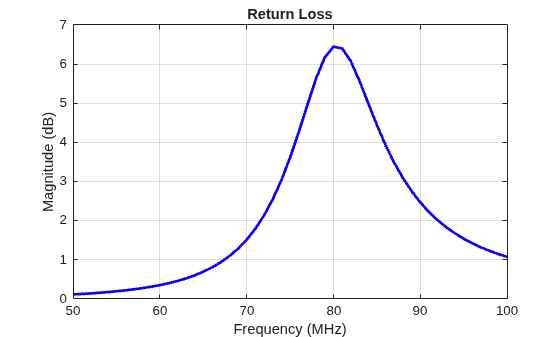
This example shows how to calculate and plot the return loss of a circular loop antenna over a frequency range of 50MHz-100MHz.
h = loopCircular;
returnLoss (h, 50e6:1e6:100e6);
Input Arguments
Name-Value Arguments
Output Arguments
Tips
Interpolating frequency sweeps may report results at frequencies that differ from the frequencies you specify. If you require results at exact frequencies, either use the default direct sweep, or set the
NumFreqsproperty of thefrequencySweepobject greater than or equal to the number of frequencies you provide.When using the
"interp"or"interpWithGrad"sweep options, provide more than 30 frequency points to have the sweep use your frequency resolution exactly; otherwise the sweep defaults to 100 points across the band.

