particleswarm
R2026bParticle swarm optimization
Syntax
Description
attempts
to find a vector x = particleswarm(fun,nvars)x that achieves a local minimum
of fun. nvars is the dimension
(number of design variables) of fun.
Note
Passing Extra Parameters explains how to pass extra parameters to the objective function, if necessary.
[ also returns the following, using any of the input
argument combinations in the previous syntaxes:x,fval,exitflag,output,points]
= particleswarm(___)
fval, a scalar that is the objective function valuefun(x)exitflag, a value that describes the exit conditionoutput, a structure that contains information about the optimization processpoints, a structure that contains the final swarm positions inpoints.Xand the associated objective function values inpoints.Fval
Examples
Minimize a simple function of two variables.
Define the objective function.
fun = @(x)x(1)*exp(-norm(x)^2);
Call particleswarm to minimize the function.
rng default % For reproducibility nvars = 2; x = particleswarm(fun,nvars)
Optimization ended: relative change in the objective value over the last OPTIONS.MaxStallIterations iterations is less than OPTIONS.FunctionTolerance.
x = 1×2
629.4474 311.4814
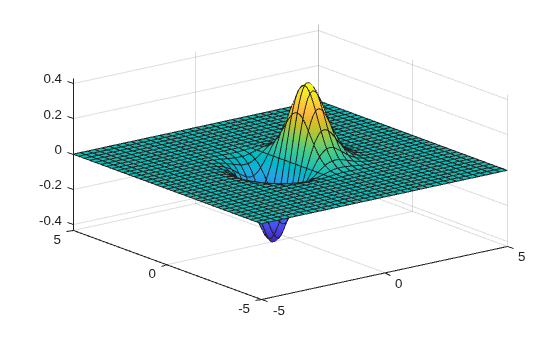
This solution is far from the true minimum, as you see in a function plot.
fsurf(@(x,y)x.*exp(-(x.^2+y.^2)))
Usually, it is best to set bounds. See Minimize a Simple Function with Bounds.
Minimize a simple function of two variables with bound constraints.
Define the objective function.
fun = @(x)x(1)*exp(-norm(x)^2);
Set bounds on the variables.
lb = [-10,-15]; ub = [15,20];
Call particleswarm to minimize the function.
rng default % For reproducibility nvars = 2; x = particleswarm(fun,nvars,lb,ub)
Optimization ended: relative change in the objective value over the last OPTIONS.MaxStallIterations iterations is less than OPTIONS.FunctionTolerance.
x = 1×2
-0.7071 -0.0000
Use a larger population and a hybrid function to try to get a better solution.
Specify the objective function and bounds.
fun = @(x)x(1)*exp(-norm(x)^2); lb = [-10,-15]; ub = [15,20];
Specify the options.
options = optimoptions("particleswarm",SwarmSize=100,HybridFcn=@fmincon);Call particleswarm to minimize the function.
rng default % For reproducibility nvars = 2; x = particleswarm(fun,nvars,lb,ub,options)
Optimization ended: relative change in the objective value over the last OPTIONS.MaxStallIterations iterations is less than OPTIONS.FunctionTolerance.
x = 1×2
-0.7071 -0.0000
Return the optional output arguments to examine the solution process in more detail.
Define the problem.
fun = @(x)x(1)*exp(-norm(x)^2);
lb = [-10,-15];
ub = [15,20];
options = optimoptions("particleswarm",SwarmSize=50,HybridFcn=@fmincon);Call particleswarm with all outputs to minimize the function and get information about the solution process.
rng default % For reproducibility nvars = 2; [x,fval,exitflag,output,points] = particleswarm(fun,nvars,lb,ub,options)
Optimization ended: relative change in the objective value over the last OPTIONS.MaxStallIterations iterations is less than OPTIONS.FunctionTolerance.
x = 1×2
-0.7071 -0.0000
fval = -0.4289
exitflag = 1
output = struct with fields:
rngstate: [1×1 struct]
iterations: 43
funccount: 2203
message: 'Optimization ended: relative change in the objective value ↵over the last OPTIONS.MaxStallIterations iterations is less than OPTIONS.FunctionTolerance.↵FMINCON: Initial point is a local minimum that satisfies the constraints.↵↵Optimization completed because at the initial point, the objective function is non-decreasing ↵in feasible directions to within the value of the optimality tolerance, and ↵constraints are satisfied to within the value of the constraint tolerance.↵↵<stopping criteria details>↵↵Optimization completed: The final point is the initial point.↵The first-order optimality measure, 2.118144e-07, is less than options.OptimalityTolerance =↵1.000000e-06, and the maximum constraint violation, 0.000000e+00, is less than↵options.ConstraintTolerance = 1.000000e-06.↵'
hybridflag: 1
points = struct with fields:
X: [50×2 double]
Fval: [50×1 double]
Input Arguments
Objective function, specified as a function handle or function name. Write the objective
function to accept a row vector of length
nvars and return a scalar
value.
When the UseVectorized option is true, write
fun to accept a pop-by-nvars
matrix, where pop is the current population size. In this case,
fun returns a vector the same length as pop containing
the fitness function values. Ensure that fun does not assume any particular
size for pop, since particleswarm can pass a single
member of a population even in a vectorized calculation.
Example: fun = @(x)(x-[4,2]).^2
Data Types: char | function_handle | string
Number of variables, specified as a positive integer. The solver passes row vectors of length
nvars to fun.
Example: 4
Data Types: double
Lower bounds, specified as a real vector or array of doubles. lb represents
the lower bounds element-wise in
lb ≤ x ≤ ub.
Internally, particleswarm converts an array lb to the
vector lb(:).
Example: lb = [0;-Inf;4] means x(1) ≥ 0, x(3) ≥ 4.
Data Types: double
Upper bounds, specified as a real vector or array of doubles. ub represents
the upper bounds element-wise in
lb ≤ x ≤ ub.
Internally, particleswarm converts an array ub to the
vector ub(:).
Example: ub = [Inf;4;10] means x(2) ≤ 4, x(3) ≤ 10.
Data Types: double
Options for particleswarm, specified as the
output of the optimoptions function.
Some options are absent from the optimoptions display.
These options are listed in italics. For details, see View Optimization Options.
CreationFcn | Function that creates the initial swarm. Specify as
|
Display | Level of display returned to the command line.
|
| DisplayInterval | Interval for iterative display. The iterative display prints
one line for every DisplayInterval iterations.
Default is 1. |
FunctionTolerance | Nonnegative scalar with default 1e-6. Iterations
end when the relative change in best objective function value over
the last MaxStallIterations iterations is less
than options.FunctionTolerance. |
| FunValCheck | Check whether objective function and constraints values are
valid. |
HybridFcn | Function that continues the optimization after
Can also be a cell array specifying the
hybrid function and its options, such as
|
InertiaRange | Two-element real vector with same sign values in increasing
order. Gives the lower and upper bound of the adaptive inertia. To
obtain a constant (nonadaptive) inertia, set both elements of InertiaRange to
the same value. Default is [0.1,1.1]. See Particle Swarm Optimization Algorithm. |
InitialPoints | Initial population or partial population of particles, specified as a matrix or a structure.
|
InitialSwarmSpan | Initial range of particle positions that
|
MaxIterations | Maximum number of iterations particleswarm takes.
Default is 200*nvars, where nvars is
the number of variables. |
MaxStallIterations | Positive integer with default 20. Iterations
end when the relative change in best objective function value over
the last MaxStallIterations iterations is less
than options.FunctionTolerance. |
MaxStallTime | The algorithm stops if there is no improvement in the best known objective function
value for |
MaxTime | Maximum amount of time that the algorithm runs as measured by
|
MinNeighborsFraction | Minimum adaptive neighborhood size, a scalar from 0 to 1.
Default is 0.25. See Particle Swarm Optimization Algorithm. |
ObjectiveLimit | Minimum objective value, a stopping criterion. Scalar, with
default -Inf. |
OutputFcn | Function handle or cell array of function handles. Output functions can read iterative data,
and stop the solver. Default is []. See
Output Function and Plot Function. |
PlotFcn | Function name, function handle, or cell array of function handles. For custom plot functions,
pass function handles. Plot functions can read iterative
data, plot each iteration, and stop the solver. Default is
[]. Available built-in plot function:
"pswplotbestf". See Output Function and Plot Function. |
SelfAdjustmentWeight | Weighting of each particle’s best position when adjusting
velocity. Finite scalar with default 1.49. See Particle Swarm Optimization Algorithm. |
SocialAdjustmentWeight | Weighting of the neighborhood’s best position when adjusting
velocity. Finite scalar with default 1.49. See Particle Swarm Optimization Algorithm. |
SwarmSize | Number of particles in the swarm, an integer greater than 1.
Default is min(100,10*nvars), where nvars is
the number of variables. |
UseParallel | Option for using parallel computing to evaluate the objective function. Option for using parallel computing, specified as one of these values:
The default is To use a parallel pool to run computations in MATLAB®, you must have Parallel Computing Toolbox™. The values |
UseVectorized | Compute objective function in vectorized fashion when true.
Default is false. See Parallel or Vectorized Function Evaluation. |
Optimization problem, specified as a structure with the following fields.
solver | "particleswarm" |
objective | Function handle to the objective function, or name of the objective function. |
nvars | Number of variables in problem. |
lb | Vector or array of lower bounds. |
ub | Vector or array of upper bounds. |
options | Options created by optimoptions. |
rngstate | Optional state of the random number generator at the beginning of the solution process. |
Data Types: struct
Output Arguments
Solution, returned as a real vector that minimizes the objective function subject to any bound constraints.
Objective value, returned as the real scalar fun(x).
Algorithm stopping condition, returned as an integer identifying
the reason the algorithm stopped. The following lists the values of exitflag and
the corresponding reasons particleswarm stopped.
| Relative change in the objective value over the last |
| Number of iterations exceeded |
| Iterations stopped by output function or plot function. |
| Bounds are inconsistent: for some |
| Best objective function value is below
|
| Best objective function value did not change within |
| Run time exceeded |
Solution process summary, returned as a structure containing information about the optimization process.
| Number of solver iterations |
| Number of objective function evaluations. |
| Reason the algorithm stopped. |
| Exit flag from the hybrid function. Relates to the
|
| State of the default random number generator just before the algorithm started. |
Final swarm positions and objective function values, returned as a structure with these fields:
X— Positions of the final swarm, returned as a matrix. Each row of the matrix represents one point.Fval— Objective function values of the final swarm. For eachi, an index of a member of the final swarm,points.Fval(i) = fun(points.X(i)).
To continue an optimization, you can pass points as the
InitialPoints option. However, this approach is not
the same as running an optimization for a longer time from the beginning,
because many aspects of the algorithm are not identical when the
optimization restarts from a final population. See Particle Swarm Optimization Algorithm.
Data Types: struct
Limitations
The problem-based Optimize Live Editor task currently does not support specifying multiple initial points or initial objective function values. To specify initial points, use the solver-based task, or use the command line.
Algorithms
For a description of the particle swarm optimization algorithm, see Particle Swarm Optimization Algorithm.
Alternative Functionality
App
The Optimize Live Editor task provides a visual interface for particleswarm.
Extended Capabilities
To run in parallel, set the UseParallel option to "auto"
or "on".
options =
optimoptions("solvername",UseParallel="auto")
For more information, see Parallel Computing in Global Optimization Toolbox.
Version History
Introduced in R2014bThe UseParallel name-value argument accepts the value
"off", "auto", or "on" instead of
true or false. This change gives you more control
over when to use a parallel pool for parallel execution.
Specifying the UseParallel name-value argument as true or false is not recommended.
This table shows how to update your code depending on the task you are performing.
| Task | Recommended | Not Recommended |
|---|---|---|
Write code that runs on the MATLAB client. |
optimoptions("particleswarm",UseParallel="off")
|
optimoptions("particleswarm",UseParallel=false)
|
| Write portable code that runs on a parallel pool and, if a pool is not available, runs on the MATLAB client. |
optimoptions("particleswarm",UseParallel="auto")
|
optimoptions("particleswarm",UseParallel=true)
|
| Write code that runs on a parallel pool and issues an error if a pool is not available. |
optimoptions("particleswarm",UseParallel="on")
| N/A |
There are no plans to remove support for the values true and
false.
Specify the MaxTime and MaxStallTime options as duration, or as scalar that is interpreted as a duration in seconds. For example,
options.MaxTime = minutes(3);
Previously, these options were scalars representing the number of seconds.
particleswarm can now return the output
points, a structure containing the final positions and
associated objective function values of the swarm. You can now provide the positions
and objective function values for the initial swarm using the
InitialPoints option. You can still provide the initial swarm
positions using the InitialSwarmMatrix option or the
InitialSwarm option. In these cases,
particleswarm passes the initial swarm matrix as the
InitialPoints option.
MATLAB Command
You clicked a link that corresponds to this MATLAB command:
Run the command by entering it in the MATLAB Command Window. Web browsers do not support MATLAB commands.
Select a Web Site
Choose a web site to get translated content where available and see local events and offers. Based on your location, we recommend that you select: .
You can also select a web site from the following list
How to Get Best Site Performance
Select the China site (in Chinese or English) for best site performance. Other MathWorks country sites are not optimized for visits from your location.
Americas
- América Latina (Español)
- Canada (English)
- United States (English)
Europe
- Belgium (English)
- Denmark (English)
- Deutschland (Deutsch)
- España (Español)
- Finland (English)
- France (Français)
- Ireland (English)
- Italia (Italiano)
- Luxembourg (English)
- Netherlands (English)
- Norway (English)
- Österreich (Deutsch)
- Portugal (English)
- Sweden (English)
- Switzerland
- United Kingdom (English)