Verify Generated HLS Code Using MATLAB Host
R2026bVerify your generated HLS code using MATLAB® Host as the simulation tool. The verification ensures that the generated HLS code for the design under test (DUT) produces the same results as the original MATLAB design for the same test bench inputs. Using MATLAB Host-based MEX simulation removes the need for third-party EDA simulation tools to verify the generated HLS code. The following example shows how to generate HLS code and verify it using MATLAB Host.
Simulate the Generated HLS Code Using MATLAB Host
This example uses a Discrete Cosine Transform (DCT) design that compresses data by converting it into a set of frequency components. The MATLAB design is mlhdlc_dct, and the test bench is mlhdlc_dct_tb.
Install the SystemC 2.3.3 library. When installing SystemC on the Windows® platform, use the Release option to build. You can download the SystemC library from accellera.org.
Set up the SystemC library path by using hdlsetuphlstoolpath. For example:
hdlsetuphlstoolpath("ToolName","SystemC","SystemCIncludePath", ...
         "C:\Users\systemc-2.3.3\systemc-2.3.3\src","SystemCLibraryPath", ...
                 "C:\Users\systemc-2.3.3\systemc-2.3.3\msvc10\SystemC\x64\Release");

After setting up the SystemC library, choose one of these methods to simulate the generated HLS code: the Command Line Interface or the HDL Workflow Advisor.
Note: To use MATLAB Host as the simulation tool, do not select a synthesis tool.
Command Line Interface
To generate and verify HLS code using the command-line interface, create an hls configuration object and set the test bench name.
cfg = coder.config("hls");
cfg.TestBenchName = "mlhdlc_dct_tb";
cfg.GenerateHLSTestBench = true;
Enable simulation of the generated code and specify the simulation tool.
cfg.SimulateGeneratedCode = true;
cfg.SimulationTool = "MATLAB Host";
Generate HLS code.
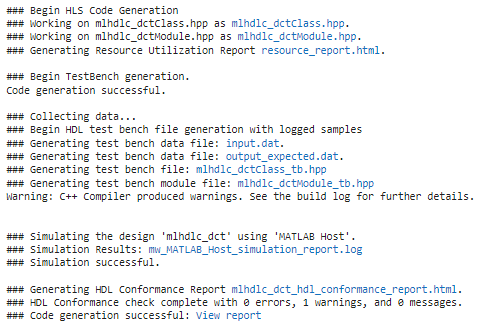
codegen("mlhdlc_dct","-config",cfg,"-report");
HDL Workflow Advisor
Open the HDL Workflow Advisor by running this command. This command creates a dct_project.mldatx file in the current folder.
coder -hdlcoder -new dct_project
Generate and verify HLS code using the HDL Workflow Advisor:
In the HDL Workflow Advisor task, set Code Generation Workflow to
MATLAB to HLS.In the Define Input Types task, select
mlhdlc_dct.mas the MATLAB Function andmlhdlc_dct_tb.mas the MATLAB Test Bench.In the Verify with HLS Test Bench task, select Generate HLS test bench and Simulate generated test bench. Set Simulation tool to
MATLAB Host.Right-click the Verify with HLS Test Bench task and select Run to selected task.
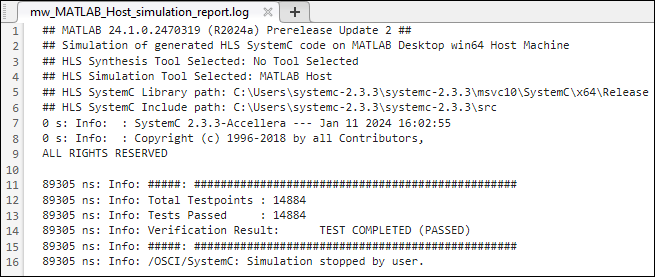
View the simulation results in mw_MATLAB_Host_simulation_report.log.
See Also
Workflow
Advisor | coder.HlsConfig | hdlsetuphlstoolpath

