remove
R2026bDescription
Add-On Required: This feature requires the Optical Design and Simulation Library for Image Processing Toolbox add-on.
remove( removes an incomplete surface
from the optical system. If an incomplete surface does not exist, the function removes the
last component. The positions of other components in the optical system remain
unchanged.opsys)
Examples
Load a double Gauss lens from a ZMX file into the workspace. Display a 2-D visualization of the optical system using the view2d object function.
opsys = zmximport("DoubleGaussLens.zmx");
view2d(opsys);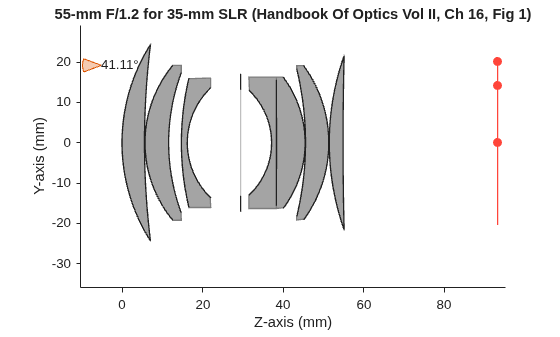
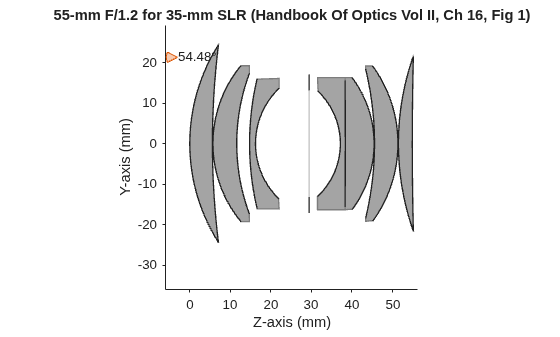
Remove the last component from the optical system using the remove object function. This removes the image plane from the optical system.
remove(opsys)
Display a 2-D visualization of the optical system using the view2d object function.
hv = view2d(opsys);
Load a double Gauss lens from a ZMX file into the workspace. Display a 2-D visualization of the optical system using the view2d object function.
opsys = zmximport("DoubleGaussLens.zmx");
view2d(opsys,Labels="component");
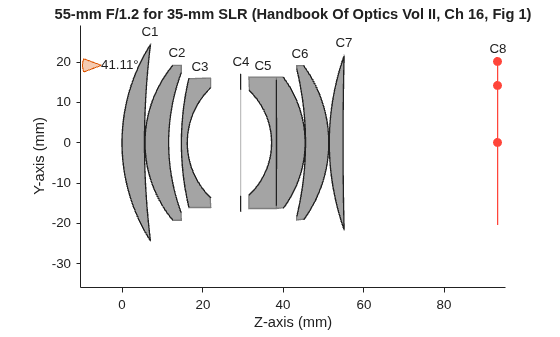
To remove a specific optical component from the system, use the remove function, and specify an index. The index specifies the position of the optical component to remove from the optical system. Remove the first doublet.
remove(opsys,2)
Display a 2-D visualization of the modified optical system using the view2d object function.
view2d(opsys,Labels="component");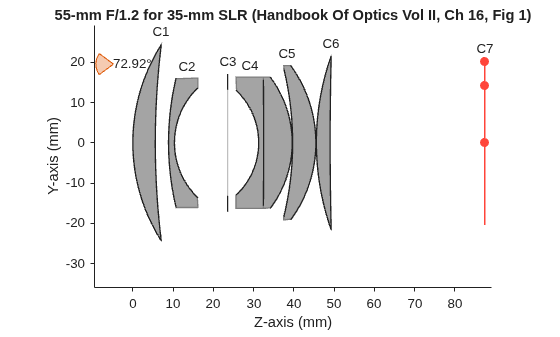
Input Arguments
Version History
Introduced in R2026a
See Also
opticalSystem | addImagePlane | addRefractiveSurface | addDiaphragm | insert | glassLibrary

