convertvars
R2026bConvert table or timetable variables to specified data type
Description
T2 = convertvars(T1,vars,dataType)
While you can specify dataType as the name of a data type, you also
can specify it as a function handle. In that case, it is a handle to a function that
converts or otherwise modifies the variables specified by vars.
Similarly, vars can contain variable names or positions of variables in
T1, or it can be a handle to a function that identifies
variables.
Examples
Read a table from a spreadsheet containing data on electric power outages. The table has text variables showing the region and cause for each power outage, datetime variables showing the outage and restoration times, and numeric variables showing the power loss and number of customers affected. Display the first five rows.
T1 = readtable("outages.csv");
head(T1,5)
Region OutageTime Loss Customers RestorationTime Cause
_____________ ________________ ______ __________ ________________ ___________________
{'SouthWest'} 2002-02-01 12:18 458.98 1.8202e+06 2002-02-07 16:50 {'winter storm' }
{'SouthEast'} 2003-01-23 00:49 530.14 2.1204e+05 NaT {'winter storm' }
{'SouthEast'} 2003-02-07 21:15 289.4 1.4294e+05 2003-02-17 08:14 {'winter storm' }
{'West' } 2004-04-06 05:44 434.81 3.4037e+05 2004-04-06 06:10 {'equipment fault'}
{'MidWest' } 2002-03-16 06:18 186.44 2.1275e+05 2002-03-18 23:23 {'severe storm' }
Convert the variables Region and Cause to categorical variables. Note that categorical values are not displayed with quotation marks.
T2 = convertvars(T1,["Region" "Cause"],"categorical");
head(T2,5)
     Region         OutageTime        Loss     Customers     RestorationTime          Cause
    _________    ________________    ______    __________    ________________    _______________

    SouthWest    2002-02-01 12:18    458.98    1.8202e+06    2002-02-07 16:50    winter storm
    SouthEast    2003-01-23 00:49    530.14    2.1204e+05                 NaT    winter storm
    SouthEast    2003-02-07 21:15     289.4    1.4294e+05    2003-02-17 08:14    winter storm
    West         2004-04-06 05:44    434.81    3.4037e+05    2004-04-06 06:10    equipment fault
    MidWest      2002-03-16 06:18    186.44    2.1275e+05    2002-03-18 23:23    severe storm
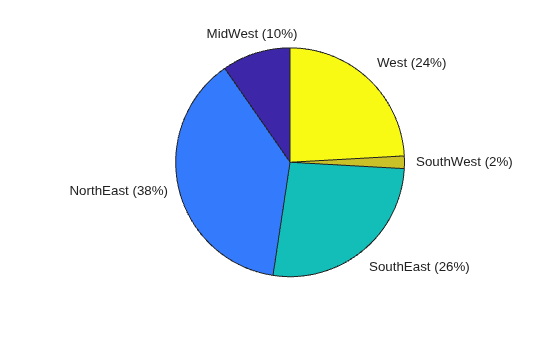
It can be convenient to convert variables to data types that offer different functionality. For example, now that T2.Region is a categorical variable, you can use the pie function to make a pie chart of power outages by region. But you cannot use T1.Region as the input argument to pie, because that variable contains text, not categorical data.
pie(T2.Region)
Detect which table variables are datetime arrays. Then use the datetime function as an argument to the convertvars function to specify a time zone and display format.
Read power outage data into a table and display the first three rows.
T1 = readtable("outages.csv",TextType="string");
head(T1,3)
      Region          OutageTime        Loss     Customers     RestorationTime         Cause
    ___________    ________________    ______    __________    ________________    ______________

    "SouthWest"    2002-02-01 12:18    458.98    1.8202e+06    2002-02-07 16:50    "winter storm"
    "SouthEast"    2003-01-23 00:49    530.14    2.1204e+05                 NaT    "winter storm"
    "SouthEast"    2003-02-07 21:15     289.4    1.4294e+05    2003-02-17 08:14    "winter storm"
The datetime arrays in T1 do not have their time zones set. Without specifying the names or locations of table variables, you can detect which variables are datetime arrays using a function handle to the isdatetime function. (A function handle is a variable that stores an association to a function. You can use a function handle to pass a function to another function. For example, specify @isdatetime to pass the handle to convertvars.) Then you can convert all datetime variables so that they have a time zone and a different display format. This technique is useful when converting many table variables that all have the same data type.
Call the convertvars function. To modify the time zone and format in place, specify an anonymous function that calls the datetime function with the TimeZone and Format name-value arguments. (An anonymous function is not stored in a program file. It can be useful for a function that requires only a brief definition. In this case, it also allows a call to datetime with multiple inputs, while passing convertvars a function that accepts only one input, as convertvars requires.) Display the first three rows, showing the change in format.
modifyTimeZoneAndFormat = @(x)(datetime(x,TimeZone="UTC",Format="MMM dd, yyyy, HH:mm z"));
T2 = convertvars(T1,@isdatetime,modifyTimeZoneAndFormat);
head(T2,3)
      Region             OutageTime            Loss     Customers         RestorationTime            Cause
    ___________    _______________________    ______    __________    _______________________    ______________

    "SouthWest"    Feb 01, 2002, 12:18 UTC    458.98    1.8202e+06    Feb 07, 2002, 16:50 UTC    "winter storm"
    "SouthEast"    Jan 23, 2003, 00:49 UTC    530.14    2.1204e+05                        NaT    "winter storm"
    "SouthEast"    Feb 07, 2003, 21:15 UTC     289.4    1.4294e+05    Feb 17, 2003, 08:14 UTC    "winter storm"
Input Arguments
Output Arguments
Alternative Functionality
You can also convert table and timetable variables
by using the VariableTypes property. Unlike
convertvars, the property enables you to convert different variables to
different data types. (since R2024b)
For example, assign new data types to the variables of table T so that
the first variable is a categorical array and the last variable is a string array.
T = readtable("outages.csv");
head(T,3)
       Region           OutageTime        Loss     Customers     RestorationTime          Cause
    _____________    ________________    ______    __________    ________________    ________________

    {'SouthWest'}    2002-02-01 12:18    458.98    1.8202e+06    2002-02-07 16:50    {'winter storm'}
    {'SouthEast'}    2003-01-23 00:49    530.14    2.1204e+05                 NaT    {'winter storm'}
    {'SouthEast'}    2003-02-07 21:15     289.4    1.4294e+05    2003-02-17 08:14    {'winter storm'}
T.Properties.VariableTypes = ["categorical" "datetime" "double" "double" "datetime" "string"];
head(T,3)
     Region         OutageTime        Loss     Customers     RestorationTime         Cause
    _________    ________________    ______    __________    ________________    ______________

    SouthWest    2002-02-01 12:18    458.98    1.8202e+06    2002-02-07 16:50    "winter storm"
    SouthEast    2003-01-23 00:49    530.14    2.1204e+05                 NaT    "winter storm"
    SouthEast    2003-02-07 21:15     289.4    1.4294e+05    2003-02-17 08:14    "winter storm"
Extended Capabilities
Version History
Introduced in R2018b
See Also
addvars | mergevars | removevars | splitvars | movevars | renamevars

