rlMBPOAgent
R2026bDescription
A model-based policy optimization (MBPO) agent is a model-based, off-policy, reinforcement learning method for environment with a discrete or continuous action space. An MBPO agent contains an internal model of the environment, which it uses to generate additional experiences without interacting with the environment. Specifically, during training, the MBPO agent generates real experiences by interacting with the environment. These experiences are used to train the internal environment model, which is used to generate additional experiences. The training algorithm then uses both the real and generated experiences to update the agent policy.
For more information on MBPO agents, see Model-Based Policy Optimization (MBPO) Agent. For more information on the different types of reinforcement learning agents, see Reinforcement Learning Agents.
Note
MBPO agents do not support recurrent networks or base SAC agents with a hybrid action space.
Creation
Description
agent = rlMBPOAgent(___,agentOptions)AgentOptions property.
Input Arguments
Properties
Object Functions
Examples
Create an environment object and extract observation and action specifications.
env = rlPredefinedEnv("CartPole-Continuous");
obsInfo = getObservationInfo(env);
actInfo = getActionInfo(env);
Create a base off-policy agent. For this example, use a SAC agent.
agentOpts = rlSACAgentOptions;
agentOpts.MiniBatchSize = 256;
initOpts = rlAgentInitializationOptions(NumHiddenUnit=64);
baseagent = rlSACAgent(obsInfo,actInfo,initOpts,agentOpts);
Check your agent with a batch of 10 random input observations.
obs = rand([obsInfo.Dimension 10]);
act = getAction(baseagent,{obs})
act = 1×1 cell array
{1×1×10 double}
Display the seventh element of the batch.
act{1}(7)ans = 0.2249
The neural network environment uses a function approximator object to approximate the environment transition function. The function approximator object uses one or more neural networks as approximator model. To account for modeling uncertainty, you can specify multiple transition models. For this example, create a single transition model.
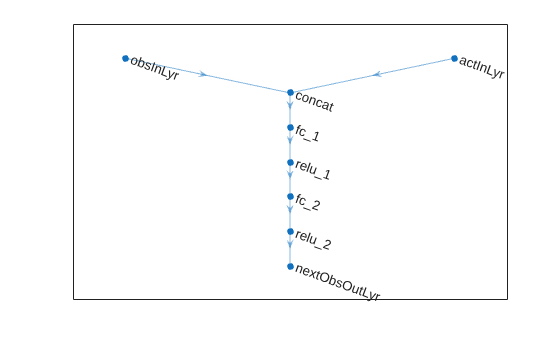
Create a neural network to use as approximation model within the transition function object. Define each network path as an array of layer objects. Specify a name for the input and output layers, so you can later explicitly associate them with the appropriate channel.
% Observation and action paths
obsPath = featureInputLayer(obsInfo.Dimension(1),Name="obsInLyr");
actionPath = featureInputLayer(actInfo.Dimension(1),Name="actInLyr");

% Common path: concatenate along dimension 1
commonPath = [
    concatenationLayer(1,2,Name="concat")
    fullyConnectedLayer(64)
    reluLayer
    fullyConnectedLayer(64)
    reluLayer
    fullyConnectedLayer( ...
        obsInfo.Dimension(1), ...
        Name="nextObsOutLyr")
    ];
Create dlnetwork object and add layers.
transNet = dlnetwork;
transNet = addLayers(transNet,obsPath);
transNet = addLayers(transNet,actionPath);
transNet = addLayers(transNet,commonPath);
Connect layers.
transNet = connectLayers(transNet,"obsInLyr","concat/in1");
transNet = connectLayers(transNet,"actInLyr","concat/in2");
Plot network.
plot(transNet)
Initialize network and display the number of weights.
transNet = initialize(transNet);
summary(transNet)
   Initialized: true

   Number of learnables: 4.8k

   Inputs:
      1   'obsInLyr'   4 features
      2   'actInLyr'   1 features
Create the transition function approximator object.
transitionFcnAppx = rlContinuousDeterministicTransitionFunction( ...
    transNet,obsInfo,actInfo, ...
    ObservationInputNames="obsInLyr", ...
    ActionInputNames="actInLyr", ...
    NextObservationOutputNames="nextObsOutLyr");
Create a neural network to use as a reward model for the reward function approximator object.
% Observation and action paths
actionPath = featureInputLayer( ...
    actInfo.Dimension(1), ...
    Name="actInLyr");
nextObsPath = featureInputLayer( ...
    obsInfo.Dimension(1), ...
    Name="nextObsInLyr");

% Common path: concatenate along dimension 1
commonPath = [
    concatenationLayer(1,2,Name="concat")
    fullyConnectedLayer(64)
    reluLayer
    fullyConnectedLayer(64)
    reluLayer
    fullyConnectedLayer(64)
    reluLayer
    fullyConnectedLayer(1)
    ];
Create dlnetwork object and add layers.
rewardNet = dlnetwork();
rewardNet = addLayers(rewardNet,nextObsPath);
rewardNet = addLayers(rewardNet,actionPath);
rewardNet = addLayers(rewardNet,commonPath);
Connect layers.
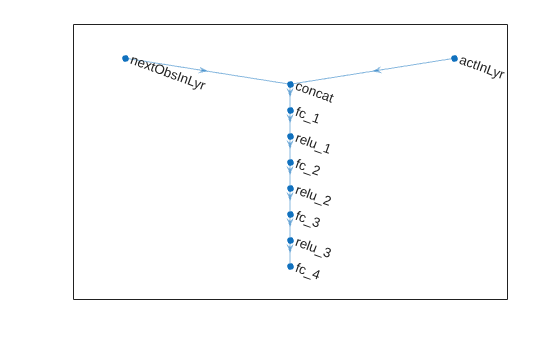
rewardNet = connectLayers(rewardNet,"nextObsInLyr","concat/in1");
rewardNet = connectLayers(rewardNet,"actInLyr","concat/in2");
Plot network.
plot(rewardNet)
Initialize network and display the number of weights.
rewardNet = initialize(rewardNet);
summary(rewardNet)
   Initialized: true

   Number of learnables: 8.8k

   Inputs:
      1   'nextObsInLyr'   4 features
      2   'actInLyr'       1 features
Create the reward function approximator object.
rewardFcnAppx = rlContinuousDeterministicRewardFunction( ...
    rewardNet,obsInfo,actInfo, ...
    ActionInputNames="actInLyr", ...
    NextObservationInputNames="nextObsInLyr");
Create an is-done model for the reward function approximator object.
% Define main path
isdNet = [
    featureInputLayer( ...
        obsInfo.Dimension(1), ...
        Name="nextObsInLyr");
    fullyConnectedLayer(64)
    reluLayer
    fullyConnectedLayer(64)
    reluLayer
    fullyConnectedLayer(2)
    softmaxLayer(Name="isdoneOutLyr")
];
Convert to dlnetwork object.
isdNet = dlnetwork(isdNet);
Display the number of weights.
summary(isdNet)
   Initialized: true

   Number of learnables: 4.6k

   Inputs:
      1   'nextObsInLyr'   4 features
Create the reward function approximator object.
isdoneFcnAppx = rlIsDoneFunction(isdNet,obsInfo,actInfo, ...
    NextObservationInputNames="nextObsInLyr");
Create the neural network environment using the observation and action specifications and the three function approximator objects.
generativeEnv = rlNeuralNetworkEnvironment( ...
    obsInfo,actInfo, ...
    transitionFcnAppx,rewardFcnAppx,isdoneFcnAppx);
Specify options for creating an MBPO agent. Specify the optimizer options for the transition network and use default values for all other options.
MBPOAgentOpts = rlMBPOAgentOptions;
MBPOAgentOpts.TransitionOptimizerOptions = rlOptimizerOptions( ...
    LearnRate=1e-4, ...
    GradientThreshold=1.0);
Create the MBPO agent.
agent = rlMBPOAgent(baseagent,generativeEnv,MBPOAgentOpts);
Check your agent with a batch of 10 random input observations.
obs = rand([obsInfo.Dimension 10]);
act = getAction(agent,{obs})
act = 1×1 cell array
{1×1×10 double}
Display the seventh element of the batch.
act{1}(7)ans = -3.0943
Version History
Introduced in R2022a

