Main Content

estimateDepth

R2026b

Estimate depth map using Depth Pro

Since R2026b

    Description

    Add-On Required: This feature requires the Computer Vision Toolbox Model for Apple DepthPro Network add-on.

    depthMap = estimateDepth(depthModel,img) estimates a dense metric depth map from a grayscale or RGB image using the pretrained Depth Pro model.

    example

    [depthMap,fLength] = estimateDepth(depthModel,img) also returns the focal length used for estimating the depth map.

    [depthResults] = estimateDepth(depthModel,imds) estimates dense metric depth maps and focal lengths for the images in the input datastore imds. The function returns the results as a table.

    example

    [___] = estimateDepth(___,Name=Value) specifies options using one or more name-value arguments.

    example

    Examples

    collapse all

    Load a pretrained Depth Pro model for estimating depth.

    depthModel = depthpro;

    Read an image into the MATLAB® workspace.

    img = imread("office_6.jpg");

    Estimate the depth map and the inferred focal length by using the estimateDepth function of the depthpro object.

    [depthMap,focalLengthPx] = estimateDepth(depthModel,img);

    Display the input image alongside the estimated depth map.

    figure
    imshow(img)
    title("Input Image")
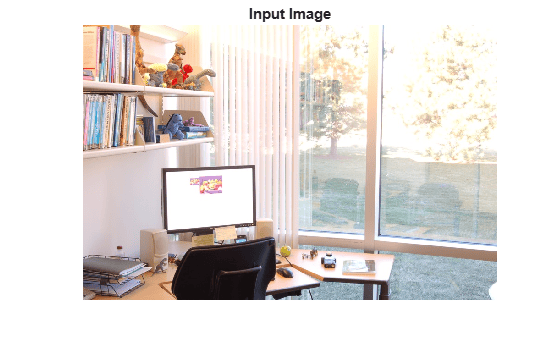
    Indoor office scene with a desk, monitor, chair, bookshelves, and glass doors overlooking a garden

    figure
    imagesc(depthMap)
    colormap("jet")
    colorbar
    title("Depth Map (meters)")
    axis image off
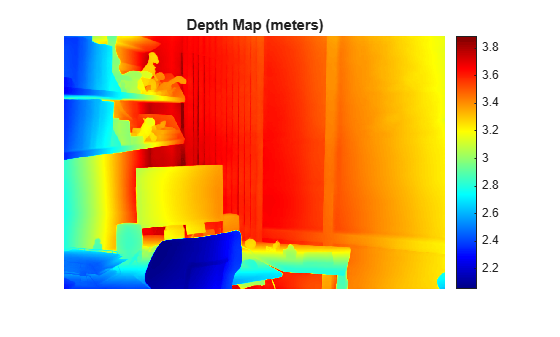
    Depth map of the office scene using jet colormap with a colorbar ranging from 2.0 to 3.8 meters. Nearby objects like the chair appear in blue and distant objects like the windows appear in red.

    disp("Estimated Focal Length = " + round(focalLengthPx) + " in pixels")
    Estimated Focal Length = 1144 in pixels
    

    Load a pretrained Depth Pro model for estimating depth.

    depthModel = depthpro;

    To estimate depth for multiple monocular RGB images in a single function call, create an image datastore containing the input images.

    imageDataPath = fullfile(matlabroot,"toolbox","vision","visiondata","imageSets","cups");
    imds = imageDatastore(imageDataPath);

    Display the input monocular RGB images in the image datastore.

    figure(Position=[20 20 900 800])
    montage(imds,size=[2 3])
    title("Images in Datastore")
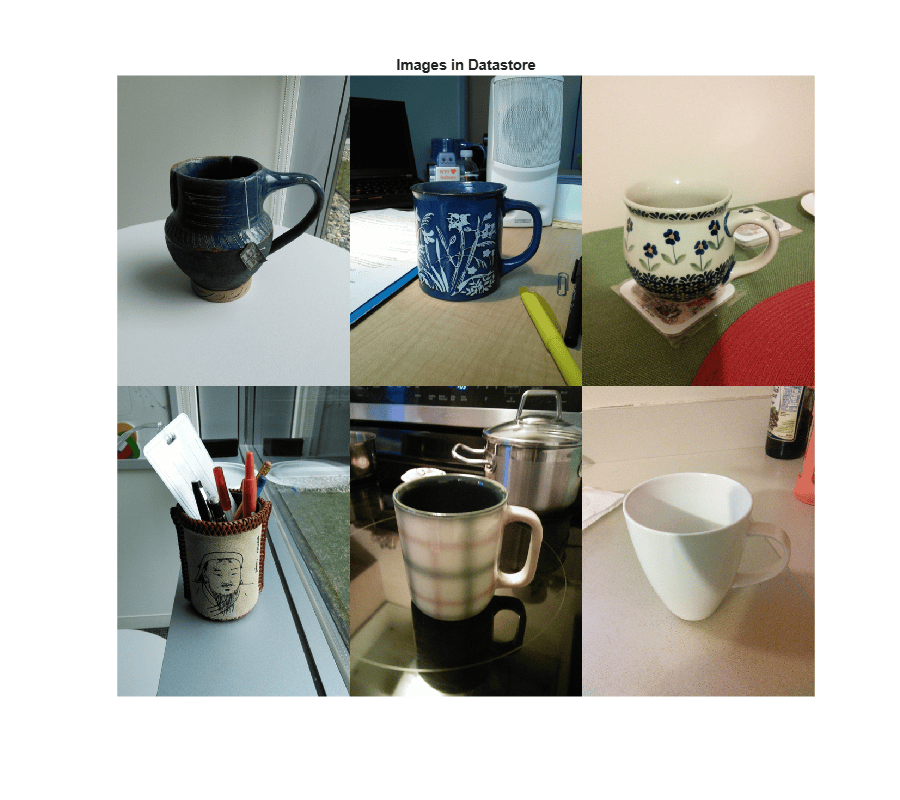
    Six input images of cups in the foreground with various background objects such as shelves, desks, and bottles

    Estimate depth and focal length for all images in the image datastore. The function returns the estimated depth maps and focal lengths in a table.

    depthResults = estimateDepth(depthModel,imds)
    depthResults = 6×2 table
        640×480 double    572.5841
        640×480 double    578.8881
        640×480 double    578.8357
        640×480 double    561.4934
        640×480 double    555.7823
        640×480 double    584.7245


    Inspect the focal lengths returned by the estimateDepth function for each image in the datastore.

    depthResults.FocalLength
    ans = 6×1
    
        572.5841
        578.8881
        578.8357
        561.4934
        555.7823
        584.7245


    Normalize the estimated depth maps to the range [0, 1] for visualization.

    for i = 1:height(depthResults)
        dm = depthResults.DepthMap{i};
        depthResults.NormalizedDepthMap{i} = (dm - min(dm(:))) / (max(dm(:)) - min(dm(:)));
    end

    Display the normalized depth maps by using the jet colormap. Within each image, blue regions correspond to closer objects, while red regions correspond to farther objects.

    figure(Position=[20 20 900 800]);
    montage(depthResults.NormalizedDepthMap,size=[2 3])
    colormap("jet")
    colorbar
    title("Normalized Depth Maps For Images in Datastore")
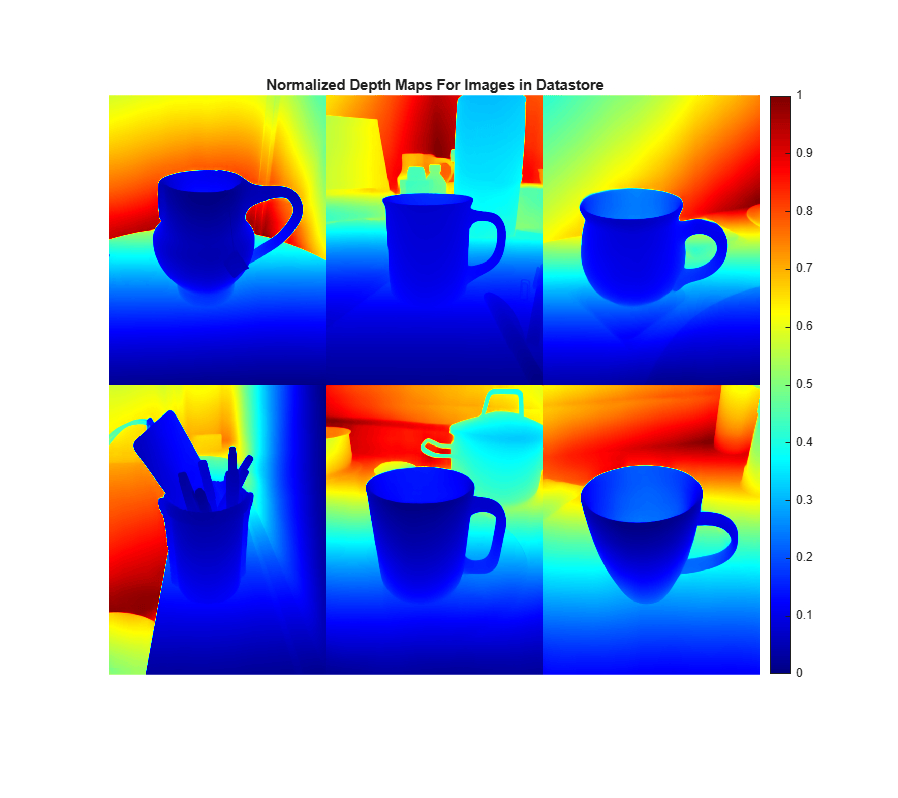
    Normalized depth maps for six cup images in jet colormap, with blue indicating closer objects and red indicating farther objects

    Load a pretrained Depth Pro model for estimating depth.

    depthModel = depthpro;

    Read an image and load the corresponding camera intrinsics into the MATLAB® workspace.

    img = imread("1341848034.683883.png");
    params = load("cameraintrinsicparams.mat")
    params = struct with fields:
        intrinsics: [1×1 cameraIntrinsics]


    Inspect the camera intrinsics. The FocalLength property contains separate horizontal and vertical focal length values.

    intrinsics= params.intrinsics
    intrinsics = 
      cameraIntrinsics with properties:
    
                 FocalLength: [535.4000 539.2000]
              PrincipalPoint: [320.1000 247.6000]
                   ImageSize: [480 640]
            RadialDistortion: [0 0]
        TangentialDistortion: [0 0]
                        Skew: 0
                           K: [3×3 double]


    To use known camera intrinsics for depth estimation, specify the FocalLength name-value argument. The estimateDepth function uses only the horizontal focal length from the intrinsics object to estimate depth.

    [depthMap,focalLengthPx] = estimateDepth(depthModel,img,FocalLength=intrinsics);

    Inspect the focal length returned by the estimateDepth function. The value matches the horizontal focal length stored in the intrinsics object.

    focalLengthPx
    focalLengthPx = 
    535.4000
    

    Display the input image and the estimated depth map. Each pixel in the depth map represents the metric depth, which is the estimated distance from the camera in meters.

    figure
    imshow(img)
    title("Input Image")
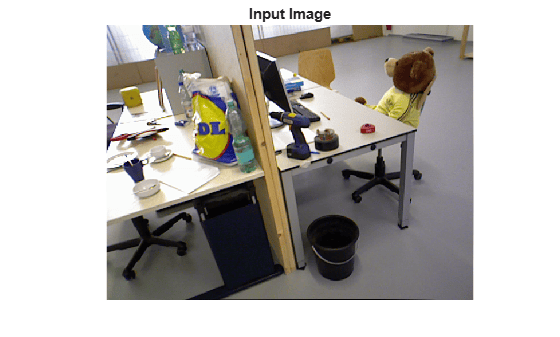
    Indoor scene with two desks, various objects including a bag and a teddy bear, office chairs, and a waste bin

    figure
    imagesc(depthMap)
    colormap("jet")
    colorbar
    title("Depth Map (meters)")
    axis image off
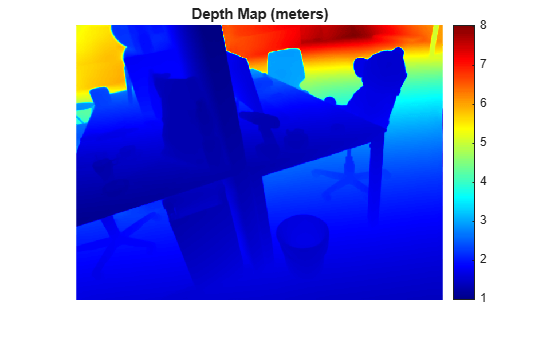
    Depth map of the indoor scene using jet colormap with a colorbar ranging from 1 to 8 meters. Nearby desk surfaces appear in blue and distant walls and ceiling appear in red.

    Input Arguments

    collapse all

    Pretrained depth estimation model, specified as a depthpro object.

    Input image, specified as one of these values.

    • A numeric array representing a grayscale image of size M-by-N or RGB image of size M-by-N-by-3.

    • A gpuArray (Parallel Computing Toolbox) object containing the image data. This requires Parallel Computing Toolbox™.

    Data Types: single | double | int8 | int16 | int32 | int64 | uint8 | uint16 | uint32 | uint64

    Test images, specified as a datastore object, fileDatastore object, imageDatastore object, CombinedDatastore object, or TransformedDatastore object containing full filenames of the test images. The images in the datastore must be grayscale or RGB images.

    Name-Value Arguments

    collapse all

    Specify optional pairs of arguments as Name1=Value1,...,NameN=ValueN, where Name is the argument name and Value is the corresponding value. Name-value arguments must appear after other arguments, but the order of the pairs does not matter.

    Example: estimateDepth(depthModel,img,FocalLength=120)

    Focal length, specified as a positive scalar representing the horizontal focal length, a two-element row vector of the form [f_{x} f_{y}], or a cameraIntrinsics object. The focal length must be specified in pixels.

    Use a cameraIntrinsics object if camera calibration information is available.

    Depth Pro assumes square pixels and computes the horizontal field of view using the horizontal focal length for estimating the depth map. In a two-element focal length vector, f_{x} and f_{y} represent the horizontal and vertical focal lengths, respectively. The function uses f_{x} to determine the field of view.

    Size of batches for processing large collections of images, specified as a positive integer. Larger batch sizes reduce processing time, but require more memory.

    Hardware resource on which to run the depth estimation, specified as "auto", "gpu", or "cpu".

    • "auto" — Use a GPU if it is available. Otherwise, use the CPU.

    • "gpu" — Use the GPU. To use a GPU, you must have Parallel Computing Toolbox and a CUDA®-enabled NVIDIA® GPU. If a suitable GPU is not available, the function returns an error. For information about the supported compute capabilities, see GPU Computing Requirements (Parallel Computing Toolbox).

    • "cpu" — Use the CPU.

    Output Arguments

    collapse all

    Estimated depth map, returned as a matrix with the same height and width as the input image. Each element in the matrix represents the estimated depth, in meters, at the corresponding pixel location.

    If the input image is a gpuArray (Parallel Computing Toolbox) object, depthMap is returned as a gpuArray object containing a matrix.

    Data Types: double

    Estimated focal length in pixels, returned as a positive scalar. If you do not specify the FocalLength name-value argument, the function estimates the focal length from the input image. If you specify the FocalLength name-value argument, the function returns the specified focal length.

    Estimated depth maps and focal lengths for the input images, returned as a table with one row for each image in the input datastore. The table includes the variables DepthMap and FocalLength. Each row of the DepthMap variable contains a cell that stores the depth map corresponding to the image in the same row of the input datastore. The depth values are in meters. FocalLength contains estimated focal lengths in pixels.

    If you do not specify the FocalLength name-value argument, the function estimates the focal length from the input image. If you specify the FocalLength name-value argument, the function returns the specified focal length.

    Data Types: double

    References

    [1] Bochkovskii, Aleksei, Amaël Delaunoy, Hugo Germain, Marcel Santos, Yichao Zhou, Stephan R. Richter, and Vladlen Koltun. “Depth Pro: Sharp Monocular Metric Depth in Less Than a Second.” arXiv preprint, 2025. https://doi.org/10.48550/arXiv.2410.02073

    Version History

    Introduced in R2026b