addObjectsToSegment
R2026bAdd objects for video segmentation using point or bounding box prompts
Since R2026b
Syntax
Description
The addObjectsToSegment function specifies which objects
to segment across video frames by providing point or bounding box prompts on specific
frames.
Call this function after creating a sam2VideoObjectSegmenter object and before calling segmentObjects. You can call this function multiple times to add objects
on different frames or to provide additional prompts for existing objects to improve
segmentation accuracy.
Note
This functionality requires the Image Processing Toolbox™ Model for Segment Anything Model 2 add-on.
addObjectsToSegment(
adds one or more objects specified by vidSegmenter,objectIDs,frameIDs,ObjectPoints=objectPoints)objectIDs for
segmentation on the video frames specified by frameIds, using
the point prompts in objectPoints to identify each object
location. Each point indicates a location on the object you want to segment.
addObjectsToSegment(
adds one or more objects for segmentation using bounding box prompts in
vidSegmenter,objectIDs,frameIDs,ObjectBoundingBox=bboxes)bboxes to identify each object region. Use bounding boxes
when you have detector output or when a box better captures the object extent than
individual points.
addObjectsToSegment(___,BackgroundPoints=
additionally specifies background points near the object for better disambiguation
using any of the previous syntaxes. For example,
bgPoints)addObjectsToSegment(vidSegmenter,"person",1,ObjectPoints=[100,200],BackgroundPoints=[50,60])
adds a point prompt identifying a person at pixel location
[100,200] and a background point at
[50,60] to exclude that region from the segmentation
mask.
Examples
Segment and track multiple vehicles across video frames using a sam2VideoObjectSegmenter object. Use Grounding DINO to detect vehicles, then use addObjectsToSegment to specify which objects to track. This example demonstrates how identity drift occurs when frames are processed sparsely, how sequential processing prevents drift by building temporal context, and how to use removeObjectsToSegment to manage object lifecycles in long videos.
Create a Grounding DINO object detector configured to detect vehicles.
gdino = groundingDinoObjectDetector("swin-tiny",ClassNames="vehicle");
Create a SAM 2 video object segmenter by specifying an input video which shows vehicle traffic on a highway.
vidSegmenter = sam2VideoObjectSegmenter("visiontraffic.avi");Configuring Segment Anything Model 2 (SAM 2)
Loading video
Write images extracted to folder:
C:\Users\user\AppData\Local\Temp\tp9c2373e5_6819_42ca_82e0_0100767b85c4
Writing images extracted from visiontraffic.avi: 0/531
Completed.
Preprocessing complete
Initializing SAM 2 temporal processing. This operation can take several minutes.
Add Multiple Objects on a Single Frame
Detect vehicles on frame 140 and visualize the detections.
img140 = imread(vidSegmenter.FramePaths(140));
bboxes140 = detect(gdino,img140);
annotatedImg = insertObjectAnnotation(img140,"rectangle",bboxes140, ...
    "vehicle " + (1:size(bboxes140,1)));
figure
imshow(annotatedImg)
title("Detected Vehicles — Frame 140")
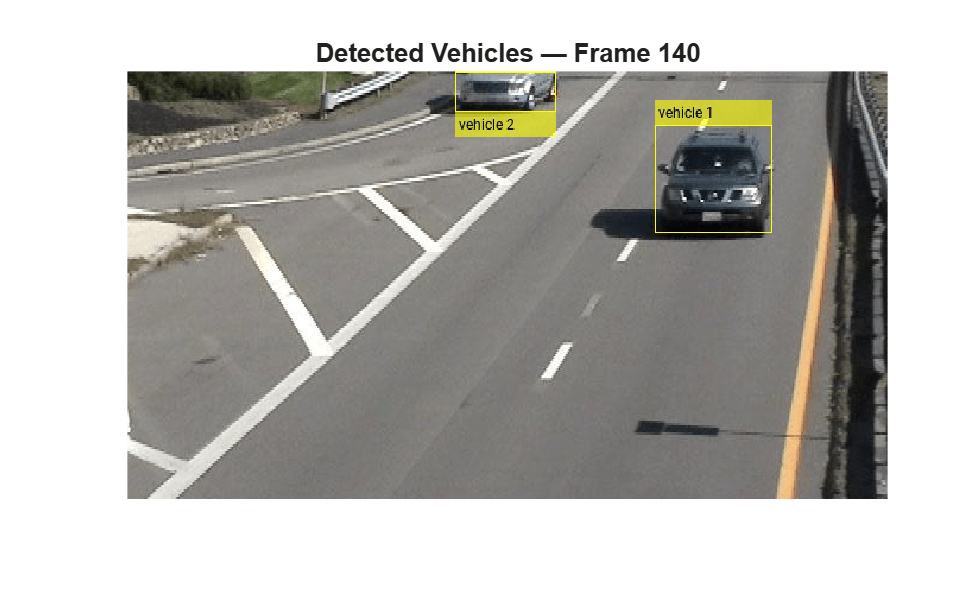
Add all detected vehicles for segmentation on frame 140. Use a vector of object IDs with a scalar frame number. Provide the bounding box prompts as a cell array.
numVehicles140 = size(bboxes140,1);
objectIDs = ["vehicle_1" "vehicle_2"];
bboxCell = cell(numVehicles140,1);
for i = 1:numVehicles140
    bboxCell{i} = bboxes140(i,:);
end
addObjectsToSegment(vidSegmenter,objectIDs,140, ...
    ObjectBoundingBox=bboxCell);
Observe Identity Drift During Sparse Processing
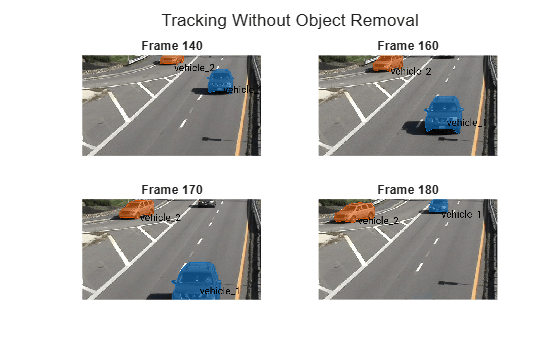
Segment and visualize frames 140, 160, 170 and 180. By frame 170, one of the original vehicles begins leaving the frame while a new vehicle enters from the opposite side.
By frame 180, the segmenter associates the newly entering vehicle with the identity of the vehicle that left the scene. This identity drift occurs because the segmenter was called on sparse frames (140, 160, 170, 180) rather than sequentially. Without the intermediate frames showing the object gradually leaving, the model lacks temporal context to distinguish departure from continued presence and latches onto a visually similar object.
framesToVisualize = [140 160 170 180];
colors = lines(numVehicles140);
figure
tiledlayout(2,2,TileSpacing="compact")
for i = 1:numel(framesToVisualize)
    fIdx = framesToVisualize(i);
    [masks,idsOut] = segmentObjects(vidSegmenter,fIdx);
    img = imread(vidSegmenter.FramePaths(fIdx));
    maskedImg = insertObjectMask(img,masks,MaskColor=colors);

    % Label each mask with its object ID at the mask centroid.
    for k = 1:numel(idsOut)
        [r,c] = find(masks(:,:,k));
        pos = [mean(c) mean(r)];
        maskedImg = insertText(maskedImg,pos,idsOut(k), ...
            FontSize=35,BoxOpacity=0,TextColor="black");
    end

    nexttile
    imshow(maskedImg)
    title("Frame " + fIdx)
end
sgtitle("Tracking Without Object Removal")
Prevent Identity Drift with Sequential Processing
Processing frames sequentially enables the segmenter to build temporal context and naturally handle object departures without identity drift. In addition, explicitly removing departed objects using removeObjectsToSegment frees resources and ensures the segmenter does not search for them in subsequent frames.
Reset the segmenter and add the same vehicles on frame 140.
removeObjectsToSegment(vidSegmenter,objectIDs);
addObjectsToSegment(vidSegmenter,objectIDs,140, ...
     ObjectBoundingBox=bboxCell);
Segment frames sequentially from 170 to 180. Sequential processing builds temporal context that prevents drift. To detect departures, compare the object IDs returned by the segmentObjects function against the previously tracked set. When you detect a departure, call removeObjectsToSegment to free resources. You can also monitor mask area trends as an alternative method to detect departure before the object fully exits.
startFrame = 170;
endFrame = 180;

prevIDs = objectIDs;
removedObjects = strings(0);

figure
tiledlayout(2,2,TileSpacing="compact")

for idx = startFrame:2:endFrame
    [masks,idsOut] = segmentObjects(vidSegmenter,idx);
    fprintf("Frame %d: Detected Objects %s\n",idx,strjoin(idsOut,", "));
    % Detect which objects are no longer returned.
    departed = setdiff(prevIDs,idsOut);
    % Remove objects that have departed
    if ~isempty(departed)
        fprintf("Frame %d: Removing %s\n",idx,strjoin(departed,", "));
        removeObjectsToSegment(vidSegmenter,departed);
        removedObjects = [removedObjects,departed]; %#ok<AGROW>
    end
    prevIDs = idsOut;

    % Visualize masks
    if ismember(idx,[170 174 178 180])
        img = imread(vidSegmenter.FramePaths(idx));
        maskedImg = insertObjectMask(img,masks,MaskColor=colors(1:size(idsOut,2),:));
        for k = 1:numel(idsOut)
            [r,c] = find(masks(:,:,k));
            pos = [mean(c) mean(r)];
            maskedImg = insertText(maskedImg,pos,idsOut(k), ...
                FontSize=35,BoxOpacity=0,TextColor="black");
        end
        nexttile
        imshow(maskedImg)
        title("Frame " + idx)
    end

end
Frame 170: Detected Objects vehicle_1, vehicle_2
Frame 172: Detected Objects vehicle_1, vehicle_2
Frame 174: Detected Objects vehicle_1, vehicle_2
Frame 176: Detected Objects vehicle_1, vehicle_2
Frame 178: Detected Objects vehicle_1, vehicle_2
Frame 180: Detected Objects vehicle_2
Frame 180: Removing vehicle_1
sgtitle("Sequential Processing Prevents Identity Drift")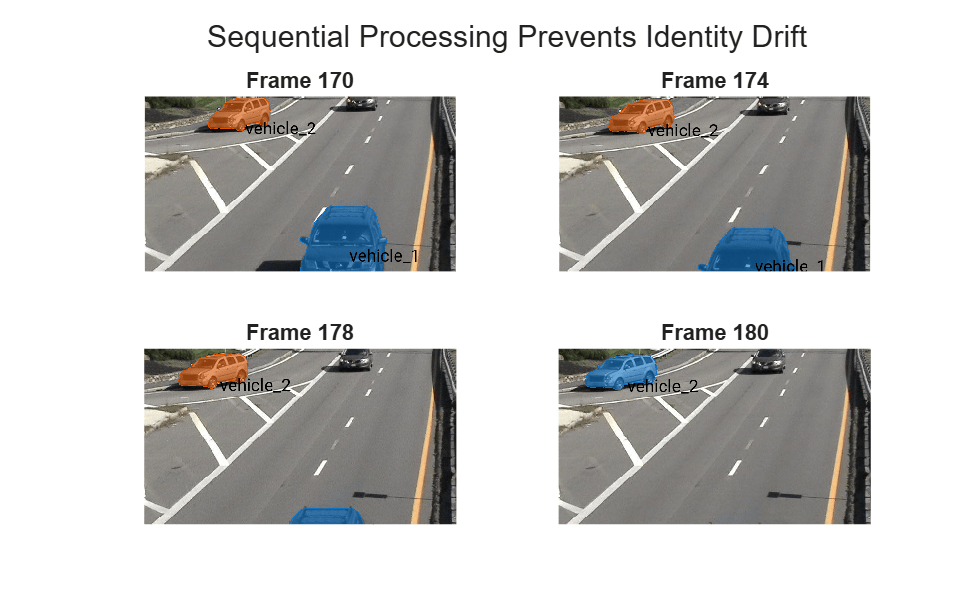
Display which objects were removed after they left the scene.
removedObjects
removedObjects =
"vehicle_1"
Detect and Add New Objects To Segment as They Enter
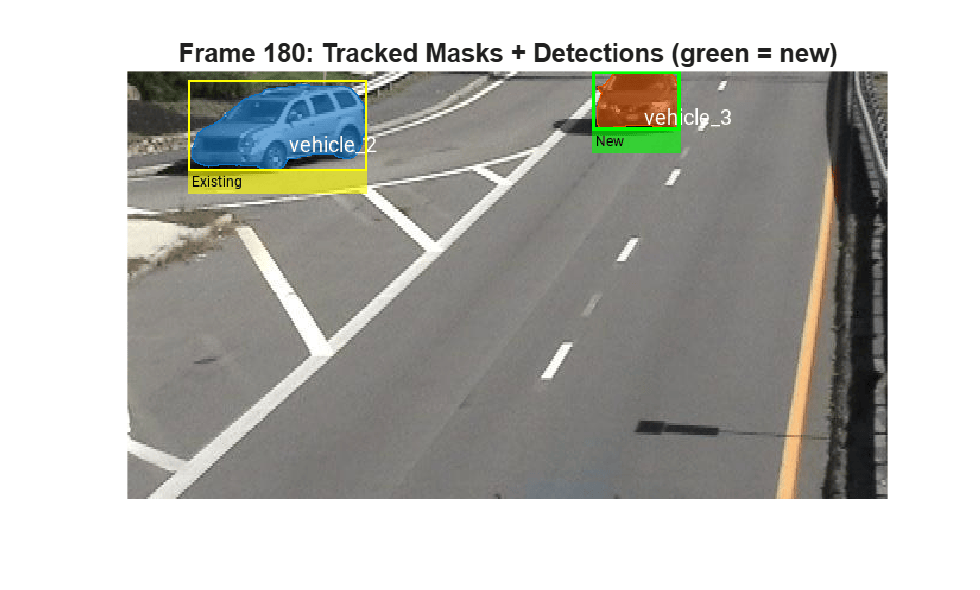
To detect new objects entering the scene, run the object detector periodically and compare the detected bounding boxes against the existing tracked masks. Any detection that does not overlap with a current mask is a new object that needs to be added with a fresh identity. Run the detector on frame 180 where a new vehicle has entered.
img180 = imread(vidSegmenter.FramePaths(180));
bboxes180 = detect(gdino,img180);
[masks180,currentIDs] = segmentObjects(vidSegmenter,180);
fprintf("Currently Tracked Masks on Frame 180: %d", numel(currentIDs))
Currently Tracked Masks on Frame 180: 1
fprintf("Detected Vehicles on Frame 180: %d",size(bboxes180,1))Detected Vehicles on Frame 180: 2
Compare each detection against bounding boxes of the current masks. Extract bounding boxes from the currently tracked masks using regionprops.
maskBboxes = zeros(size(masks180,3),4);
for k = 1:size(masks180,3)
    props = regionprops(masks180(:,:,k),"BoundingBox");
    maskBboxes(k,:) = props(1).BoundingBox;
end
Then, identify detections that do not overlap with any existing track using using bboxOverlapRatio.
isNewDet = false(size(bboxes180,1),1);
for i = 1:size(bboxes180,1)
    overlapRatios = bboxOverlapRatio(bboxes180(i,:),maskBboxes);
    isNewDet(i) = all(overlapRatios < 0.3);
end
Add newly detected objects to the video segmenter using addObjectsToSegment.
newObjCount = 0;
for i = find(isNewDet)
    newObjCount = newObjCount + 1;
    newID = "vehicle_" + (numel(currentIDs) + newObjCount + 1);
    fprintf("Frame 180: Adding new object %s from detection %d\n",newID,i);
    addObjectsToSegment(vidSegmenter,newID,180,ObjectBoundingBox=bboxes180(i,:));
end
Frame 180: Adding new object vehicle_3 from detection 2
Call segmentObjects again to get updated masks that include the newly added objects. Visualize the tracked masks with object IDs and overlay detected bounding boxes. Highlight newly added detections in green and existing detections in yellow.
[masks180updated,idsUpdated] = segmentObjects(vidSegmenter,180);
maskedImg180 = insertObjectMask(img180,masks180updated,MaskColor=lines(size(masks180updated,3)));
for k = 1:numel(idsUpdated)
    [r,c] = find(masks180updated(:,:,k));
    pos = [mean(c) mean(r)];
    maskedImg180 = insertText(maskedImg180,pos,idsUpdated(k), ...
        FontSize=18,BoxOpacity=0,TextColor="white");
end

if any(~isNewDet)
    maskedImg180 = insertObjectAnnotation(maskedImg180,"rectangle", ...
        bboxes180(~isNewDet,:),"Existing","Color","yellow","LineWidth",2);
end

if any(isNewDet)
    maskedImg180 = insertObjectAnnotation(maskedImg180,"rectangle", ...
        bboxes180(isNewDet,:),"New","Color","green","LineWidth",3);
end
figure
imshow(maskedImg180)
title("Frame 180: Tracked Masks + Detections (green = new)")
Continue Sequential Processing with Detection and Removal
Continue processing frames 182 to 190 sequentially, combining object removal and periodic detection into a single loop.
prevIDs = idsUpdated;
vizFrames = [185 191 203 209];

figure
tiledlayout(2,2,TileSpacing="compact")

for fIdx = 182:3:210
    [masks,ids] = segmentObjects(vidSegmenter,fIdx);
    fprintf("Frame %d: Detected Objects %s\n",fIdx,strjoin(ids,", "));
    % Remove departed objects
    departed = setdiff(prevIDs,ids);
    if ~isempty(departed)
        fprintf("Frame %d: Removed %s\n",fIdx,strjoin(departed,", "));
        removeObjectsToSegment(vidSegmenter,departed);
    end

    % Visualize select frames
    if ismember(fIdx,vizFrames)
        img = imread(vidSegmenter.FramePaths(fIdx));
        maskedImg = insertObjectMask(img,masks,MaskColor=lines(size(masks,3)));
        for k = 1:numel(ids)
            [r,c] = find(masks(:,:,k));
            pos = [mean(c) mean(r)];
            maskedImg = insertText(maskedImg,pos,ids(k), ...
                FontSize=18,BoxOpacity=0,TextColor="white");
        end
        nexttile
        imshow(maskedImg)
        title("Frame " + fIdx + " (" + numel(ids) + " tracked)")
    end

    prevIDs = ids;
end
Frame 182: Detected Objects vehicle_2, vehicle_3
Frame 185: Detected Objects vehicle_2, vehicle_3
Frame 188: Detected Objects vehicle_2, vehicle_3
Frame 191: Detected Objects vehicle_2, vehicle_3
Frame 194: Detected Objects vehicle_2, vehicle_3
Frame 197: Detected Objects vehicle_2, vehicle_3
Frame 200: Detected Objects vehicle_2, vehicle_3
Frame 203: Detected Objects vehicle_2, vehicle_3
Frame 206: Detected Objects vehicle_3
Frame 206: Removed vehicle_2
Frame 209: Detected Objects vehicle_3
sgtitle("Combined Workflow: Sequential Processing with Removal")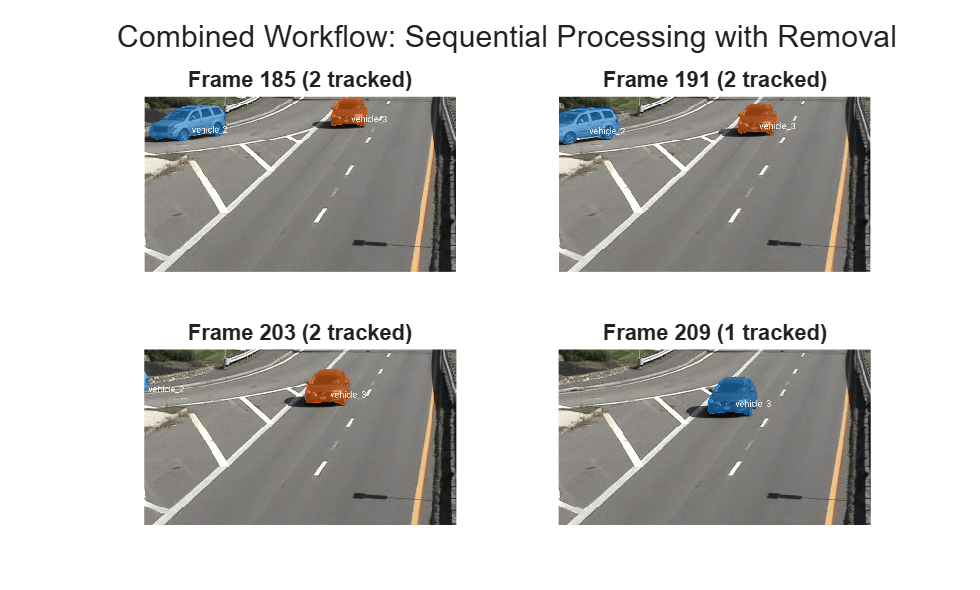
By processing frames sequentially, removing departed objects, and running the detector periodically to discover new objects, the segmenter maintains correct identity associations throughout the video.
Input Arguments
More About
Tips
If the segmentation includes unwanted background regions, add
BackgroundPointson those regions to refine the object boundary.For more accurate segmentation across long videos, add prompts for the same object on multiple frames that are far apart in time. SAM 2 uses all provided prompts to maintain consistent identity.
You can call this function at any point during the segmentation workflow even after calling
segmentObjectson some frames. Calling this function for the same object on a frame it has already been added to will replace the existing prompts on that frame. Add new prompts to correct errors or introduce new objects that appear later in the video.When using an object detector to generate prompts, pass the detected bounding boxes directly using
ObjectBoundingBox.
Version History
Introduced in R2026b

