sam2VideoObjectSegmenter
R2026bDescription
The sam2VideoObjectSegmenter function creates a video
object segmenter that segments and tracks objects across video frames using the Segment
Anything Model 2 (SAM 2).
Use this object to perform prompt-driven video object segmentation by specifying
objects on one or more frames using point or bounding box prompts. When you call
segmentObjects on each frame, the segmenter propagates object
identity from the prompted frames to the requested frame using temporal context. The
typical workflow is:
Create a
sam2VideoObjectSegmenterobject from a video file or image datastore.Add objects to segment using
addObjectsToSegmentwith point or bounding box prompts.Loop through the video frames and call
segmentObjectson each frame to segment the specified objects.Remove objects that have permanently left the scene using
removeObjectsToSegmentto free resources and prevent the segmenter from searching for them. If an object temporarily leaves and re-enters, add a new prompt on the re-entry frame usingaddObjectsToSegmentwith the same object ID.Release GPU resources with
releaseGPUMemorywhen segmentation is complete.
Unlike frame-by-frame approaches such as segmentAnythingModel or imsegsam,
sam2VideoObjectSegmenter maintains consistent object identities
across frames by propagating segmentation results. This reduces the need to re-prompt on
every frame.
Note
This functionality requires the Image Processing Toolbox™ Model for Segment Anything Model 2 add-on.
Creation
Syntax
Description
vidSegmenter = sam2VideoObjectSegmenter(videoName)vidSegmenter from the
video file specified by videoName. The function loads the
SAM 2 model and writes extracted video frames to disk for processing. By
default, the object uses the "sam2-large" model
variant.
vidSegmenter = sam2VideoObjectSegmenter(ds)vidSegmenter from the
file-backed datastore ds, which represents an image
sequence. The function processes the images in read order and writes those
frames to disk in the format required by SAM 2.
vidSegmenter = sam2VideoObjectSegmenter(___,Name=Value)sam2VideoObjectSegmenter("video.mp4",ModelName="sam2-tiny")
uses the smallest and fastest SAM 2 model variant,
sam2-tiny.
Note
During creation, the sam2VideoObjectSegmenter object
converts the video or images in the datastore into consecutively numbered JPEG
files and writes them to disk. For long videos or large image sequences, this
process can take some time and requires sufficient disk space.
Input Arguments
Name-Value Arguments
Properties
Object Functions
Examples
Segment and track multiple vehicles across video frames using a sam2VideoObjectSegmenter object. Use Grounding DINO to detect vehicles, then use addObjectsToSegment to specify which objects to track. This example demonstrates how identity drift occurs when frames are processed sparsely, how sequential processing prevents drift by building temporal context, and how to use removeObjectsToSegment to manage object lifecycles in long videos.
Create a Grounding DINO object detector configured to detect vehicles.
gdino = groundingDinoObjectDetector("swin-tiny",ClassNames="vehicle");
Create a SAM 2 video object segmenter by specifying an input video which shows vehicle traffic on a highway.
vidSegmenter = sam2VideoObjectSegmenter("visiontraffic.avi");Configuring Segment Anything Model 2 (SAM 2)
Loading video
Write images extracted to folder:
C:\Users\user\AppData\Local\Temp\tp9c2373e5_6819_42ca_82e0_0100767b85c4
Writing images extracted from visiontraffic.avi: 0/531
Completed.
Preprocessing complete
Initializing SAM 2 temporal processing. This operation can take several minutes.
Add Multiple Objects on a Single Frame
Detect vehicles on frame 140 and visualize the detections.
img140 = imread(vidSegmenter.FramePaths(140));
bboxes140 = detect(gdino,img140);
annotatedImg = insertObjectAnnotation(img140,"rectangle",bboxes140, ...
    "vehicle " + (1:size(bboxes140,1)));
figure
imshow(annotatedImg)
title("Detected Vehicles — Frame 140")
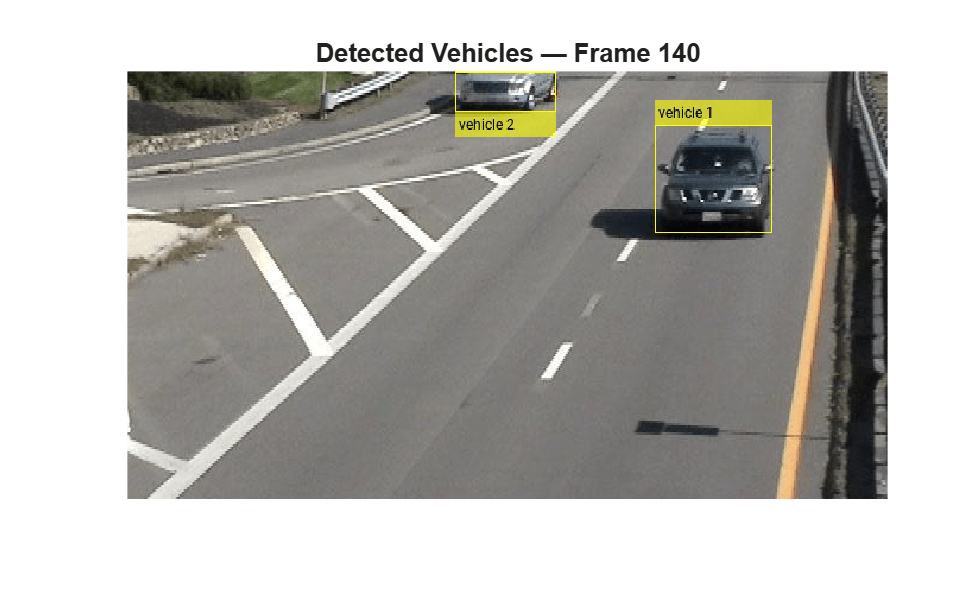
Add all detected vehicles for segmentation on frame 140. Use a vector of object IDs with a scalar frame number. Provide the bounding box prompts as a cell array.
numVehicles140 = size(bboxes140,1);
objectIDs = ["vehicle_1" "vehicle_2"];
bboxCell = cell(numVehicles140,1);
for i = 1:numVehicles140
    bboxCell{i} = bboxes140(i,:);
end
addObjectsToSegment(vidSegmenter,objectIDs,140, ...
    ObjectBoundingBox=bboxCell);
Observe Identity Drift During Sparse Processing
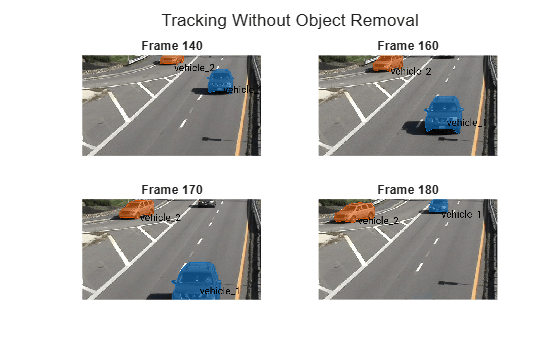
Segment and visualize frames 140, 160, 170 and 180. By frame 170, one of the original vehicles begins leaving the frame while a new vehicle enters from the opposite side.
By frame 180, the segmenter associates the newly entering vehicle with the identity of the vehicle that left the scene. This identity drift occurs because the segmenter was called on sparse frames (140, 160, 170, 180) rather than sequentially. Without the intermediate frames showing the object gradually leaving, the model lacks temporal context to distinguish departure from continued presence and latches onto a visually similar object.
framesToVisualize = [140 160 170 180];
colors = lines(numVehicles140);
figure
tiledlayout(2,2,TileSpacing="compact")
for i = 1:numel(framesToVisualize)
    fIdx = framesToVisualize(i);
    [masks,idsOut] = segmentObjects(vidSegmenter,fIdx);
    img = imread(vidSegmenter.FramePaths(fIdx));
    maskedImg = insertObjectMask(img,masks,MaskColor=colors);

    % Label each mask with its object ID at the mask centroid.
    for k = 1:numel(idsOut)
        [r,c] = find(masks(:,:,k));
        pos = [mean(c) mean(r)];
        maskedImg = insertText(maskedImg,pos,idsOut(k), ...
            FontSize=35,BoxOpacity=0,TextColor="black");
    end

    nexttile
    imshow(maskedImg)
    title("Frame " + fIdx)
end
sgtitle("Tracking Without Object Removal")
Prevent Identity Drift with Sequential Processing
Processing frames sequentially enables the segmenter to build temporal context and naturally handle object departures without identity drift. In addition, explicitly removing departed objects using removeObjectsToSegment frees resources and ensures the segmenter does not search for them in subsequent frames.
Reset the segmenter and add the same vehicles on frame 140.
removeObjectsToSegment(vidSegmenter,objectIDs);
addObjectsToSegment(vidSegmenter,objectIDs,140, ...
     ObjectBoundingBox=bboxCell);
Segment frames sequentially from 170 to 180. Sequential processing builds temporal context that prevents drift. To detect departures, compare the object IDs returned by the segmentObjects function against the previously tracked set. When you detect a departure, call removeObjectsToSegment to free resources. You can also monitor mask area trends as an alternative method to detect departure before the object fully exits.
startFrame = 170;
endFrame = 180;

prevIDs = objectIDs;
removedObjects = strings(0);

figure
tiledlayout(2,2,TileSpacing="compact")

for idx = startFrame:2:endFrame
    [masks,idsOut] = segmentObjects(vidSegmenter,idx);
    fprintf("Frame %d: Detected Objects %s\n",idx,strjoin(idsOut,", "));
    % Detect which objects are no longer returned.
    departed = setdiff(prevIDs,idsOut);
    % Remove objects that have departed
    if ~isempty(departed)
        fprintf("Frame %d: Removing %s\n",idx,strjoin(departed,", "));
        removeObjectsToSegment(vidSegmenter,departed);
        removedObjects = [removedObjects,departed]; %#ok<AGROW>
    end
    prevIDs = idsOut;

    % Visualize masks
    if ismember(idx,[170 174 178 180])
        img = imread(vidSegmenter.FramePaths(idx));
        maskedImg = insertObjectMask(img,masks,MaskColor=colors(1:size(idsOut,2),:));
        for k = 1:numel(idsOut)
            [r,c] = find(masks(:,:,k));
            pos = [mean(c) mean(r)];
            maskedImg = insertText(maskedImg,pos,idsOut(k), ...
                FontSize=35,BoxOpacity=0,TextColor="black");
        end
        nexttile
        imshow(maskedImg)
        title("Frame " + idx)
    end

end
Frame 170: Detected Objects vehicle_1, vehicle_2
Frame 172: Detected Objects vehicle_1, vehicle_2
Frame 174: Detected Objects vehicle_1, vehicle_2
Frame 176: Detected Objects vehicle_1, vehicle_2
Frame 178: Detected Objects vehicle_1, vehicle_2
Frame 180: Detected Objects vehicle_2
Frame 180: Removing vehicle_1
sgtitle("Sequential Processing Prevents Identity Drift")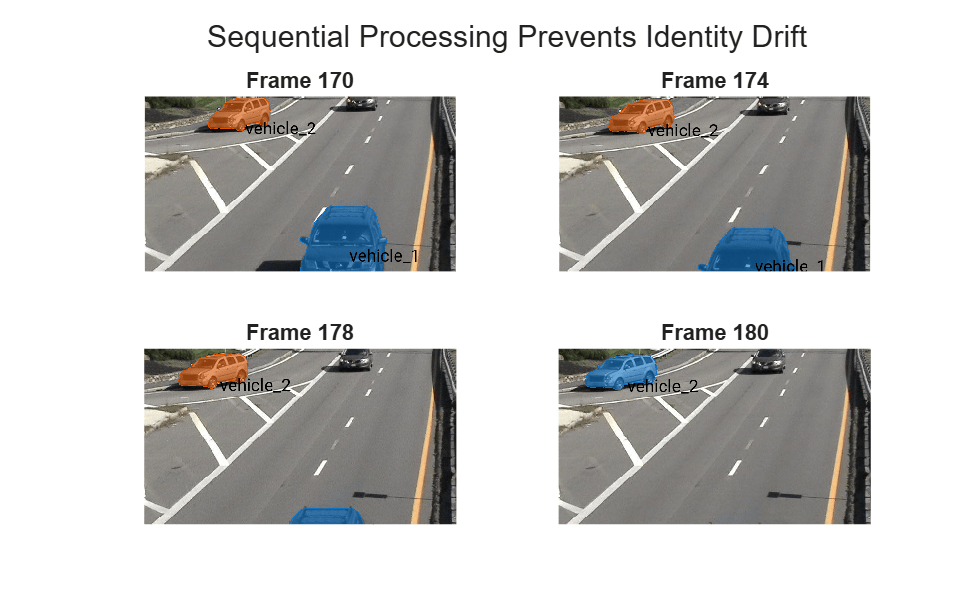
Display which objects were removed after they left the scene.
removedObjects
removedObjects =
"vehicle_1"
Detect and Add New Objects To Segment as They Enter
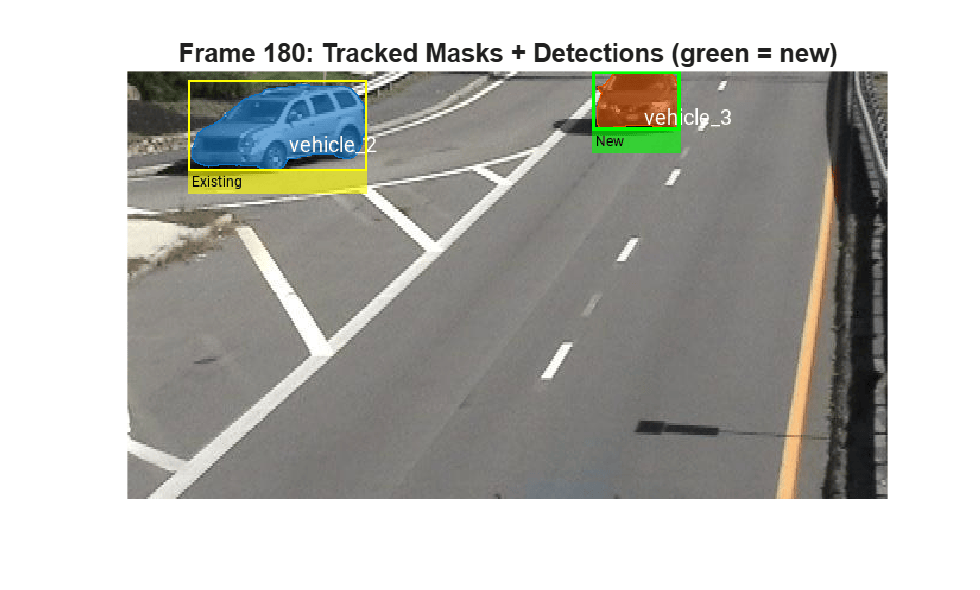
To detect new objects entering the scene, run the object detector periodically and compare the detected bounding boxes against the existing tracked masks. Any detection that does not overlap with a current mask is a new object that needs to be added with a fresh identity. Run the detector on frame 180 where a new vehicle has entered.
img180 = imread(vidSegmenter.FramePaths(180));
bboxes180 = detect(gdino,img180);
[masks180,currentIDs] = segmentObjects(vidSegmenter,180);
fprintf("Currently Tracked Masks on Frame 180: %d", numel(currentIDs))
Currently Tracked Masks on Frame 180: 1
fprintf("Detected Vehicles on Frame 180: %d",size(bboxes180,1))Detected Vehicles on Frame 180: 2
Compare each detection against bounding boxes of the current masks. Extract bounding boxes from the currently tracked masks using regionprops.
maskBboxes = zeros(size(masks180,3),4);
for k = 1:size(masks180,3)
    props = regionprops(masks180(:,:,k),"BoundingBox");
    maskBboxes(k,:) = props(1).BoundingBox;
end
Then, identify detections that do not overlap with any existing track using using bboxOverlapRatio.
isNewDet = false(size(bboxes180,1),1);
for i = 1:size(bboxes180,1)
    overlapRatios = bboxOverlapRatio(bboxes180(i,:),maskBboxes);
    isNewDet(i) = all(overlapRatios < 0.3);
end
Add newly detected objects to the video segmenter using addObjectsToSegment.
newObjCount = 0;
for i = find(isNewDet)
    newObjCount = newObjCount + 1;
    newID = "vehicle_" + (numel(currentIDs) + newObjCount + 1);
    fprintf("Frame 180: Adding new object %s from detection %d\n",newID,i);
    addObjectsToSegment(vidSegmenter,newID,180,ObjectBoundingBox=bboxes180(i,:));
end
Frame 180: Adding new object vehicle_3 from detection 2
Call segmentObjects again to get updated masks that include the newly added objects. Visualize the tracked masks with object IDs and overlay detected bounding boxes. Highlight newly added detections in green and existing detections in yellow.
[masks180updated,idsUpdated] = segmentObjects(vidSegmenter,180);
maskedImg180 = insertObjectMask(img180,masks180updated,MaskColor=lines(size(masks180updated,3)));
for k = 1:numel(idsUpdated)
    [r,c] = find(masks180updated(:,:,k));
    pos = [mean(c) mean(r)];
    maskedImg180 = insertText(maskedImg180,pos,idsUpdated(k), ...
        FontSize=18,BoxOpacity=0,TextColor="white");
end

if any(~isNewDet)
    maskedImg180 = insertObjectAnnotation(maskedImg180,"rectangle", ...
        bboxes180(~isNewDet,:),"Existing","Color","yellow","LineWidth",2);
end

if any(isNewDet)
    maskedImg180 = insertObjectAnnotation(maskedImg180,"rectangle", ...
        bboxes180(isNewDet,:),"New","Color","green","LineWidth",3);
end
figure
imshow(maskedImg180)
title("Frame 180: Tracked Masks + Detections (green = new)")
Continue Sequential Processing with Detection and Removal
Continue processing frames 182 to 190 sequentially, combining object removal and periodic detection into a single loop.
prevIDs = idsUpdated;
vizFrames = [185 191 203 209];

figure
tiledlayout(2,2,TileSpacing="compact")

for fIdx = 182:3:210
    [masks,ids] = segmentObjects(vidSegmenter,fIdx);
    fprintf("Frame %d: Detected Objects %s\n",fIdx,strjoin(ids,", "));
    % Remove departed objects
    departed = setdiff(prevIDs,ids);
    if ~isempty(departed)
        fprintf("Frame %d: Removed %s\n",fIdx,strjoin(departed,", "));
        removeObjectsToSegment(vidSegmenter,departed);
    end

    % Visualize select frames
    if ismember(fIdx,vizFrames)
        img = imread(vidSegmenter.FramePaths(fIdx));
        maskedImg = insertObjectMask(img,masks,MaskColor=lines(size(masks,3)));
        for k = 1:numel(ids)
            [r,c] = find(masks(:,:,k));
            pos = [mean(c) mean(r)];
            maskedImg = insertText(maskedImg,pos,ids(k), ...
                FontSize=18,BoxOpacity=0,TextColor="white");
        end
        nexttile
        imshow(maskedImg)
        title("Frame " + fIdx + " (" + numel(ids) + " tracked)")
    end

    prevIDs = ids;
end
Frame 182: Detected Objects vehicle_2, vehicle_3
Frame 185: Detected Objects vehicle_2, vehicle_3
Frame 188: Detected Objects vehicle_2, vehicle_3
Frame 191: Detected Objects vehicle_2, vehicle_3
Frame 194: Detected Objects vehicle_2, vehicle_3
Frame 197: Detected Objects vehicle_2, vehicle_3
Frame 200: Detected Objects vehicle_2, vehicle_3
Frame 203: Detected Objects vehicle_2, vehicle_3
Frame 206: Detected Objects vehicle_3
Frame 206: Removed vehicle_2
Frame 209: Detected Objects vehicle_3
sgtitle("Combined Workflow: Sequential Processing with Removal")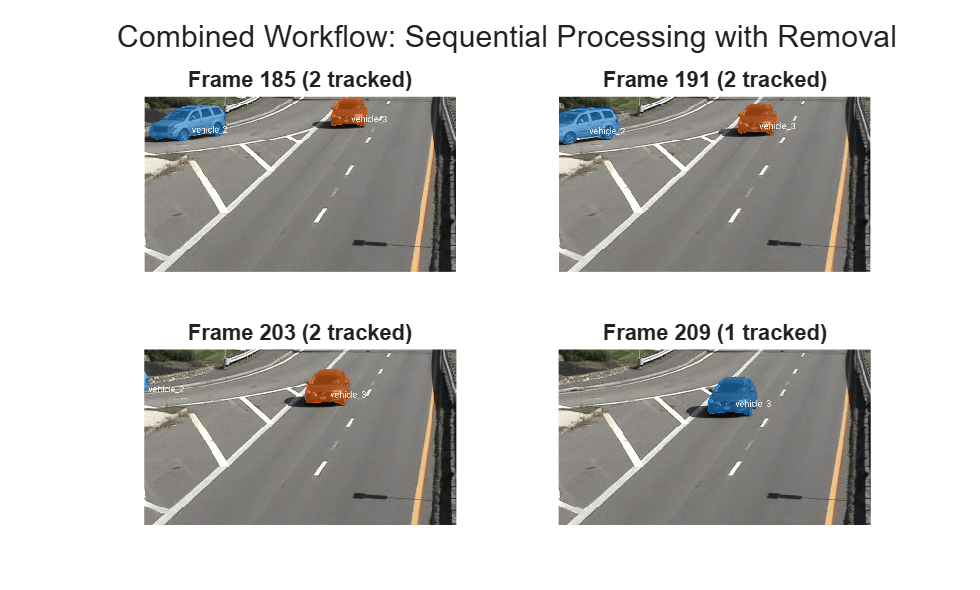
By processing frames sequentially, removing departed objects, and running the detector periodically to discover new objects, the segmenter maintains correct identity associations throughout the video.
Tips
For best results, mark each object on at least two frames that are far apart in time from each other (for example, frame 1 and frame 200). This helps SAM 2 maintain consistent object identity across the video.
If SAM 2 segments the wrong object or includes background regions, add
BackgroundPointsinaddObjectsToSegmentto refine the segmentation boundary.Process frames sequentially to prevent identity drift. Sequential processing builds temporal context that allows the segmenter to distinguish departures from new arrivals. Remove permanently departed objects using
removeObjectsToSegmentto free resources.When an object leaves the scene,
segmentObjectsstops returning its ID. Use ID presence or mask area to detect departures. Do not rely onmaskScoresas they may remain high even during departure.If an object temporarily leaves the frame and re-enters, do not remove it. Instead, add a new prompt on the re-entry frame using
addObjectsToSegmentwith the same object ID. This refreshes the model memory without losing identity continuity.When two visually similar objects cross paths, the
sam2VideoObjectSegmenterobject might confuse their identities because it relies on visual cues without physics-based motion prediction. CombinesegmentObjectsoutput with a multi-object tracker such asvideoTracker(Sensor Fusion and Tracking Toolbox) for more robust identity association.
Version History
Introduced in R2026b

