addElevation
R2026bSyntax
Description
Add-On Required: This feature requires the Scenario Builder for Automated Driving Toolbox add-on.
elevatedSceneData = addElevation(sceneData,geoReferencedPointCloud)sceneData by using the elevation
information from the georeferenced point cloud
geoReferencedPointCloud.
Note: This feature also requires a Point Cloud Toolbox™ license.
elevatedSceneData = addElevation(sceneData,geoReferencedPointCloud,Name=Value)CropSceneData=false adds elevation information to the scene without
cropping the scene data. (since R2026a)
Examples
Load a roadrunnerHDMap object into the workspace.
load("addElevationData.mat","rrMap")
Read a georeferenced point cloud for an area that represents the loaded roadrunnerHDMap object.
geoReferencedPointCloud = pcread("USGS_LPC_CA_NoCAL_3DEP_Supp_Funding_2018_D18_w2276n1958_Cropped_geoReferenced.pcd");Use the point cloud to add elevation to the scene data from the roadrunnerHDMap object.
elevatedSceneData = addElevation(rrMap,geoReferencedPointCloud);
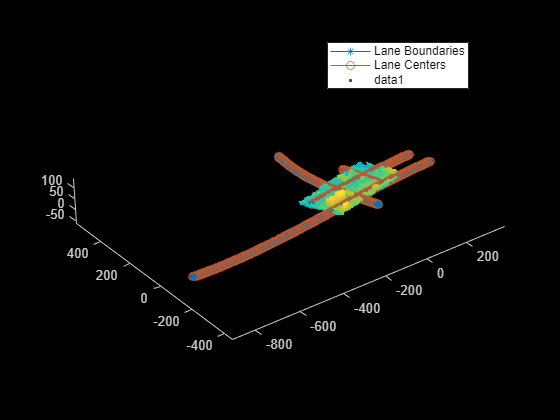
Overlay and plot the elevated scene data and georeferenced point cloud. Observe the elevation information added to the scene.
plot(elevatedSceneData)
hold on
pcshow(geoReferencedPointCloud)
hold off
Load 2D lane boundary points into the workspace.
load("addElevationData.mat","laneBoundaryPoints")
Read a georeferenced point cloud for an area that contains the loaded 2D lane boundary points.
geoReferencedPointCloud = pcread("USGS_LPC_CA_NoCAL_3DEP_Supp_Funding_2018_D18_w2276n1958_Cropped_geoReferenced.pcd");Use the point cloud to add elevations to the 2D lane boundary points.
elevatedLanes = addElevation(laneBoundaryPoints,geoReferencedPointCloud);
Overlay and plot the elevated lanes and georeferenced point cloud. Observe the elevation information added to the lane boundary points.
pcshow(geoReferencedPointCloud)
hold on
scatter3(elevatedLanes(:,1),elevatedLanes(:,2),elevatedLanes(:,3))
hold off

Load static object cuboids into the workspace.
load("addElevationData.mat","statObjs")
Read a georeferenced point cloud for an area that contains the loaded static object cuboids.
geoReferencedPointCloud = pcread("USGS_LPC_CA_NoCAL_3DEP_Supp_Funding_2018_D18_w2276n1958_Cropped_geoReferenced.pcd");Add the elevation information from the point cloud to the static object cuboids by replacing their older elevation values, without cropping the lane boundary points.
elevatedCuboids = addElevation(statObjs,geoReferencedPointCloud,cropSceneData=false);
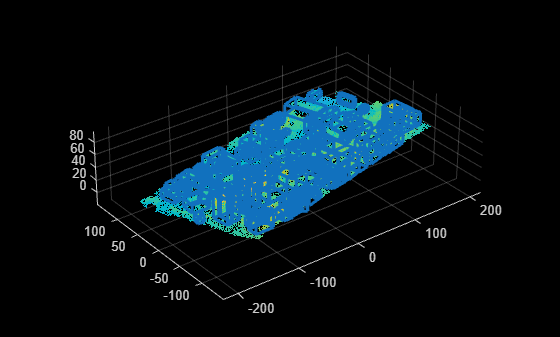
Overlay and plot the updated cuboids and georeferenced point cloud. Observe the elevation information added to the static object cuboids.
pcshow(geoReferencedPointCloud)
hold on
showShape("cuboid",elevatedCuboids)
hold off
Input Arguments
Scene data to which to add elevation, specified as a roadrunnerHDMap object, N-by-2 matrix, or
M-by-9 matrix.
Specify lane boundary points as an N-by-2 matrix, where N is the number of lane boundary points. Each row represents a lane boundary point in the form [x y]. For more information, see the Add Elevations to 2D Lane Boundary Points example.
Specify cuboids of static objects as an M-by-9 matrix, where M is the number of static objects. Each row of the matrix specifies a cuboid model of a static object using the form [xctr yctr zctr xlen ylen zlen xrot yrot zrot].
xctr, yctr, and zctr specify the coordinates of the cuboid center.
xlen, ylen, and zlen specify the length of the cuboid, in meters, along the x-, y-, and z-axes, respectively, before rotation has been applied.
xrot, yrot, and zrot specify the rotation angles, in degrees, for the cuboid along the x-, y-, and z-axes, respectively. These angles are clockwise-positive when looking in the forward direction of their corresponding axes.
This figure shows how these values determine the position of a cuboid. All values are in the world coordinate system.

For more information, see the Update Elevations of Static Object Cuboids example.
Note
For locations in the sceneData argument not included in the
geoReferencedPointCloud argument, the
addElevation function extrapolates values from the input point
cloud to estimate elevation. These estimations can be imprecise. To estimate precise
elevation, ensure that all locations in sceneData are included in
geoReferencedPointCloud.
Geographically referenced point cloud data, specified as a pointCloud (Point Cloud Toolbox) object. For more information on how to create a georeferenced
point cloud, see the Georeference Sequence of Point Clouds for Scene Generation and Transform Aerial Point Cloud for Scene Generation examples.
Note
The input geoReferencedPointCloud must contain point cloud
data in the east-north-up (ENU) coordinate system.
Name-Value Arguments
Output Arguments
References
[1] "USGS Lidar Explorer Map." Accessed November 14, 2025. https://apps.nationalmap.gov/lidar-explorer/.

