ordfilt2
R2026b2-D order-statistic filtering
Description
Examples
Read image into workspace and display it.
A = imread("snowflakes.png");
figure
imshow(A)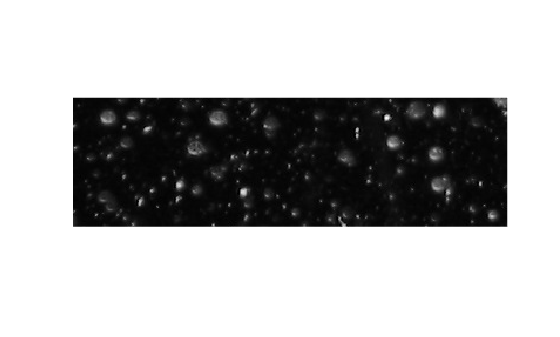
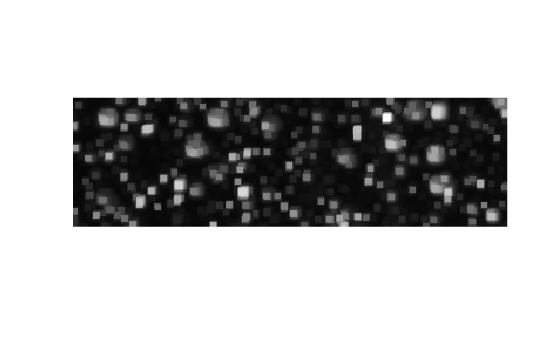
Filter the image with a 5-by-5 maximum filter and display the result.
B = ordfilt2(A,25,true(5));
figure
imshow(B)
Read an image into workspace and display it.
A = imread("snowflakes.png");
A = im2double(A);
figure
imshow(A,[])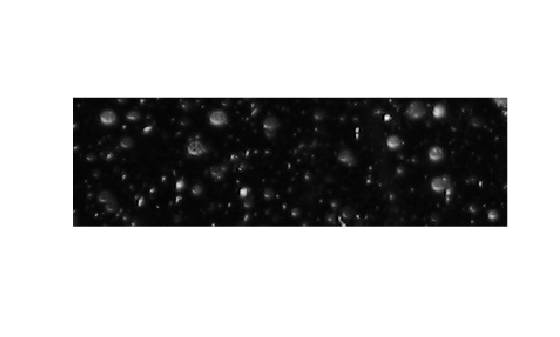
Define a skewed 5-by-5 structuring element that has higher intensities in the right columns than the left columns.
SE = repmat([1 1 1 5 5],5,1)
SE = 5×5

     1     1     1     5     5
     1     1     1     5     5
     1     1     1     5     5
     1     1     1     5     5
     1     1     1     5     5
The domain of the ordfilt2 function requires only the positions of the nonzero elements in the structuring element, and not the values. Define the domain as the logical values of the structuring element.
domain = SE > 0
domain = 5×5 logical array

   1   1   1   1   1
   1   1   1   1   1
   1   1   1   1   1
   1   1   1   1   1
   1   1   1   1   1
To perform morphological dilation, the order of the ordfilt2 function must be specified as maximum. Specify the order has the number of nonzero elements in the domain.
order = nnz(domain)
order =
25
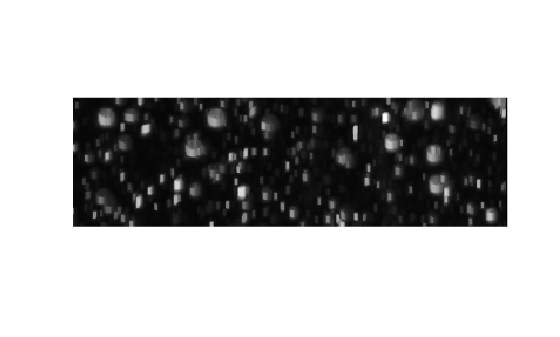
Filter the image with the maximum filter with the structuring element as the additive offset. The additive offset controls the directions in which the morphological effect occurs.
B = ordfilt2(A,order,domain,SE);
Display the filtered image. Observe that the snowflakes dilate in different proportions on the left and right because of the intensities of the structuring element.
figure
imshow(B,[])
Input Arguments
Data to filter, specified as a 2-D numeric matrix or 2-D logical matrix.
Data Types: single | double | int8 | int16 | int32 | uint8 | uint16 | uint32 | logical
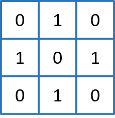
Neighborhood, specified as a numeric or logical matrix containing 1s and
0s. domain is equivalent to the
structuring element used for binary image operations. The
1-valued elements define the neighborhood for the
filtering operation. The table gives examples of some common filters.
| Type of Filtering Operation | Sample code | Neighborhood | Sample Image Data, Indicating Selected Element |
|---|---|---|---|
| Median filter | B = ordfilt2(A,5,ones(3,3)) |
|
|
| Minimum filter | B = ordfilt2(A,1,ones(3,3)) |
|
|
| Maximum filter | B = ordfilt2(A,9,ones(3,3)) |
|
|
| Minimum of north, east, south, and west neighbors | B = ordfilt2(A,1,[0 1 0; 1 0 1; 0 1
0]) |
|
|
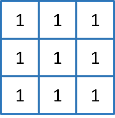
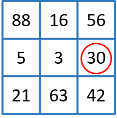
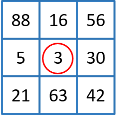
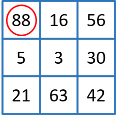

Data Types: single | double | int8 | int16 | int32 | int64 | uint8 | uint16 | uint32 | uint64 | logical
Additive offsets, specified as a numeric matrix of the same size as
domain. The function adds the values of
S corresponding to the nonzero values of
domain before sorting. You can use additive offsets
to implement grayscale morphological operations, including grayscale
dilation and erosion. The additive offset controls the directions in which
the morphological effect occurs.
Data Types: single | double | int8 | int16 | int32 | int64 | uint8 | uint16 | uint32 | uint64 | logical
Padding option, specified as one of the following values. The nature of padding controls how the function computes the values of the output pixels at the edges of the image.
| Option | Description | Example |
|---|---|---|
"zeros" | Pad array boundaries with the value
0. |
|
"symmetric" | Pad array with mirror reflections of itself. |
|
Data Types: char | string
Output Arguments
Tips
When working with large domain matrices that do not contain any zero-valued elements,
ordfilt2can achieve higher performance ifAis in an integer data format (uint8,int8,uint16,int16). The gain in speed is larger foruint8andint8than for the 16-bit data types. For 8-bit data formats, the domain matrix must contain seven or more rows. For 16-bit data formats, the domain matrix must contain three or more rows and 520 or more elements.
References
[1] Haralick, Robert M., and Linda G. Shapiro, Computer and Robot Vision, Volume I, Addison-Wesley, 1992.
[2] Huang, T. S., G. J. Yang, and G. Y. Tang. "A fast two-dimensional median filtering algorithm.", IEEE transactions on Acoustics, Speech and Signal Processing, Vol ASSP 27, No. 1, February 1979.

