LCW: Linear Colormap Widget

A simple tool for creating attractive and perceptually smooth colormaps

You are now following this Submission

This tool simplifies the creation of perceptually linear and/or smooth colormaps for data visualization. The tool works by using palette colors selected by the user and performing all interpolations and sortings in CAM02-UCS, a color space with good perceptual properties. Note that this requires the user to also download the conversion tools created by Stephen Cobeldick (author of "cubehelix") and found in:
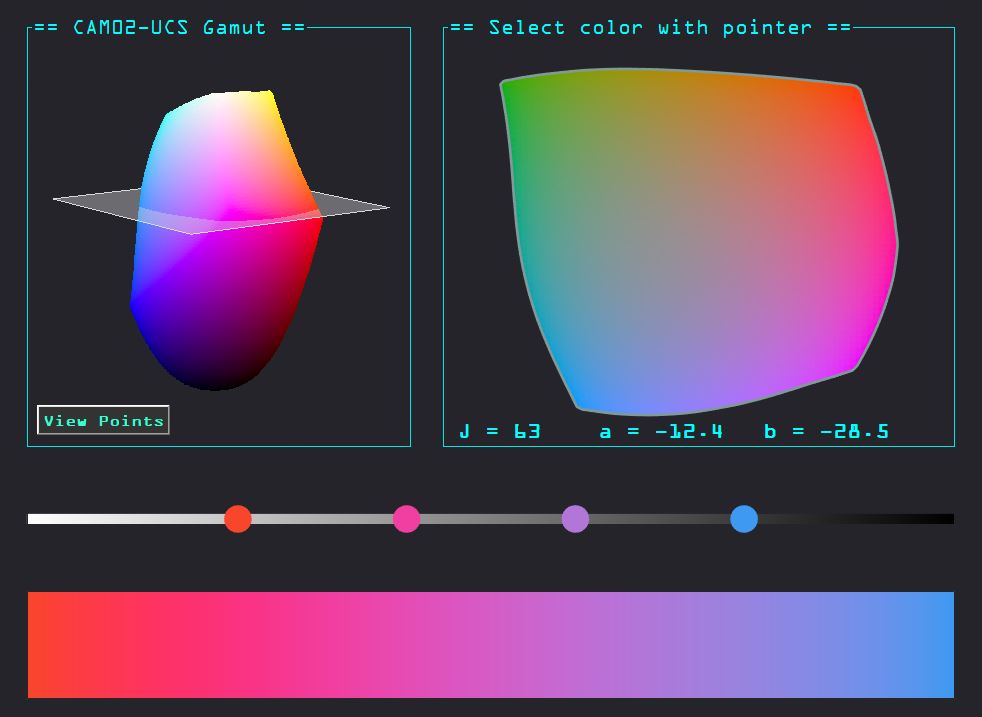
Usage of the tool is simple. Type "lcw" in the command line with lcw files and CIECAM colorspace files in the active directory. A gui like the one below will open.
The user can move the slider on the right to change the slice / lightness value of the gamut, and use the pointer to click on a color within the slice to view a sample in the top right box. The user can add the color to the palette bar (middle) using the "Add" button. When multiple colors are selected, the user can create a palette using various options that are described in more detail in the help file of the function. The following example shows the creation of the included "merlin" colormap, which has been passed a custom lightness function that boosts the low end a small amount.
Happy color-mapping!

Cite As

Tim (2026). LCW: Linear Colormap Widget (https://au.mathworks.com/matlabcentral/fileexchange/131504-lcw-linear-colormap-widget), MATLAB Central File Exchange. Retrieved .

Acknowledgements

Inspired by: CubeHelix Colormap Generator

General Information

MATLAB Release Compatibility

  • Compatible with R2020a to R2023b

Platform Compatibility

  • Windows
  • macOS
  • Linux
Version Published Release Notes Action
1.0.0