Simulink real time I/0 mode

Show older comments
Hi I'm using simulink in SDRT I/0 mode to visualize and analyze my signal.
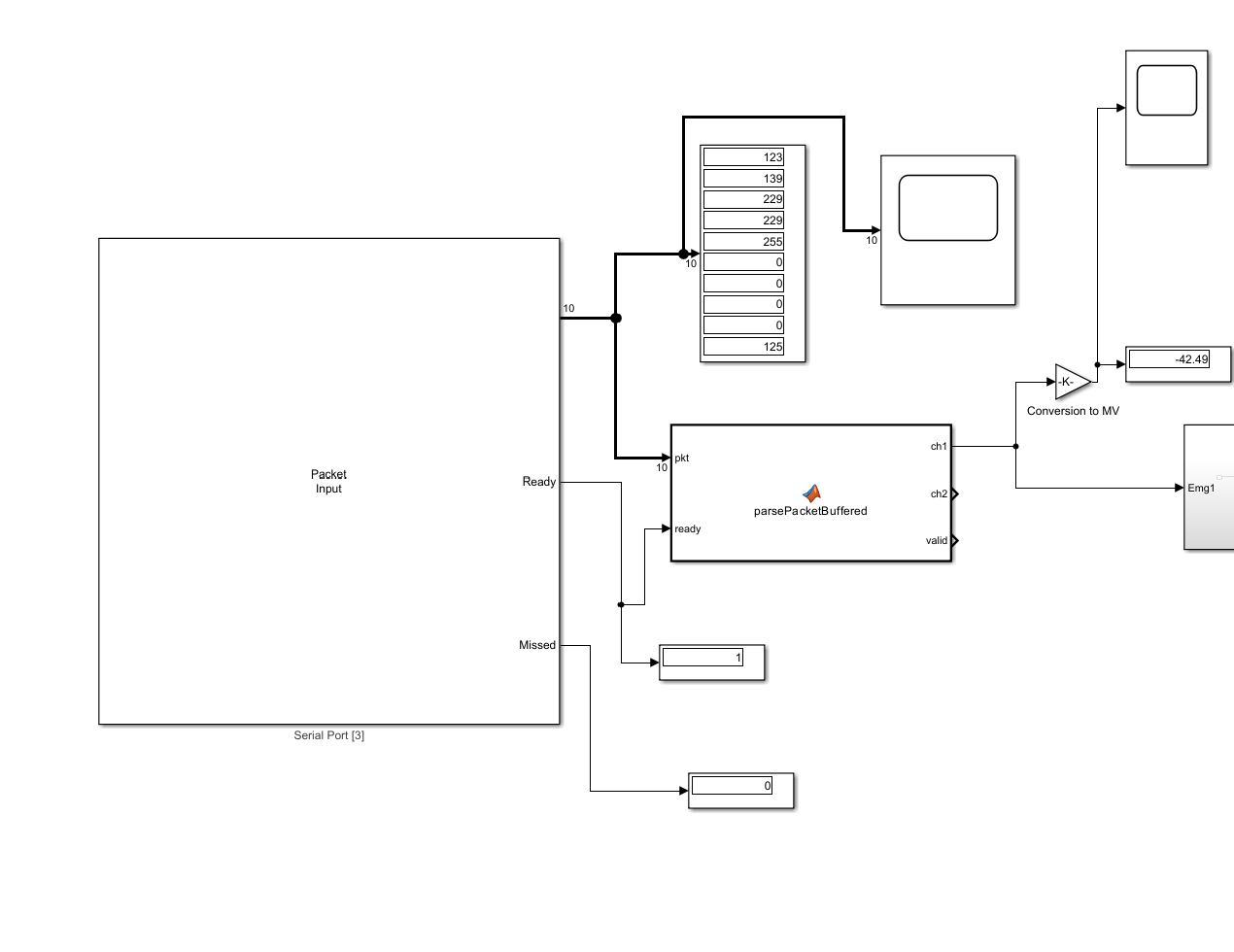
I use the packet input and a matlab function to parse the data
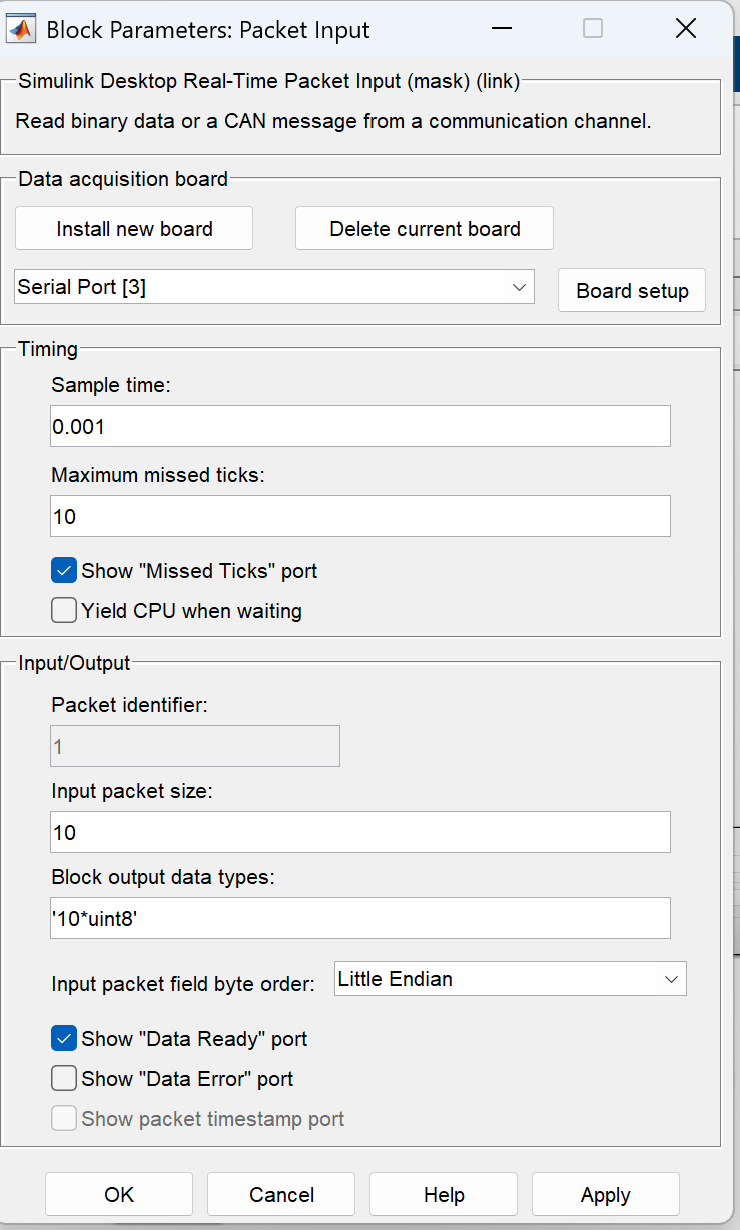
and this is the function
function [ch1, ch2, valid] = parsePacketBuffered(pkt, ready)
%#codegen
persistent buf
if isempty(buf)
buf = zeros(1, 100, 'uint8');
end
ch1 = int32(0);
ch2 = int32(0);
valid = false;
if ~ready
return;
end
m = length(pkt);
if m >= length(buf)
buf(:) = pkt(end-length(buf)+1:end);
else
buf(1:end-m) = buf(m+1:end);
buf(end-m+1:end) = pkt;
end
% cerca l'ULTIMO frame valido, non il primo
for i = (length(buf)-9):-1:1
if buf(i) == uint8(123) && buf(i+9) == uint8(125)
raw1 = uint32(buf(i+1)) + ...
bitshift(uint32(buf(i+2)), 8) + ...
bitshift(uint32(buf(i+3)), 16) + ...
bitshift(uint32(buf(i+4)), 24);
raw2 = uint32(buf(i+5)) + ...
bitshift(uint32(buf(i+6)), 8) + ...
bitshift(uint32(buf(i+7)), 16) + ...
bitshift(uint32(buf(i+8)), 24);
ch1 = typecast(raw1, 'int32');
ch2 = typecast(raw2, 'int32');
valid = true;
return;
end
end
PROBLEM IS: there is a 1.5s latency between the plot in simulink and the same plot done in phyton. What can be the issue? What am I missing?
Answers (1)

Isha
on 16 Jun 2026
0 votes
Hello,
The ~1.5 s latency you observe in Simulink Desktop Real-Time (SDRT) I/O mode is very unlikely due to your MATLAB parsing function. Instead, it is typically caused by buffering and scheduling effects in the serial communication and SDRT data acquisition chain.
1. Packet Input block behavior (frame-based + buffering)
The Packet Input block reads binary data from a communication channel (e.g., serial port) and delivers it to the model in chunks rather than byte-by-byte.
This implies:
- Data is collected into packets (here 10 bytes)
- Output occurs only when a full packet is available
More generally, Simulink uses buffering and frame-based processing, where data is grouped into frames before being processed or output, which inherently introduces delay proportional to buffer size.Buffering and frame based processing
If upstream data arrives continuously, this buffering creates a queue backlog, which appears as latency.
2. Serial port buffering (major contributor)
Serial communication on PC systems involves multiple buffering layers:
- Hardware FIFO in the UART
- OS/driver-level buffers
- Application-level buffers
According to Microsoft’s serial driver documentation, received data is first stored in a receive FIFO and driver-managed buffers, and must be read in time to avoid accumulation. Reading Data from a SerCx2-Managed Serial Port - Windows drivers | Microsoft Learn
Similarly, MATLAB serial communication uses an input buffer where data is stored before being returned to the application. Serial Port I/O (External Interfaces/API)
If the application (SDRT in this case) reads data slower than it arrives, the buffer:
- Fills up
- Outputs older samples first
- Creates visible delay (often in the order of seconds)
3. Real-time execution vs actual processing speed
SDRT uses a real-time kernel synchronized to your sample time, but it can fall behind:
- The Packet Input block provides a“Missed Ticks” output indicating lag vs real time. Packet Input - Read binary data or a CAN message from a communication channel - Simulink
- If your model cannot keep up, SDRT processes queued data, not live data.
In Simulink, it is important to distinguish:
- Simulation time (ideal, no delay)
- Computational delay (real execution delays) Delay and Latency - MATLAB & Simulink
If computational or I/O throughput is insufficient, delay accumulates even though simulation time looks correct.4. Why Python appears real-time
Python (pyserial) behaves differently:
- It reads from the serial port using direct, often blocking or event-based reads
- It typically processes data as soon as bytes arrive
This avoids large intermediate buffering layers and reduces latency. PySerial Docs | PySerial Docs
Hence Python shows nearly real-time plots, while Simulink may lag due to buffering + scheduling.
The delay is most likely caused by a combination of:
- Serial port buffering (OS + driver + hardware FIFO)
- Packet-based acquisition in SDRT (10-byte frame aggregation)
- Real-time scheduling lag (visible via “Missed Ticks”)
- Visualization buffering in Simulink scopes (minor contributor)
Your parsing function is efficient and not the source of the 1.5 s delay.
Hope this helps.
Categories
Find more on Serial Port Interface in Help Center and File Exchange
on 16 Jun 2026
Community Treasure Hunt
Find the treasures in MATLAB Central and discover how the community can help you!
Start Hunting!
