Main Content

Results for

Building Transition Matrices for the Royal Game of Err

King Neduchadneddar the Procrastinator has devised yet another scheme to occupy his court's time, and this one is particularly devious. The Royal Game of Err involves moving pawns along a path of n squares by rolling an m-sided die, with forbidden squares thrown in just to keep things interesting. Your mission, should you choose to accept it, is to construct a transition matrix that captures all the probabilistic mischief of this game. But here's the secret: you don't need nested loops or brute force. With the right MATLAB techniques, you can build this matrix with the elegance befitting a Chief Royal Mage of Matrix Computations.

The heart of this problem lies in recognizing that the transition matrix is dominated by a beautiful superdiagonal pattern. When you're on square j and roll the die, you have a 1/m chance of moving to each of squares j+1, j+2, up to j+m, assuming none are forbidden and you don't overshoot. This screams for vectorized construction rather than element-by-element assignment. The key weapon in your arsenal is MATLAB's ability to construct multiple diagonals simultaneously using either repeated calls to diag with offset parameters, or the more powerful spdiags function for those comfortable with advanced matrix construction.

Consider this approach: start with a zero matrix and systematically add 1/m to each of the m superdiagonals. For a die with m sides, you're essentially saying "from square j, there's a 1/m probability of landing on j+k for k = 1 to m." This can be accomplished with a simple loop over k, using T = T + diag(ones(1,n-k)*(1/m), k) for each offset k from 1 to m. The beauty here is that you're working with entire diagonals at once, not individual elements. This vectorized approach is not only more elegant but also more efficient and less error-prone than tracking indices manually.

Figure 1: Basic transition matrix structure for n=8, m=3, no forbidden squares. Notice the three superdiagonals carrying probability 1/3 each.

Now comes the interesting part: handling forbidden squares. When square j is forbidden, two things must happen simultaneously. First, you cannot land ON square j from anywhere, which means column j should be entirely zeros. Second, you cannot move FROM square j to anywhere, which means row j should be entirely zeros. The naive approach would involve checking each forbidden square and carefully adjusting individual elements. The elegant approach recognizes that MATLAB's logical indexing was practically designed for this scenario.

Here's the trick: once you've built your basic superdiagonal structure, handle all forbidden squares in just two lines: T(nogo, :) = 0 to eliminate all moves FROM forbidden squares, and T(:, nogo) = 0 to eliminate all moves TO forbidden squares. But wait, there's more. When you zero out these entries, the probabilities that would have gone to those squares need to be redistributed. This is where the "stay put" mechanism comes in. If rolling a 3 would land you on a forbidden square, you stay where you are instead. This means adding those lost probabilities back to the main diagonal.

The sophisticated approach uses logical indexing to identify which transitions would have violated the forbidden square rule, then redirects those probabilities to the diagonal. You can check if a move from square j to square k would hit a forbidden square using ismember(k, nogo), and if so, add that 1/m probability to T(j,j) instead. This "probability conservation" ensures that each row still sums to 1, maintaining the stochastic property of your transition matrix.

Figure 2: Transition matrix with forbidden squares marked. Left: before adjustment. Right: after forbidden square handling showing probability redistribution. Compare the diagonal elements.

The final square presents its own challenge. Once you reach square n, the game is over, which in Markov chain terminology means it's an "absorbing state." This is elegantly represented by setting T(n,n) = 1 and ensuring T(n, j) = 0 for all j not equal to n. But there's another boundary condition that's equally important: what happens when you're on square j and rolling the die would take you beyond square n?

The algorithm description provides a clever solution: you stay put. If you're on square n-2 and roll a 4 on a 6-sided die, you don't move. This means that for squares near the end, the diagonal element T(j,j) needs to accumulate probability from all those "overshooting" scenarios. Mathematically, if you're on square j and rolling k where j+k exceeds n, that 1/m probability needs to be added to T(j,j). A clean way to implement this is to first build the full superdiagonal structure as if the board were infinite, then add (1:m)/m to the last m elements of the diagonal to account for staying put.

There's an even more elegant approach: build your superdiagonals only up to where they're valid, then explicitly calculate how much probability should stay on the diagonal for each square. For square j, count how many die outcomes would either overshoot n or hit forbidden squares, multiply by 1/m, and add to T(j,j). This direct calculation ensures you've accounted for every possible outcome and maintains the row-sum property.

Figure 3: Heat map showing probability distributions from different starting squares. Notice how probabilities "pile up" at the diagonal for squares near the boundary.

Now that you understand the three key components, the construction strategy becomes clear. Initialize your n-by-n zero matrix. Build the basic superdiagonal structure to represent normal movement. Identify and handle forbidden squares by zeroing rows and columns, then redistributing lost probability to the diagonal. Finally, ensure boundary conditions are met by setting the final square as absorbing and handling the "stay put" cases for near-boundary squares.

The order matters here. If you handle forbidden squares first and then build diagonals, you might overwrite your forbidden square adjustments. The cleanest approach is to build all m superdiagonals first, then make a single pass to handle both forbidden squares and boundary conditions simultaneously. This can be done efficiently with a vectorized check: for each square j, count valid moves, calculate stay-put probability, and update T(j,j) accordingly.

Figure 4: Complete transition matrix for a test case with n=7, m=4, nogo=[2 5]. Spy plot showing the sparse structure alongside a color-coded heat map. Notice the complex pattern of probabilities.

Before declaring victory over King Neduchadneddar, verify your matrix satisfies the fundamental properties of a transition matrix. First, every element should be between 0 and 1 (probabilities, after all). Second, each row should sum to exactly 1, representing the fact that from any square, you must end up somewhere (even if it's staying put). You can check this with all(abs(sum(T,2) - 1) < 1e-10) to account for floating-point arithmetic.

The provided test cases offer another validation opportunity. Start with the simplest cases where patterns are obvious, like n=8, m=3 with no forbidden squares. You should see a clean superdiagonal structure. Then progress to cases with forbidden squares and verify that columns and rows are properly zeroed. The algorithm description even provides example matrices for you to compare against. Pay special attention to the diagonal elements, as they're where most of the complexity hides.

Figure 5: Validation dashboard showing row sums (should all be 1), matrix properties, and comparison with expected structure for a simple test case.

For those seeking to optimize their solution, consider that for large n, explicitly storing an n-by-n dense matrix becomes memory-intensive. Since most elements are zero, MATLAB's sparse matrix format is ideal. Replace zeros(n) with sparse(n,n) at initialization. The same indexing and diagonal operations work seamlessly with sparse matrices, but you'll save considerable memory for large problems.

Another sophistication involves recognizing that the transition matrix construction is fundamentally about populating a banded matrix with some modifications. The spdiags function was designed for exactly this scenario. You can construct all m superdiagonals in a single call by preparing a matrix where each column represents one diagonal's values. While the syntax takes some getting used to, the resulting code is remarkably compact and efficient.

For debugging purposes, visualizing your matrix at each construction stage helps immensely. Use imagesc(T) with a colorbar to see the probability distribution, or spy(T) to see the non-zero structure. If you're not seeing the expected patterns, these visualizations immediately reveal whether your diagonals are in the right positions or if forbidden squares are properly handled.

Figure 6: Performance comparison showing construction time and memory usage for dense vs sparse implementations as n increases.

King Neduchadneddar may have thought he was creating an impossible puzzle, but armed with MATLAB's matrix manipulation prowess, you've seen that elegant solutions exist. The key insights are recognizing the superdiagonal structure, handling forbidden squares through logical indexing rather than explicit loops, and carefully managing boundary conditions to ensure probability conservation. The transition matrix you've constructed doesn't just solve a Cody problem; it represents a complete probabilistic model of the game that could be used for further analysis, such as computing expected game lengths or steady-state probabilities.

The beauty of this approach lies not in clever tricks but in thinking about the problem at the right level of abstraction. Rather than considering each element individually, you've worked with entire diagonals, rows, and columns. Rather than writing conditional logic for every special case, you've used vectorized operations that handle all cases simultaneously. This is the essence of MATLAB mastery: letting the language's strengths work for you rather than against you.

As Vasilis Bellos demonstrated with the Bridges of Nedsburg , sometimes the most satisfying part of a Cody problem isn't just getting the tests to pass, but understanding the mathematical structure deeply enough to implement it elegantly. King Neduchadneddar would surely be impressed by your matrix manipulation skills, though he'd probably never admit it. Now go forth and construct those transition matrices with the confidence of a true Chief Royal Mage of Matrix Computations. The court awaits your solution.

Note: This article provides strategic insights and techniques for solving Problem 61067 without revealing the complete solution. The figures reference MATLAB Mobile script created by me that demonstrate key concepts. For the full Cody Contest 2025 experience and to test your implementation, visit the problem page and may your matrices always be stochastic.

I believe that it is very useful and important to know when we have new comments of our own problems. Although I had chosen to receive notifications about my own problems, I only receive them when I am mentioned by @.
Is it possible to add a 'New comment' alert in front of each problem on the 'My Problems' page?
As @Vasilis Bellos has neatly summarized here, in order to solve Problem 61069. Clueless - Lord Ned in the Game Room with the Technical Computing Language from the Cody Contest 2025, there are 4 rules to take into account and implement:
  1. If a player has a card, no other player has it
  2. If a player has ncards confirmed, they have no other cards
  3. If (n - 1) cards in a category are located, the nth card is in the envelope
  4. If a player has (3n - ncards) confirmed cards that they don't have, they must have the remaining unknown cards
As suggested in the problem statement, one natural way to attempt to solve the problem leads to storing the status of our knowledge about all the cards in an array, specifically a 3d matrix of size n by 3 by m.
Such a matrix is especially convenient because K(card, category, player) directly yields the knowledge status we have about a given card and category for a given player.
It also enables us to check the knowledge status:
  • across all players for a given card and category, with K(card, category, :) (needed for rule 1)
  • about the cards that a given player holds in his hand: K(:, :, player) yields a 2d slice of size n by 3 (needed for rules 2 and 4)
  • of the location of the n-1 cards for each category: K(:, category, :) (needed for rule 3)
The question then arises of how to encode the information about the status of cards of the players : whether unknown, maybe, definitely have and definitely have not.
It quickly appears that there is no difference between “unknown” and “maybe”.
Therefore only three distinct values are needed, to encode “YES”, “NO”, and “MAYBE”.
I would like to discuss the way these values are chosen has an impact on how we can manage to vectorize the solution to the problem (especially since a vectorized solution does not immediately appear) and make computations more elegant and easier to follow.
The 3D-matrix naturally suggest the use of the functions sum, max, and min across any of its 3 dimensions to perform the required computations. As such, the values 0, 1, NaN, and Inf can all play a very important role in storing our knowledge about the presence or absence of the cards throughout our deductions.
However, after having a look at the submitted solutions, what has struck me is that the majority of solvers (about two thirds) chose to encode MAYBE = 0, NO = -1, and YES = 1.
I wonder if that was because they were influenced by the way the problem is stated, or whether because they are “naturally” inclined to consider “MAYBE” to be “between” NO and YES.
The hierarchy we choose is important because it will influence the way we can make use of max and min. Also, 0 is a very important value because it "absorbs" all multiplied values during computations. Why give "MAYBE" such an important value?
My personal first intuition was to encode NO = 0 and YES = 1, and then something complety appart for MAYBE, either NaN or (-1). The advantage of -1 being that it can be easily transformed into 0 or 1.
In my mind, that way makes it easier:
  • to count the YESs : sum( K > 0)
  • to count the NOs : sum( K == 0 )
  • to find the last remaining NOs : find( K(…) == 0)
  • to count the MAYBEs or YESs (the “not NOs”) : sum( abs(K(…)) ) or sum( K(…) ~= 0 )
  • to convert MAYBE into YES with information from the turns without modifying other cards’ statuses : K( … ) = abs(K( … )) or K(…) = K( … ).^2
  • to convert MAYBE into NO once a card is located elsewhere without modifying other cards’ statuses : K(…) = max(0, K( … ))
(You can have a look at the vectorized solution I devised using that encoding: Solution 14893448)
Of course, we can devise similar operations if we choose to encode MAYBE = 0, NO = -1, and YES = 1, such as:
  • to count the YESs : sum( K > 0)
  • to count the NOs : sum( K < 0 )
  • to find the last remaining NOs : find( K(…) < 0)
  • to count the MAYBEs or YESs (the “not NOs”) : sum( K(…) >= 0)
  • to convert MAYBE into YES with information from the turns without modifying other cards’ statuses : K(… ) = min(1, 2*K(…) + 1)
  • to convert MAYBE into NO once a card is located elsewhere without modifying other cards’ statuses : K(…) = max(-1, (2*K(…) - 1 )) (already used in Matt Tearle’s Solution 14843428)
I find those functions somewhat more cumbersome and of course they don’t help reducing Cody size. I tried devising a solution using that encoding that you can check there too and see how twisted it looks: Solution 14904420 (it can still be optimised, I believe, but I find it hard to get my head around it...)
At some point, I also considered devising a solution combining 0, 1 and Inf or -Inf, but the problem was that 0 * Inf = NaN, not very practical in the end.
The real breakthrough came when @Stefan Abendroth submitted a solution using the following convention: MAYBE = 1, NO = 0, and YES = any number > 1 (Solution 14896297).
He used the following functions :
  • to convert MAYBE into YES with information from the turns without modifying other cards’ statuses : K(…) = 2 * K(…) (such a simple function!)
  • to convert MAYBE into NO once a card is located elsewhere without modifying other cards’ statuses : K(…) = bitand(K(…), 254), which was later optimised and became even simpler after several iterations.
The current leading solution uses that encoding and is really worth a close examination in my opinion, because it actually compacts the computation in such an elegant way, in just a few instructions.
Opening up the space of the values that encode YES and exploiting the properties of 0 and 1 for algebraic operations, shows in a profound way how to use the set of natural numbers, an idea that doesn’t come immediately to my mind as I am so used to thinking in vector spaces and linear algebra.
Interestingly enough, the first solution that Stefan submitted (Solution 14848390) already encoded MAYBE as 1, NO as 0 and YES as 2. I wonder where that intuition comes from.
I have seen two others solvers use MAYBE = 2 / NO = 0 / YES = 1, (at least) three that used the MAYBE = -1 / NO = 0 / YES = 1, and several others using various systems of their own.
I hope this example showcases how different matrix encoding reveal different thinking processes and how the creative search for a more efficient matrix encoding (motivated by the reduction in Cody size) has (unexpectedly ?) led to a brilliant and elegant vectorized solution.
Another proof of how Cody can provide so much instruction and fun!
The formula comes from @yuruyurau. (https://x.com/yuruyurau)
digital life 1
figure('Position',[300,50,900,900], 'Color','k');
axes(gcf, 'NextPlot','add', 'Position',[0,0,1,1], 'Color','k');
axis([0, 400, 0, 400])
SHdl = scatter([], [], 2, 'filled','o','w', 'MarkerEdgeColor','none', 'MarkerFaceAlpha',.4);
t = 0;
i = 0:2e4;
x = mod(i, 100);
y = floor(i./100);
k = x./4 - 12.5;
e = y./9 + 5;
o = vecnorm([k; e])./9;
while true
t = t + pi/90;
q = x + 99 + tan(1./k) + o.*k.*(cos(e.*9)./4 + cos(y./2)).*sin(o.*4 - t);
c = o.*e./30 - t./8;
SHdl.XData = (q.*0.7.*sin(c)) + 9.*cos(y./19 + t) + 200;
SHdl.YData = 200 + (q./2.*cos(c));
drawnow
end
digital life 2
figure('Position',[300,50,900,900], 'Color','k');
axes(gcf, 'NextPlot','add', 'Position',[0,0,1,1], 'Color','k');
axis([0, 400, 0, 400])
SHdl = scatter([], [], 2, 'filled','o','w', 'MarkerEdgeColor','none', 'MarkerFaceAlpha',.4);
t = 0;
i = 0:1e4;
x = i;
y = i./235;
e = y./8 - 13;
while true
t = t + pi/240;
k = (4 + sin(y.*2 - t).*3).*cos(x./29);
d = vecnorm([k; e]);
q = 3.*sin(k.*2) + 0.3./k + sin(y./25).*k.*(9 + 4.*sin(e.*9 - d.*3 + t.*2));
SHdl.XData = q + 30.*cos(d - t) + 200;
SHdl.YData = 620 - q.*sin(d - t) - d.*39;
drawnow
end
digital life 3
figure('Position',[300,50,900,900], 'Color','k');
axes(gcf, 'NextPlot','add', 'Position',[0,0,1,1], 'Color','k');
axis([0, 400, 0, 400])
SHdl = scatter([], [], 1, 'filled','o','w', 'MarkerEdgeColor','none', 'MarkerFaceAlpha',.4);
t = 0;
i = 0:1e4;
x = mod(i, 200);
y = i./43;
k = 5.*cos(x./14).*cos(y./30);
e = y./8 - 13;
d = (k.^2 + e.^2)./59 + 4;
a = atan2(k, e);
while true
t = t + pi/20;
q = 60 - 3.*sin(a.*e) + k.*(3 + 4./d.*sin(d.^2 - t.*2));
c = d./2 + e./99 - t./18;
SHdl.XData = q.*sin(c) + 200;
SHdl.YData = (q + d.*9).*cos(c) + 200;
drawnow; pause(1e-2)
end
digital life 4
figure('Position',[300,50,900,900], 'Color','k');
axes(gcf, 'NextPlot','add', 'Position',[0,0,1,1], 'Color','k');
axis([0, 400, 0, 400])
SHdl = scatter([], [], 1, 'filled','o','w', 'MarkerEdgeColor','none', 'MarkerFaceAlpha',.4);
t = 0;
i = 0:4e4;
x = mod(i, 200);
y = i./200;
k = x./8 - 12.5;
e = y./8 - 12.5;
o = (k.^2 + e.^2)./169;
d = .5 + 5.*cos(o);
while true
t = t + pi/120;
SHdl.XData = x + d.*k.*sin(d.*2 + o + t) + e.*cos(e + t) + 100;
SHdl.YData = y./4 - o.*135 + d.*6.*cos(d.*3 + o.*9 + t) + 275;
SHdl.CData = ((d.*sin(k).*sin(t.*4 + e)).^2).'.*[1,1,1];
drawnow;
end
digital life 5
figure('Position',[300,50,900,900], 'Color','k');
axes(gcf, 'NextPlot','add', 'Position',[0,0,1,1], 'Color','k');
axis([0, 400, 0, 400])
SHdl = scatter([], [], 1, 'filled','o','w',...
'MarkerEdgeColor','none', 'MarkerFaceAlpha',.4);
t = 0;
i = 0:1e4;
x = mod(i, 200);
y = i./55;
k = 9.*cos(x./8);
e = y./8 - 12.5;
while true
t = t + pi/120;
d = (k.^2 + e.^2)./99 + sin(t)./6 + .5;
q = 99 - e.*sin(atan2(k, e).*7)./d + k.*(3 + cos(d.^2 - t).*2);
c = d./2 + e./69 - t./16;
SHdl.XData = q.*sin(c) + 200;
SHdl.YData = (q + 19.*d).*cos(c) + 200;
drawnow;
end
digital life 6
clc; clear
figure('Position',[300,50,900,900], 'Color','k');
axes(gcf, 'NextPlot','add', 'Position',[0,0,1,1], 'Color','k');
axis([0, 400, 0, 400])
SHdl = scatter([], [], 2, 'filled','o','w', 'MarkerEdgeColor','none', 'MarkerFaceAlpha',.4);
t = 0;
i = 1:1e4;
y = i./790;
k = y; idx = y < 5;
k(idx) = 6 + sin(bitxor(floor(y(idx)), 1)).*6;
k(~idx) = 4 + cos(y(~idx));
while true
t = t + pi/90;
d = sqrt((k.*cos(i + t./4)).^2 + (y/3-13).^2);
q = y.*k.*cos(i + t./4)./5.*(2 + sin(d.*2 + y - t.*4));
c = d./3 - t./2 + mod(i, 2);
SHdl.XData = q + 90.*cos(c) + 200;
SHdl.YData = 400 - (q.*sin(c) + d.*29 - 170);
drawnow; pause(1e-2)
end
digital life 7
clc; clear
figure('Position',[300,50,900,900], 'Color','k');
axes(gcf, 'NextPlot','add', 'Position',[0,0,1,1], 'Color','k');
axis([0, 400, 0, 400])
SHdl = scatter([], [], 2, 'filled','o','w', 'MarkerEdgeColor','none', 'MarkerFaceAlpha',.4);
t = 0;
i = 1:1e4;
y = i./345;
x = y; idx = y < 11;
x(idx) = 6 + sin(bitxor(floor(x(idx)), 8))*6;
x(~idx) = x(~idx)./5 + cos(x(~idx)./2);
e = y./7 - 13;
while true
t = t + pi/120;
k = x.*cos(i - t./4);
d = sqrt(k.^2 + e.^2) + sin(e./4 + t)./2;
q = y.*k./d.*(3 + sin(d.*2 + y./2 - t.*4));
c = d./2 + 1 - t./2;
SHdl.XData = q + 60.*cos(c) + 200;
SHdl.YData = 400 - (q.*sin(c) + d.*29 - 170);
drawnow; pause(5e-3)
end
digital life 8
clc; clear
figure('Position',[300,50,900,900], 'Color','k');
axes(gcf, 'NextPlot','add', 'Position',[0,0,1,1], 'Color','k');
axis([0, 400, 0, 400])
SHdl{6} = [];
for j = 1:6
SHdl{j} = scatter([], [], 2, 'filled','o','w', 'MarkerEdgeColor','none', 'MarkerFaceAlpha',.3);
end
t = 0;
i = 1:2e4;
k = mod(i, 25) - 12;
e = i./800; m = 200;
theta = pi/3;
R = [cos(theta) -sin(theta); sin(theta) cos(theta)];
while true
t = t + pi/240;
d = 7.*cos(sqrt(k.^2 + e.^2)./3 + t./2);
XY = [k.*4 + d.*k.*sin(d + e./9 + t);
e.*2 - d.*9 - d.*9.*cos(d + t)];
for j = 1:6
XY = R*XY;
SHdl{j}.XData = XY(1,:) + m;
SHdl{j}.YData = XY(2,:) + m;
end
drawnow;
end
digital life 9
clc; clear
figure('Position',[300,50,900,900], 'Color','k');
axes(gcf, 'NextPlot','add', 'Position',[0,0,1,1], 'Color','k');
axis([0, 400, 0, 400])
SHdl{14} = [];
for j = 1:14
SHdl{j} = scatter([], [], 2, 'filled','o','w', 'MarkerEdgeColor','none', 'MarkerFaceAlpha',.1);
end
t = 0;
i = 1:2e4;
k = mod(i, 50) - 25;
e = i./1100; m = 200;
theta = pi/7;
R = [cos(theta) -sin(theta); sin(theta) cos(theta)];
while true
t = t + pi/240;
d = 5.*cos(sqrt(k.^2 + e.^2) - t + mod(i, 2));
XY = [k + k.*d./6.*sin(d + e./3 + t);
90 + e.*d - e./d.*2.*cos(d + t)];
for j = 1:14
XY = R*XY;
SHdl{j}.XData = XY(1,:) + m;
SHdl{j}.YData = XY(2,:) + m;
end
drawnow;
end
Having tackled a given problem is not the end of the game, and the fun is far from over. Thanks to the test suite in place, we can continue tweaking our solutions ("refactoring") so that it still passes the tests while improving its ranking with regard to "Cody size".
Although reducing the Cody size does not necessarily mean a solution will perform more efficiently nor be more readable (quite the contrary, actually…), it is a fun way to delve into the intricacies of MATLAB code and maybe win a Cody Leader badge!
I am not talking about just basic hacks. The size constraint urges us to find an “out-of-the box” way of solving a problem, a way of thinking creatively, of finding other means to achieve a desired computation result, that uses less variables, that is less cumbersome, or that is more refined.
The past few days have taught me several useful tricks that I would like to share with anyone wishing to reduce the solution size of their Cody submission. Happy to learn about other tricks you may know of, please share!
  1. Use this File Exchange submission to get the size of your solution: https://fr.mathworks.com/matlabcentral/fileexchange/34754-calculate-size
  2. Use existing MATLAB functions that may already perform the desired calculations but that you might have overlooked (as I did with histcount and digraph).
  3. Use vectorization amply. It’s what make the MATLAB language so concise and elegant!
  4. Before creating a matrix of replicated values, check if your operation requires it. See Compatible Array Sizes for Basic Operations. For example, you can write x == y with x being a column vector and y a row vector, thereby obtaining a 2 by 2-matrix.
  5. Try writing out for loops instead of vectorization. Sometimes it’s actually smaller from a Cody point of view.
  6. Avoid nested functions and subfunctions. Try anonymous functions if used in several places. (By all means, DO write nested functions and subfunctions in real life!)
  7. Avoid variable assignments. If you declare variables, look for ones you can use in multiples places for multiple purposes. If you have a variable used only in one place, replace it with its expression where you need it. (Do not do this in real life!)
  8. Instead of variable assignments, write hardcoded constants. (Do not do this in real life!)
  9. Instead of indexed assignments, look for a way to use multiplying or exponentiating with logical indexes. (For example, compare Solution 14896297 and Solution 14897502 for Problem 61069. Clueless - Lord Ned in the Game Room with the Technical Computing Language).
  10. Replace x == 0 with ~x if x is a numeric scalar or vector or matrix that doesn’t contain any NaN (the latter is smaller in size by 1)
  11. Instead of x == -1, see if x < 0 works (smaller in size by 1).
  12. Instead of [1 2], write 1:2 (smaller in size by 1).
  13. sum(sum(x))” is actually smaller than “sum(x, 1:2)
  14. Instead of initialising a matrix of 2s with 2 * ones(m,n), write repmat(2,m,n) (smaller in size by 1).
  15. If you have a matrix x and wish to initialize a matrix of 1s, instead of ones(size(x)), write x .^ 0 (works as long as x doesn’t contain any NaN) (smaller in size by 2).
  16. Unfortunately, x ^-Inf doesn’t provide any reduction compared to zeros(size(x)), and it doesn’t work when x contains 0 or 1.
  17. Beware of Operator Precedence and avoid unnecessary parenthesis (special thanks to @Stefan Abendroth for bringing that to my attention ;)) :
  • Instead of x * (y .^ 2), write x * y .^2 (smaller in size by 1).
  • Instead of x > (y == z), write y == z < x (smaller in size by 1).
18. Ask help from other solvers: ideas coming from a new pair of eyes can bring unexpected improvements!
That’s all I can see for now.
Having applied all those tips made me realise that a concise yet powerful code, devoid of the superfluous, also has a beauty of its own kind that we can appreciate.
Yet we do not arrive at those minimalist solutions directly, but through several iterations, thanks to the presence of tests that allow us to not worry about breaking anything, and therefore try out sometimes audacious ideas.
That's why I think the main interest lies in that it prompts to think of our solutions differently, thereby opening ways to better understand the problem statement at hand and the inner workings of the possible solutions.
Hope you’ll find it fun and useful!
P.S.: Solvers, please come help us reduce even more the size of the leading solution for Problem 61069. Clueless - Lord Ned in the Game Room with the Technical Computing Language!
Heavenly
Heavenly
Last activity on 26 Nov 2025 at 20:57

Hello everyone,
My name is heavnely, studying Aerospace Enginerring in IIT Kharagpur. I'm trying to meet people that can help to explore about things in control systems, drones, UAV, Reseearch. I have started wrting papers an year ago and hopefully it is going fine. I hope someone would reply to reply to this messege.
Thank you so much for anyone who read my messege.
Hi Creative Coders!
I've been working my way through the problem set (and enjoying all the references), but the final puzzle has me stumped. I've managed to get 16/20 of the test cases to the right answer, and the rest remain very unsolvable for my current algorithm. I know there's some kind of leap of logic I'm missing, but can't figure out quite what it is. Can any of you help?
What I've Done So Far
My current algorithm looks a bit like this. The code is doing its best to embody spaghetti at the moment, so I'll refrain from posting the whole thing to spare you all from trying to follow my thought processes.
Step 1: Go through all the turns and fill out tables of 'definitely', 'maybe', and 'clue' based on the information provided in a single run through the turns. This means that the case mentioned in the problem where information from future turns affecting previous turns does not matter yet. 'Definitely' information is for when I know a card must belong to a certain player (or to no-one). 'Maybe' starts off with all players in all cells, and when a player is found to not be able to have a card, their number is removed from the cell. Think of Sudoku notes where someone has helpfully gone through the grid and put every single possible number in each cell. 'Clue' contains information about which cards players were hinted about.
Example from test case 1:
definitelyTable =
6×3 table
G1 G2 G3
____________ ____________ ____________
{[ 0]} {0×0 double} {0×0 double}
{0×0 double} {[ -1]} {[ 1]}
{0×0 double} {[ 6]} {[ 0]}
{[ 3]} {[ 4]} {0×0 double}
{0×0 double} {[ 0]} {0×0 double}
{[ 5]} {[ 3]} {0×0 double}
maybeTable =
6×3 table
G1 G2 G3
_________ _______ _______
{[ 0]} {[2 5]} {[1 2]}
{[ 4]} {[ 0]} {[ 0]}
{[2 4 6]} {[ 0]} {[ 0]}
{[ 0]} {[ 0]} {[1 4]}
{[ 1 4]} {[ 0]} {[ 1]}
{[ 0]} {[ 0]} {[2 4]}
clueTable =
6×3 table
G1 G2 G3
____________ ____________ ____________
{0×0 double} {[ 5 6]} {[ 2 4]}
{[ 4 6]} {[ 4 6]} {0×0 double}
{[ 2 6]} {[ 5 6]} {0×0 double}
{0×0 double} {[ 4]} {[ 4 5 6]}
{[ 4]} {0×0 double} {[ 1 4 6]}
{[ 2 5]} {0×0 double} {[ 2 4 5 6]}
(-1 indicates the card is in the envelope. 0 indicates the card is commonly known.)
Step 2: While a solution has not yet been found, loop through all the turns again. This is the part where future turn info can now be fed back into previous turns, and where my sticky test cases loop forever. I've coded up each of the implementation tips from the problem statement for this stage.
Where It All Comes Undone
The problem is, for certain test cases (e.g., case 5), I reach a point where going through all turns yields no new information. I either end up with an either-or scenario, where the potential culprit card is one of two choices, or with so little information it doesn't look like there is anywhere left to turn.
I solved some of the either-or cases by adding a snippet that assumes one of the values and then tries to solve the problem based on that new information. If it can't solve it, then it tries the other option and goes round again. Unfortunately, however, this results in an infinite flip-flop for some cases as neither guess resolves the puzzle.
Essentially guessing the solution and following through to a logical inconsistency for however many combinations of players and cards sounds a) inefficient and b) not the way this was intended to be solved. Does anyone have any hints that might get me on track to solve this mystery?
Thank you to everyone who attended the workshop A Hands-On Introduction to Reinforcement Learning! Now that you all have had some time to digest the content, I wanted to create a thread where you could ask any further questions, share insights, or discuss how you're applying the concepts to your work. Please feel free to share your thoughts in the thread below! And for your reference, I have attached a PDF version of the workshop presentation slides to this post.
If you were interested in joining the RL workshop but weren't able to attend live (maybe because you were in one of our other fantastic workshops instead!), you can find the workshop hands-on material in this shared MATLAB Drive folder. To access the exercises, simply download the MATLAB Project Archive (.mlproj) file or copy it to your MATLAB Drive, extract the files, and open the project (.prj). Each exercise has its own live script (.mlx file) which contains all the instructions and individual steps for each exercise. Happy (reinforcement) learning!
Is it possible to get the slides from the Hands-On-Workshops?
I can't find them in the proceedings. I'm particularly interested in the Reinforcement Learning workshop, but unfortunately I couldn't participate.
Thanks in advance!
Walter Roberson
Walter Roberson
Last activity on 19 Nov 2025 at 20:42

@Cody Team, how can I vote or give a like in great comments?
It seems that there are not such options.
Developing an application in MATLAB often feels like a natural choice: it offers a unified environment, powerful visualization tools, accessible syntax, and a robust technical ecosystem. But when the goal is to build a compilable, distributable app, the path becomes unexpectedly difficult if your workflow depends on symbolic functions like sym, zeta, or lambertw.
This isn’t a minor technical inconvenience—it’s a structural contradiction. MATLAB encourages the creation of graphical interfaces, input validation, and dynamic visualization. It even provides an Application Compiler to package your code. But the moment you invoke sym, the compiler fails. No clear warning. No workaround. Just: you cannot compile. The same applies to zeta and lambertw, which rely on the symbolic toolbox.
So we’re left asking: how can a platform designed for scientific and technical applications block compilation of functions that are central to those very disciplines?
What Are the Alternatives?
  • Rewrite everything numerically, avoiding symbolic logic—often impractical for advanced mathematical workflows.
  • Use partial workarounds like matlabFunction, which may work but rarely preserve the original logic or flexibility.
  • Switch platforms (e.g., Python with SymPy, Julia), which means rebuilding the architecture and leaving behind MATLAB’s ecosystem.
So, Is MATLAB Still Worth It?
That’s the real question. MATLAB remains a powerful tool for prototyping, teaching, analysis, and visualization. But when it comes to building compilable apps that rely on symbolic computation, the platform imposes limits that contradict its promise.
Is it worth investing time in a MATLAB app if you can’t compile it due to essential mathematical functions? Should MathWorks address this contradiction? Or is it time to rethink our tools?
I’d love to hear your thoughts. Is MATLAB still worth it for serious application development?
Great material, examples and skillfully guided. And, of course, very useful.
Thanks!
Matt Tearle
Matt Tearle
Last activity on 17 Nov 2025 at 21:43

Fittingly for a Creative Coder, @Vasilis Bellos clearly enjoyed the silliness I put into the problems. If you've solved the whole problem set, don't forget to help out your teammates with suggestions, tips, tricks, etc. But also, just for fun, I'm curious to see which of my many in-jokes and nerdy references you noticed. Many of the problems were inspired by things in the real world, then ported over into the chaotic fantasy world of Nedland.
I guess I'll start with the obvious real-world reference: @Ned Gulley (I make no comment about his role as insane despot in any universe, real or otherwise.)
Hi, what’s the best way to learn MATLAB, Simulink, and Simscape? Do you recommend a learning path? I work in the Electrical & Electronics area for automotive systems.
Don’t miss out on two incredible keynotes that will shape the future of engineering and innovation:
1️What’s New in MATLAB and Simulink in 2025
Get an inside look at the latest features designed to supercharge your workflows:
  • A redesigned MATLAB desktop with customizable sidebars, light/dark themes, and new panels for coding tasks
  • MATLAB Copilot – your AI-powered assistant for learning, idea generation, and productivity
  • Simulink upgrades, including an enhanced quick insert tool, auto-straightening signal lines, and new methods for Python integration
  • New options to deploy AI models on Qualcomm and Infineon hardware
2️Accelerating Software-Defined Vehicles with Model-Based Design
See how MathWorks + NXP are transforming embedded system development for next-gen vehicles:
  • Vehicle electrification example powered by MATLAB, Simulink, and NXP tools
  • End-to-end workflow: modeling → validation → code generation → hardware deployment → real-time cloud monitoring
📅 When: November 13
💡Why Join? Stay ahead with cutting-edge tools, workflows, and insights from industry leaders.
👉 Register now and be part of the future of engineering!
The Cody Contest 2025 is underway, and it includes a super creative problem group which many of us have found fascinating. The central theme of the problems, expertly curated by @Matt Tearle, humorously revolves around the whims of the capricious dictator Lord Ned, as he goes out of his way to complicate the lives of his subjects and visitors alike. We cannot judge whether or not there's any truth to the rumors behind all the inside jokes, but it's obvious that the team had a lot of fun creating these; and we had even more fun solving them.
Today I want to showcase a way of graphically solving and visualizing one of those problems which I found very elegant, The Bridges of Nedsburg.
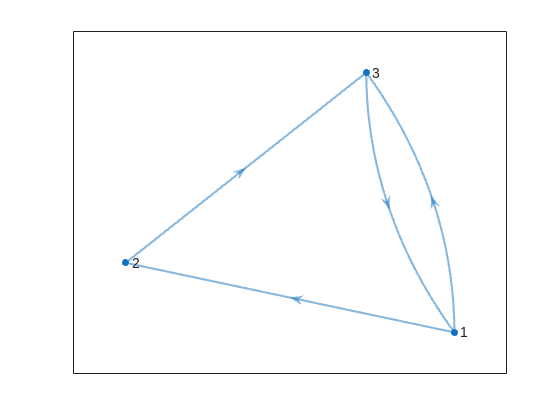
To briefly reiterate the problem, the number of islands and the arrangement of bridges of the city of Nedsburg are constantly changing. Lord Ned has decided to take advantage of this by charging visitors with an increasingly expensive n-bridge pass which allows them to cross up to n bridges in one journey. Given the Connectivity Matrix C, we are tasked with calculating the minimum n needed so that there is a path from every island to every other island in n steps or fewer.
Matt kindly provided us with some useful bit of math in the description detailing how to calculate the way to get from one island to another in an number of m steps. However, he has also hidden an alternative path to the solution in plain sight, in one of the graphs he provided. This involves the extremely useful and versatile class digraph, representing directed graphs, which have directional edges connecting the nodes. Here's some further great documentation and other cool resources on the topic for those who are interested in learning more about it:
Let's start using this class to explore a graphical solution to Lord Ned's conundrum. We will use the unit tests included in the problem to visualize the solution. We can retrieve the connectivity matrix for each case using the following function:
function C = getConnectivityMatrix(unit_test)
% Number of islands and bridge arrangement
switch unit_test
case 1
m = 3; idx = [3;4;8];
case 2
m = 3; idx = [3;4;7;8];
case 3
m = 4; idx = [2;7;8;10;13];
case 4
m = 4; idx = [4;5;7;8;9;14];
case 5
m = 5; idx = [5;8;11;12;14;18;22;23];
case 6
m = 5; idx = [2;5;8;14;20;21;24];
case 7
m = 6; idx = [3;4;7;11;18;23;24;26;30;32];
case 8
m = 6; idx = [3;11;12;13;18;19;28;32];
case 9
m = 7; idx = [3;4;6;8;13;14;20;21;23;31;36;47];
case 10
m = 7; idx = [4;11;13;14;19;22;23;26;28;30;34;35;37;38;45];
case 11
m = 8; idx = [2;4;5;6;8;12;13;17;27;39;44;48;54;58;60;62];
case 12
m = 8; idx = [3;9;12;20;24;29;30;31;33;44;48;50;53;54;58];
case 13
m = 9; idx = [8;9;10;14;15;22;25;26;29;33;36;42;44;47;48;50;53;54;55;67;80];
case 14
m = 9; idx = [8;10;22;32;37;40;43;45;47;53;56;57;62;64;69;70;73;77;79];
case 15
m = 10; idx = [2;5;8;13;16;20;24;27;28;36;43;49;53;62;71;75;77;83;86;87;95];
case 16
m = 10; idx = [4;9;14;21;22;35;37;38;44;47;50;51;53;55;59;61;63;66;69;76;77;84;85;86;90;97];
end
C = zeros(m);
C(idx) = 1;
end
The case in the example refers to unit test case 2.
unit_test = 2;
C = getConnectivityMatrix(unit_test);
disp(C)
0 1 1 0 0 1 1 0 0
We can now create a digraph object D, and visualize it using its corresponding plot method:
D = digraph(C);
figure
p = plot(D,'LineWidth',1.5,'ArrowSize',10);
This is the same as the graph provided in the example. Another very useful method of digraph is shortestpath. This allows us to calculate the path and distance from one single node to another. For example:
% Path and distance from node 1 to node 2
[path12,dist12] = shortestpath(D,1,2);
fprintf('The shortest path from island %d to island %d is: %s. The minimum number of steps is: n = %d\n', 1, 2, join(string(path12), ' -> '),dist12)
The shortest path from island 1 to island 2 is: 1 -> 2. The minimum number of steps is: n = 1
% Path and distance from node 2 to node 1
[path21,dist21] = shortestpath(D,2,1);
fprintf('The shortest path from island %d to island %d is: %s. The minimum number of steps is: n = %d\n', 2, 1, join(string(path21), ' -> '),dist21)
The shortest path from island 2 to island 1 is: 2 -> 3 -> 1. The minimum number of steps is: n = 2
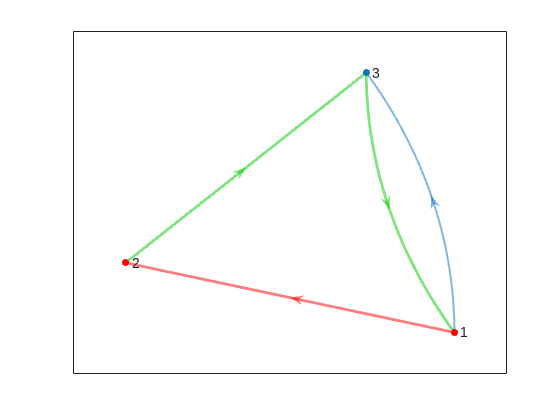
We can visualize these using the highlight method of the graph plot:
figure
p = plot(D,'LineWidth',1.5,'ArrowSize',10);
highlight(p,path12,'EdgeColor','r','NodeColor','r','LineWidth',2)
highlight(p,path21,'EdgeColor',[0 0.8 0],'LineWidth',2)
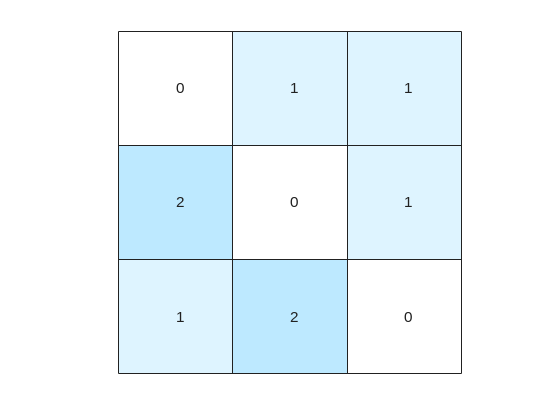
But that's not all! digraph can also provide us with a matrix of the distances d, i.e. the steps needed to travel from island i to island j, where i and j are the rows and columns of d respectively. This is accomplished by using its distances method. The distance matrix can be visualized as:
d = distances(D);
figure
% Using pcolor w/ appending matrix workaround for convenience
pcolor([d,d(:,end);d(end,:),d(end,end)])
% Alternatively you can use imagesc(d), but you'll have to recreate the grid manually
axis square
set(gca,'YDir','reverse','XTick',[],'YTick',[])
[X,Y] = meshgrid(1:height(d));
text(X(:)+0.5,Y(:)+0.5,string(d(:)),'FontSize',11)
colormap(interp1(linspace(0,1,4), [1 1 1; 0.7 0.9 1; 0.6 0.7 1; 1 0.3 0.3], linspace(0,1,8)))
clim([-0.5 7+0.5])
This confirms what we saw before, i.e. you need 1 step to go from island 1 to island 2, but 2 steps for vice versa. It also confirms that the minimum number of steps n that you need to buy the pass for is 2 (which also occurs for traveling from island 3 to island 2). As it's not the point of the post to give the full solution to the problem but rather present the graphical way of visualizing it I will not include the code of how to calculate this, but I'm sure that by now it's reduced to a trivial problem which you have already figured out how to solve.
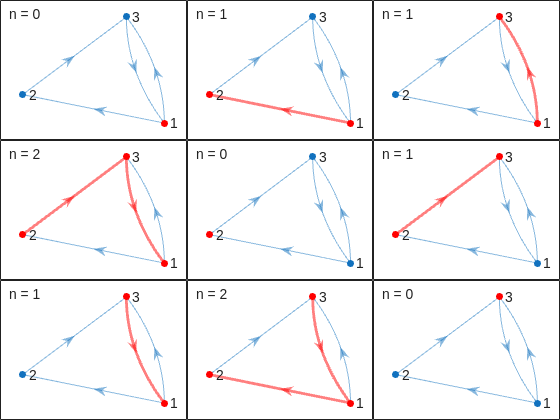
That being said, now that we have the distance matrix, let's continue with the visualizations. First, let's plot the corresponding paths for each of these combinations:
figure
tiledlayout(size(C,1),size(C,2),'TileSpacing','tight','Padding','tight');
for i = 1:size(C,1)
for j = 1:size(C,2)
nexttile
p = plot(D,'ArrowSize',10);
highlight(p,shortestpath(D,i,j),'EdgeColor','r','NodeColor','r','LineWidth',2)
lims = axis;
text(lims(1)+diff(lims(1:2))*0.05,lims(3)+diff(lims(3:4))*0.9,sprintf('n = %d',d(i,j)))
end
end
This allows us to go from the distance matrix to visualizing the paths and number of steps for each corresponding case. Things are rather simple for this 3-island example case, but evil Lord Ned is just getting started. Let's now try to solve the problem for all provided unit test cases:
% Cell array of connectivity matrices
C = arrayfun(@getConnectivityMatrix,1:16,'UniformOutput',false);
% Cell array of corresponding digraph objects
D = cellfun(@digraph,C,'UniformOutput',false);
% Cell array of corresponding distance matrices
d = cellfun(@distances,D,'UniformOutput',false);
% id of solutions: Provided as is to avoid handing out the code to the full solution
id = [2, 2, 9, 3, 4, 6, 16, 4, 44, 43, 33, 34, 7, 18, 39, 2];
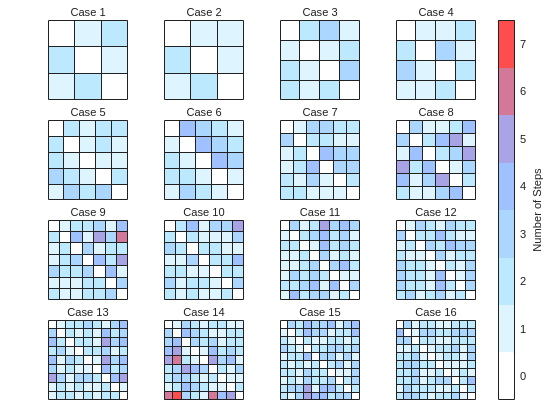
First, let's plot the distance matrix for each case:
figure
tiledlayout('flow','TileSpacing','compact','Padding','compact');
% Vary this to plot different combinations of cases
plot_cases = 1:numel(C);
for i = plot_cases
nexttile
pcolor([d{i},d{i}(:,end);d{i}(end,:),d{i}(end,end)])
axis square
set(gca,'YDir','reverse','XTick',[],'YTick',[])
title(sprintf('Case %d',i),'FontWeight','normal','FontSize',8)
end
c = colorbar('Ticks',0:7,'TickLength',0,'Limits',[-0.5 7+0.5],'FontSize',8);
c.Layout.Tile = 'East';
c.Label.String = 'Number of Steps';
c.Label.FontSize = 8;
colormap(interp1(linspace(0,1,4), [1 1 1; 0.7 0.9 1; 0.6 0.7 1; 1 0.3 0.3], linspace(0,1,8)))
clim(findobj(gcf,'type','axes'),[-0.5 7+0.5])
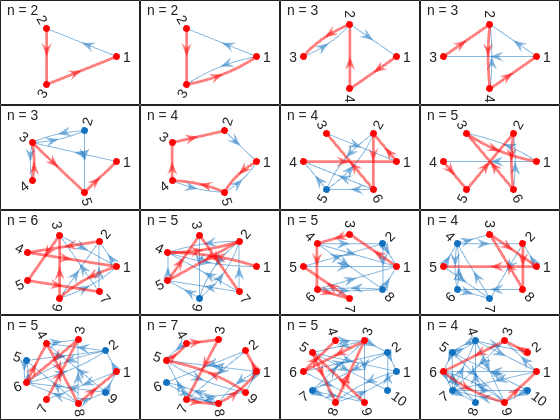
We immediately notice some inconsistencies, perhaps to be expected of the eccentric and cunning dictator. Things are pretty simple for the configurations with a small number of islands, but the minimum number of steps n can increase sharply and disproportionally to the additional number of islands. Cases 8 and 9 specifically have a particularly large n (relative to their grid dimensions), and case 14 has the largest n, almost double that of case 16 despite the fact that the latter has one extra island.
To visualize how this is possible, let's plot the path corresponding to the largest n for each case (though note that there might be multiple possible paths for each case):
figure
tiledlayout('flow','TileSpacing','tight','Padding','tight');
for i = plot_cases
nexttile
% Changing the layout to circular so we can better visualize the paths
p = plot(D{i},'ArrowSize',10,'Layout','Circle');
% Alternatively we could use the XData and YData properties if the positions of the islands were provided
axis([-1.5 1.5 -1.5 1.75])
[row,col] = ind2sub(size(d{i}),id(i));
highlight(p,shortestpath(D{i},row,col),'EdgeColor','r','NodeColor','r','LineWidth',2)
lims = axis;
text(lims(1)+diff(lims(1:2))*0.05,lims(3)+diff(lims(3:4))*0.9,sprintf('n = %d',d{i}(row,col)))
end
And busted! Unraveled! Exposed! Lord Ned has clearly been taking advantages of the tectonic forces by instructing his corrupt civil engineer lackeys to design the bridges to purposely force the visitors to go around in circles in order to drain them of their precious savings. In particular, for cases 8 and 9, he would have them go through every single island just to get from one island to another, whereas for case 14 they would have to visit 8 of the 9 islands just to get to their destination. If that's not diabolical then I don't know what is!
Ned jokes aside, I hope you enjoyed this contest just as much as I did, and that you found this article useful. I look forward to seeing more creative problems and solutions in the future.
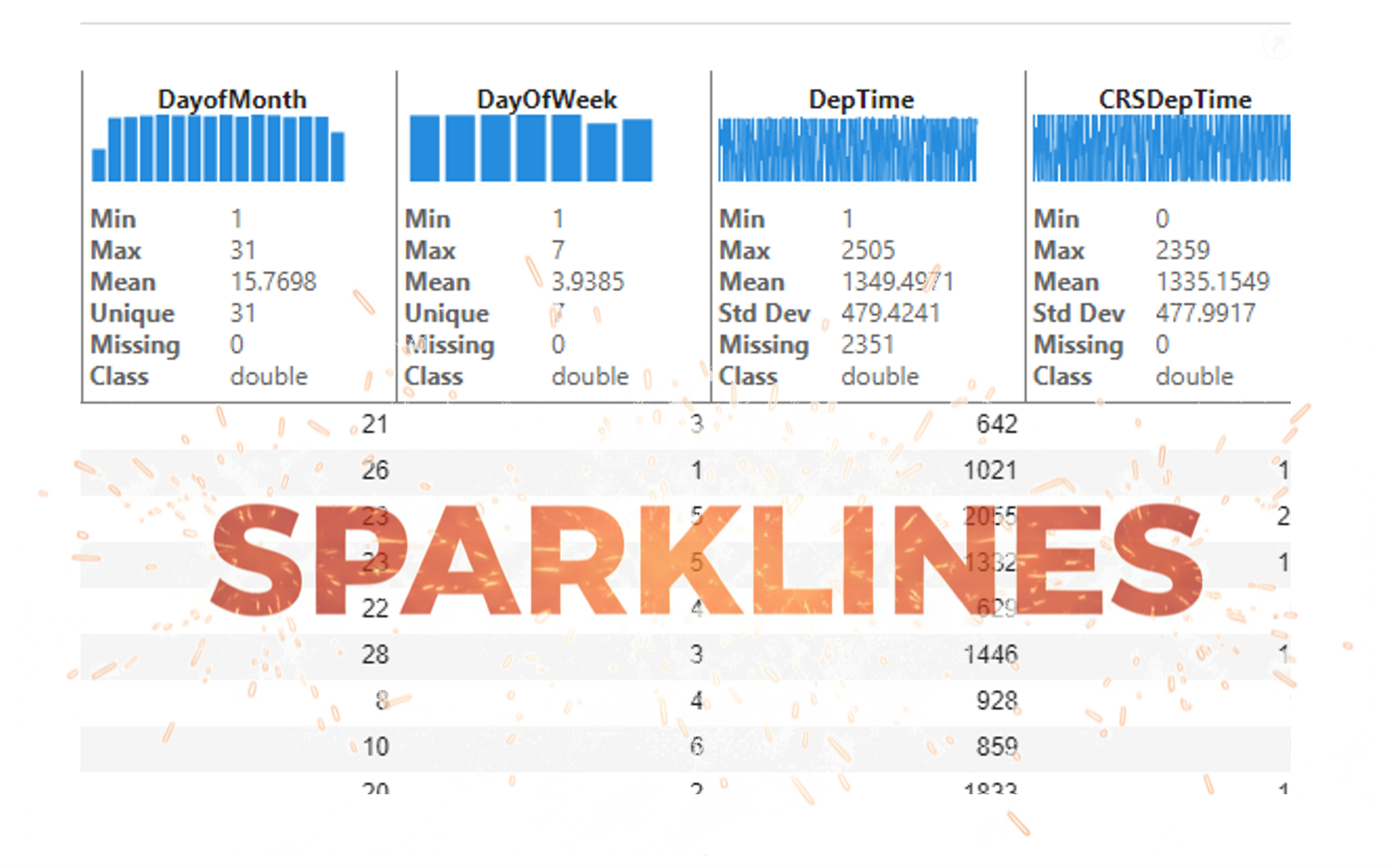
It’s exciting to dive into a new dataset full of unfamiliar variables but it can also be overwhelming if you’re not sure where to start. Recently, I discovered some new interactive features in MATLAB live scripts that make it much easier to get an overview of your data. With just a few clicks, you can display sparklines and summary statistics using table variables, sort and filter variables, and even have MATLAB generate the corresponding code for reproducibility.
The Graphics and App Building blog published an article that walks through these features showing how to explore, clean, and analyze data—all without writing any code.
If you’re interested in streamlining your exploratory data analysis or want to see what’s new in live scripts, you might find it helpful:
If you’ve tried these features or have your own tips for quick data exploration in MATLAB, I’d love to hear your thoughts!
Ludvig Nordin
Ludvig Nordin
Last activity on 13 Nov 2025 at 1:24

Pure Matlab
82%
Simulink
18%
11 votes
idris
idris
Last activity on 12 Nov 2025 at 15:29

In the FAQs, I saw the procedure to download the "mobile background", is the the same thing as an award? If yes, good, else how can we get an award and what are the available ones?
iaabdulhameed@knu.ac.kr